Reading pens with text-to-speech can turn printed words into spoken audio, helping children and adults read independently, check unfamiliar vocabulary, and practice another language. The best models combine accurate scanning with useful tools such as translation, dictionaries, recording, and AI-based reading support.
We compared 10 leading options across accessibility features, language support, ease of use, and everyday practicality. Whether you need a pen for dyslexia support, homework, travel, or language study, this guide highlights the specifications that matter most before you buy.
Best 10 Reading Pens with Text to Speech Picks for 2026
AI-Powered Dyslexia Support

- Adjustable speed, pauses, and accents
- 112-language translation with photo OCR
- AI study tools and 16GB storage
Best For: Learners wanting customizable reading help and broad study features
Connected Reading Companion

- Text to speech in 57 languages with Wi-Fi
- Dictionary, thesaurus, and pronunciation tools
- AI Reading Buddy and ScanNote syncing
Best For: Connected learning and comprehension support across devices
Offline Privacy Pick

- Offline OCR and text to speech
- Adjustable read-aloud settings in five languages
- Includes headphones, case, and PDF software
Best For: Private, connection-free reading assistance and language learning
Travel Translation Helper

- Online translation in 142 languages
- Offline translation in 10 languages
- Read-aloud scanning and two-way translation
Best For: Travelers and language learners needing portable translation support
Best AI Reading Pen
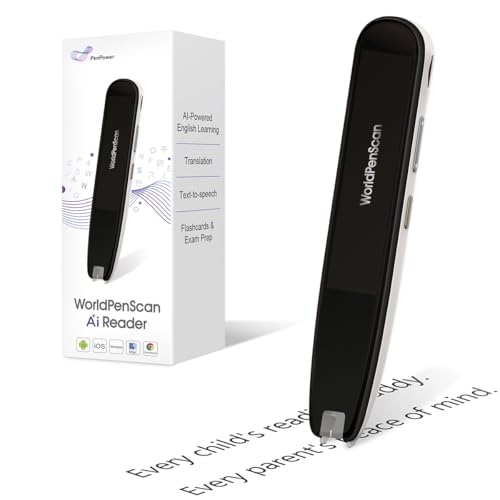
- AI explains difficult words, sentences, and ideas
- Offline text-to-speech, translation, and dictionary tools
- Supports English, Spanish, and Chinese
Best For: Growing readers and ESL learners needing comprehension support
Best for Dyslexia Support

- Reads text aloud with highlighted words
- Translates more than 100 languages
- Exports scans and supports Bluetooth headphones
Best For: Language learners and users needing auditory reading support
Best Scan-to-Text Option
Multilingual Reading and Translation Pen

- Combines read-aloud scanning with text extraction
- Translates 142 online and 10 offline languages
- Camera supports offline photo translation in supported languages
Best For: Students, travelers, professionals, and ESL learners
Best for Study Notes
Reading Pen with Recorder and Text to Speech

- Reads and highlights scanned text for comprehension support
- Adds note-taking, memo, and voice-recording functions
- Translates 142 online and 10 offline languages
Best For: Students, professionals, and users managing classroom or meeting information
AI-Powered Dyslexia Support – NEWYES AI Pen
The NEWYES AI Pen is a versatile option among reading pens with text to speech, combining adjustable read-aloud settings with translation, OCR, and AI learning tools. Its six reading levels and choice of British or American accents make it adaptable for different learners.
Best For: Students, adults, and readers with dyslexia who want adjustable reading support plus translation and study features.
Pros:
- Adjustable reading speed and pause time, with British and American accent options.
- Supports scanning, photo OCR, voice input, and translation across 112 languages.
- Includes AI dictionary, homework checker, AI chat, image recognition, and scan-to-solve tools.
- Offers 16GB storage, Bluetooth, and export to TXT, DOC, and PDF formats.
Cons:
- Some AI, translation, and connectivity features may be more than users seeking a basic read-aloud pen need.
- The supplied notes do not specify offline language support.
This is a feature-rich choice for users who want reading assistance alongside study and translation functions. The adjustable reading controls are particularly useful for personalized dyslexia support.
Connected Reading Companion – WorldPenScan Go
The PenPower WorldPenScan Go is a strong reading pen with text to speech for users who want scanned words and sentences read aloud without relying on a phone. It also adds dictionary tools, recording, Wi-Fi syncing, and an AI Reading Buddy for comprehension support.
Best For: Children, students, dyslexic readers, language learners, and families using computers or Chromebooks for study.
Pros:
- Reads scanned words, phrases, and sentences aloud in 57 languages with Wi-Fi.
- Built-in dictionary and thesaurus provide definitions, examples, and pronunciation help.
- ScanNote can send text and recordings to iOS, Android, Windows, Mac, and Chromebook devices.
- AI Reading Buddy can simplify paragraphs, summarize ideas, and add facts.
Cons:
- Its multilingual recognition and speech features require a Wi-Fi connection.
- The ScanNote workflow adds a connected software component for saving and revisiting content.
Choose this model if connected learning tools matter as much as basic read-aloud functionality. Its dictionary, replay, layout, and AI comprehension features make it especially suitable for ongoing study.
Offline Privacy Pick – IRISPen Reader 8
The IRISPen Reader 8 is a practical reading pen with text to speech for users who prioritize offline operation and data privacy. It reads scanned lines aloud, offers adjustable speed and pauses, and includes headphones, a case, storage, and PDF software.
Best For: Dyslexic readers, language learners, and users who need offline OCR and read-aloud access in five languages.
Pros:
- Works offline for OCR, text to speech, and photo OCR without Wi-Fi.
- Reads text aloud in English, French, German, Italian, and Spanish, with adjustable speed and pauses.
- Includes a 5MP camera for photo OCR and supports voice recording for audio notes.
- Comes with USB-C earphones, a protective case, 16GB ROM, and Readiris PDF software.
Cons:
- Text-to-speech supports five languages, fewer than its 48-language offline OCR capability.
- The SD card is not included.
- Charging takes approximately three hours according to the supplied specifications.
This is one of the better fits for privacy-conscious users and anyone needing dependable reading assistance away from an internet connection. Its focused offline design and included accessories make it ready for school, travel, or home use.
Travel Translation Helper – Scan Translation Pen
This Scan Translation Pen combines reading support and travel-oriented language tools in a compact device. As one of the reading pens with text to speech, it scans written material and reads it aloud, while also offering online translation in 142 languages and offline translation in 10.
Best For: Travelers, language learners, and readers with dyslexia who need translation and basic read-aloud help on the go.
Pros:
- Provides online translation in 142 languages.
- Supports offline translation in 10 languages for use without internet access.
- Text-to-speech reads scanned text aloud to support comprehension.
- Two-way translation supports conversations, and text excerpting helps capture key information.
Cons:
- The supplied notes do not specify which languages are available for text to speech.
- Most of the broad 142-language translation capability is described as online.
- The notes do not list included accessories or storage capacity.
This model makes the most sense for users who place translation and portability ahead of advanced study software. Its offline translation and two-way communication features are useful companions for travel and everyday language practice.
Best AI Reading Pen – WorldPenScan AI Reader
For shoppers comparing reading pens with text to speech, the WorldPenScan AI Reader stands out for combining offline reading tools with connected AI support. It can scan words, phrases, or sentences, read text aloud, translate content, and explain difficult ideas in age-appropriate language.
Best For: Growing readers, ESL learners, and children who need extra vocabulary or comprehension support.
Pros:
- Quick AI can explain difficult words, sentences, and concepts.
- Includes text-to-speech, translation, and a built-in dictionary.
- AI Reading Buddy can provide extra insights and reading quizzes when connected.
- Supports English, Spanish, and Chinese.
Cons:
- Several AI features require an internet connection.
- At 170 g, it may be less lightweight than some alternatives.
This is a strong choice if comprehension coaching matters as much as text-to-speech. Its connected AI features add learning support beyond basic word lookup, while offline tools keep essential reading functions available away from Wi-Fi.
Best for Dyslexia Support – Scanmarker Pal
The Scanmarker Pal is a practical option among reading pens with text to speech for learners, travelers, and people who benefit from auditory reading support. It scans text, reads it aloud while highlighting words on the screen, and translates more than 100 languages.
Best For: Language learners, travelers, and users seeking highlighted read-aloud support for dyslexia or other reading difficulties.
Pros:
- Reads scanned text aloud while highlighting the words.
- Translates more than 100 languages.
- Offers offline translation for English, Spanish, French, German, and Italian.
- Can export scanned text as a digital file and connect to Bluetooth headphones.
Cons:
- Bluetooth or USB support is required for the listed computer systems.
- The supplied specifications do not indicate Wi-Fi connectivity.
Choose the Scanmarker Pal when read-aloud feedback, translation, and portability are priorities. Its highlighted text display can make following along easier, while export tools add value for studying and digitizing notes.
Best Multifunction Reader – VORMOR Translator Pen
For buyers seeking reading pens with text to speech plus travel features, the VORMOR Translator Pen combines OCR scanning, read-aloud functionality, translation, recording, and a large 3.5-inch touch screen. It can scan text from books, screens, labels, and other surfaces, then transfer important text to a computer by USB.
Best For: Travelers, students, and users who want a reading pen with translation, recording, and headphone connectivity.
Pros:
- Scans text in 55 languages and supports online translation in 112 languages.
- Includes text-to-speech, photo translation, and smart recording.
- Features a 3.5-inch touch screen and Bluetooth for headphones or speakers.
- Supports left-handed reverse scanning and Collins and FLTRP dictionaries.
Cons:
- Two-way real-time translation requires an online connection.
- At 93 g, it is heavier than the Scanmarker Pal listed here.
This model is more of a multifunction translation and scanning device than a basic dictionary pen. Its recording mode, camera-based translation, large display, and broad language support make it particularly useful for travel and study scenarios.
Best Portable Scan Translator – Smart Reading Pen for Learning Support
This lightweight option combines scanning, translation, text extraction, and read-aloud functions in one device. As one of the more versatile reading pens with text to speech, it can support pronunciation practice, comprehension, language learning, and on-the-go translation.
Best For: Students, ESL learners, travelers, adults, and classroom users who want scan-to-read support with online and offline translation.
Pros:
- Supports online translation in 142 languages and offline translation in 10 languages.
- Reads scanned original text aloud to support pronunciation and comprehension.
- Includes photo translation, text extraction, and Bluetooth headphone connectivity.
- Compact 2.56-ounce design fits easily in a pocket or pencil case.
Cons:
- Not suitable for blind users.
- Japanese text recognition is limited to horizontal text; vertical Japanese is not supported.
- Bluetooth connectivity is required for compatible wireless headphone use.
This is a practical pick when you want a portable reading aid that also handles translation and note-related tasks. Its broad language coverage is especially useful for multilingual learning and travel.
Best Scan-to-Text Option – Multilingual Reading and Translation Pen
For shoppers comparing reading pens with text to speech, this model emphasizes scanning, read-aloud assistance, and text extraction. Its camera-based translation features make it useful for printed documents, signs, menus, and study materials.
Best For: Dyslexia support, ESL practice, students, business travelers, professionals, and elderly users who need scanning and translation functions.
Pros:
- Combines scan reading, text extraction, voice translation, and image translation.
- Offers online translation in 142 languages and offline translation in 10 languages.
- Highlights words on the screen while reading scanned text aloud.
- Built-in camera supports photo translation without requiring an internet connection for its offline languages.
Cons:
- Not suitable for blind users.
- Vertical Japanese text cannot be recognized.
- Some translation functions depend on online access.
The scan-to-text and highlighting features give this pen a study-friendly focus. It is a strong choice for users who want read-aloud support along with quick access to key information in documents or images.
Best for Study Notes – Reading Pen with Recorder and Text to Speech
This device adds note-taking and voice recording to the core scanning and read-aloud functions. Among reading pens with text to speech, it stands out for users who want to capture classroom, meeting, or study information as well as hear scanned text.
Best For: Students, professionals, special education classroom use, language learners, and anyone who benefits from scan-to-read support plus recorded notes.
Pros:
- Reads scanned text aloud and highlights words on the display.
- Supports online translation in 142 languages and offline translation in 10 languages.
- Provides on-device note-taking, memo capture, and voice recording.
- Built-in camera enables online and offline photo translation.
Cons:
- Not suitable for blind users.
- Vertical Japanese text recognition is not supported.
- Online translation features require internet access.
The recording and memo functions make this a useful companion for classes, meetings, and independent study. Choose it over a simpler scan reader if capturing spoken or written information is part of your workflow.
How We Picked the Best Reading Pens with Text to Speech
We focused on the features that have the greatest effect on real-world reading. Each selected pen offers some form of OCR scanning and spoken text, while many also add translation, dictionary access, audio recording, or learning assistance. We considered language coverage, online and offline capabilities, display and controls, portability, and suitability for children or users with reading difficulties.
Product names and advertised language counts can vary by version, app, region, and internet connection. Check the current specifications carefully, especially if offline use or a particular language is essential.
Quick Comparison
| Feature | Why It Matters |
|---|---|
| OCR accuracy | Determines how reliably the pen recognizes books, worksheets, and labels. |
| Text-to-speech controls | Look for adjustable volume, speed, voice, and replay options. |
| Language support | Confirm both scanned-text languages and translation pairs. |
| Offline operation | Useful for classrooms, travel, and locations without dependable Wi-Fi. |
| Learning tools | Dictionaries, recording, AI assistance, and saved text can improve study sessions. |
Key Buying Factors for Reading Pens with Text-To-Speech
Scanning and OCR Performance
A pen should scan smoothly across standard printed text without requiring excessive pressure or repeated passes. OCR quality can decline with small type, curved pages, unusual fonts, handwriting, low contrast, or glossy paper. If the device will support dyslexia or other learning difficulties, simple aiming and immediate audio feedback are especially valuable.
Speech, Translation, and Language Features
Prioritize natural-sounding speech and controls that let the user slow down or repeat words. Multilingual users should distinguish between languages supported for reading aloud and those supported for translation. Offline language packs are more dependable than cloud-only features, but may cover fewer languages.
Ease of Use and Privacy
Consider screen size, button layout, grip, battery life, charging method, and whether setup requires a phone or account. Devices that save scans, recordings, or cloud data may raise privacy concerns, particularly for children. Review storage, synchronization, and deletion controls before use.
Who Should Buy Which Reading Pens with Text to Speech?
For dyslexia support or independent reading, choose a straightforward model with reliable OCR, adjustable text-to-speech, and minimal setup. Language learners may prefer a pen with a broad translation library, pronunciation help, dictionary tools, and saved vocabulary. Families and classrooms can benefit from recording, AI reading companions, and durable controls, provided the device is easy for the intended user to operate.
Travelers should prioritize offline translation and battery life, while students who work across multiple languages should verify the exact language pairs rather than relying only on a headline language count. When two models appear similar, choose the one with clearer controls, better support documentation, and the most suitable offline features.