SABLUTE KM23D Wireless Keyboard and Mouse Combo review buyers usually want one thing: a quiet, comfortable desktop set that makes long typing sessions easier.
This one leans hard into everyday productivity and low-noise use.
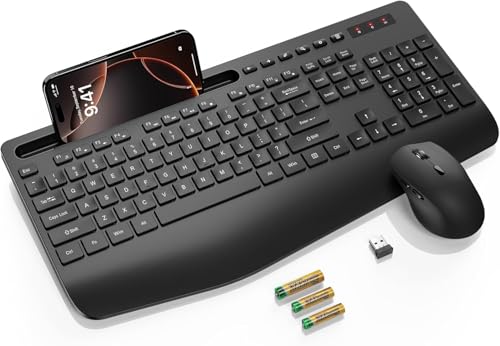
SABLUTE KM23D Review Summary
If you want a full-size wireless keyboard and mouse combo for home, office, or school, the SABLUTE KM23D Wireless Keyboard and Mouse Combo is built around the right priorities: comfort, silence, and convenience.
It is especially appealing for buyers who spend hours at a desk and want an easy plug-and-play setup without dealing with charging cables.
Its biggest strengths are the extra-wide wrist rest, the 10° tilt, the very quiet key and mouse behavior, and the useful built-in phone or tablet holder.
Those details make the SABLUTE KM23D feel less like a basic bundle and more like a thoughtfully designed productivity accessory for shared spaces, dorm rooms, offices, and busy home workstations.
Scorecard
| Category | Score | Why It Matters |
|---|---|---|
| Ergonomics | 8.0 | Extra-wide wrist rest and a 10° tilt angle help reduce strain during longer typing sessions. |
| Typing Comfort | 8.0 | Low-profile membrane keys and quiet key transmission support smooth, less fatiguing daily use. |
| Mouse Performance | 7.0 | The 6-button mouse with 800/1200/1600 DPI offers flexible everyday control, though it is not a premium pointer. |
| Wireless Convenience | 8.0 | 2.4G USB receiver connectivity keeps setup simple and battery power removes charging downtime. |
| Noise Level | 9.0 | Quiet typing and nearly silent clicks make it a strong fit for offices, libraries, and late-night work. |
| Compatibility | 8.0 | Broad support across Windows, Mac OS, Chrome OS, Linux, and Windows Server increases versatility. |
| Productivity Features | 8.0 | Multimedia hotkeys, shortcut functions, and a device holder add real practical value. |
Overall, the SABLUTE KM23D Wireless Keyboard and Mouse Combo is best for buyers who want a quiet, full-size, comfort-first desktop setup rather than a slim travel kit or a premium mechanical typing experience.
It delivers a practical feature set that should satisfy most office and school users.
Key Features and Specifications of SABLUTE KM23D
The SABLUTE KM23D is a full-size wireless keyboard and mouse combo with a traditional QWERTY layout and 111 keys.
The design clearly targets productivity users who prefer a complete keyboard with shortcuts, a number-friendly layout, and a separate right-hand mouse.
| Specification | Details |
|---|---|
| Brand / Model | SABLUTE KM23D |
| Connectivity | 2.4G USB wireless receiver |
| Keyboard Layout | QWERTY |
| Number of Keys | 111 |
| Mouse Buttons | 6 |
| DPI Settings | 800 / 1200 / 1600 |
| Power Source | Battery powered |
| Batteries Included | 2 AAA batteries included |
| Compatible OS | Windows, Mac OS, Chrome OS, Linux, Windows Server |
| Compatible Devices | Desktop, laptop, Chromebook, MacBook Air, iMac, notebook, TV, personal computer |
| Special Features | Ergonomic wrist rest, phone holder, shortcut keys, low-profile keycaps, water-repellent design |
| Item Weight | 2 pounds |
| Hand Orientation | Right-hand mouse |
Several hardware choices stand out.
The 2.8-inch-wide wrist rest is more generous than the tiny lip you see on cheaper combos, and the 10° angle is meant to keep your wrists in a more natural position.
The keyboard also uses low-profile membrane keys with quieter transmission, so it aims for a softer feel rather than a clicky or highly tactile response.
The mouse is also practical for office work.
It offers three DPI levels and includes forward/back buttons, which helps when switching between documents, browser tabs, or work apps.
If you are browsing spreadsheets or moving between pages all day, those extra controls are more valuable than they first appear.
One important note: the combo is battery powered and comes with the required AAA batteries, so you do not have to recharge it right away.
On the other hand, this also means battery replacement is part of long-term ownership.
If you prefer rechargeable peripherals, that is a real consideration.
Pros and Cons of SABLUTE KM23D
Here is the quick SABLUTE KM23D Wireless Keyboard and Mouse Combo pros and cons breakdown buyers should consider before ordering.
Pros
- Very quiet typing and clicking for offices, libraries, and shared rooms
- Comfort-focused wrist rest and 10° tilt help with long sessions
- Built-in device holder is handy for multitasking
- No charging cable to manage thanks to battery power
- Useful multimedia and shortcut keys for day-to-day productivity
- Broad operating system compatibility across common desktop ecosystems
Cons
- Battery-based design may not suit users who want rechargeables
- USB-C dongle is not included, so port compatibility may require attention
- Not meant to connect directly to phones or tablets
- Right-hand mouse shape is less ideal for left-handed users
- Bulkier than compact keyboards, so it is not the best travel option
For most buyers, the pros are easy to understand: the set is built to be used all day without much noise or setup friction.
The drawbacks are equally clear: it is a desktop-first combo with battery power and a relatively large footprint.
Who Should Buy SABLUTE KM23D?
The SABLUTE KM23D Wireless Keyboard and Mouse Combo is a strong fit for anyone building a calm, comfortable work area.
It makes the most sense for people who type a lot and want a practical, quiet bundle instead of a flashy gaming setup.
- Office workers who want a quieter desk environment
- Students who need a full-size layout for homework, notes, and papers
- Home users who want a simple mouse-and-keyboard upgrade
- People who switch between Windows and Mac environments
- Users who value wrist comfort and low noise more than portability
It is less compelling for buyers who want a compact travel keyboard, a rechargeable wireless combo, or an advanced mechanical typing feel.
If you work from a desk most days, though, the SABLUTE KM23D is easy to appreciate.
How the wrist rest and tilt affect comfort
Comfort is where the SABLUTE KM23D tries hardest to separate itself from standard budget combos.
The extra-wide wrist rest gives your palms a stable landing zone, which can make a noticeable difference if you type for hours.
Instead of forcing your wrists to hover awkwardly, the design gives you a more supported posture.
The 10° tilt angle also matters more than many shoppers expect.
A slight incline can improve typing ergonomics by reducing wrist extension and helping your hands settle more naturally on the home row.
It is not a medical device, and it will not magically solve bad posture, but it is a smart design choice for long work sessions.
The low-profile keycaps support that same comfort-first strategy.
They keep the finger travel shallow, which can reduce fatigue for casual typing, data entry, and everyday browsing.
If you are used to tall mechanical switches, the feel will be different, but most buyers looking for a quiet office keyboard will likely find it easy to adapt to.
Phone and tablet holder usefulness
The built-in holder is one of the more interesting productivity touches on the SABLUTE KM23D.
It fits devices up to 11.9 inches, which makes it useful for propping up a phone, reading a tablet reference page, or keeping a second screen visible while you work.
That said, the holder should be understood correctly.
It is for supporting a device while you use the keyboard, not for directly connecting that device as the host computer.
The combo is still a wireless peripheral set for desktops and laptops.
If you were hoping to use a phone as the main computing device, this is not the right product for that role.
For the right person, though, the holder adds genuine value.
It keeps notifications, reference material, or video calls visible without requiring a separate stand.
That is a nice quality-of-life feature in a home office or study setup.
Mouse DPI and shortcut button performance
The included mouse is not trying to compete with a high-end productivity mouse, but it is better equipped than the most basic bundle mice.
The 800, 1200, and 1600 DPI settings let you choose between slower precision and faster cursor movement, which is helpful if you work across spreadsheets, documents, and web pages.
The 6-button layout adds forward and backward navigation, which is especially useful for browsing, file management, and multitasking.
The buttons are also designed with silent micro motion technology, so the click sound stays low enough for shared spaces.
What you should expect, however, is a productivity mouse rather than a precision tool.
It is adequate for everyday office work, study, and general home use, but it is not the kind of mouse you would choose for competitive gaming or detailed creative work.
In other words, the mouse is sensible, not specialized.
Battery life and power-saving features
A battery-powered setup has both advantages and trade-offs.
The upside is convenience: no charging schedule, no cable clutter, and no downtime waiting for a built-in battery to refill.
The SABLUTE KM23D arrives with 2 AAA batteries included, so setup is straightforward.
The combo also claims a smart sleep mode for power saving.
That matters because wireless accessories are often left idle for hours at a time.
Sleep behavior helps stretch battery life and makes the system more practical for regular desk use.
The downside is equally obvious: you will eventually need replacements.
If you hate replacing batteries, a rechargeable keyboard and mouse set may suit you better.
If you value simplicity and want to avoid a charging routine, the KM23D’s battery approach can actually be preferable.
Best use cases for office, school, and home
This is where the SABLUTE KM23D makes the strongest case for itself.
In an office, it works well as a quiet desk companion that will not disturb nearby coworkers.
In a school or college setting, the full-size layout and wrist support make it a comfortable option for writing assignments and researching online.
At home, the combo is especially useful for shared living spaces or family desktops.
The near-silent operation means you can type late without creating much noise, and the receiver-based wireless connection keeps your desk cleaner than a wired setup.
It also works well for mixed-device households that use Windows laptops, Chromebooks, Macs, and general-purpose desktop PCs.
The wide compatibility is a real strength, especially if you often move peripherals between machines.
Alternatives to consider
If you are comparing the SABLUTE KM23D Wireless Keyboard and Mouse Combo against other popular Amazon options, a few alternatives are worth looking at:
- Logitech wireless keyboard and mouse combo — A reliable mainstream choice if you want broad brand recognition and lots of model variety.
- Arteck ergonomic wireless keyboard combo — Good to compare if you want a comfort-focused setup with a slightly different design philosophy.
- Microsoft ergonomic keyboard and mouse set — Worth checking if wrist support is your main buying factor and you want a more established ergonomic lineup.
- compact wireless keyboard with rechargeable mouse — A better direction if portability and rechargeable power matter more than full-size comfort.
Compared with those alternatives, the SABLUTE KM23D stands out mainly on quiet operation, built-in convenience features, and comfort-first design.
It is not the most premium option, but it is one of the more sensible everyday bundles for desk work.
Is SABLUTE KM23D Worth It?
So, is SABLUTE KM23D Wireless Keyboard and Mouse Combo worth it?
For the right buyer, yes.
If you want a quiet, full-size, ergonomic-ish wireless combo for office work, homework, or a home desktop, this is a very practical pick.
The SABLUTE KM23D is strongest when you care about comfort, silence, simple wireless setup, and productivity shortcuts.
It also makes a good case for itself if you like built-in convenience features such as the phone or tablet holder and do not want to manage another charging cable.
You should probably skip it if you want a compact travel setup, a rechargeable combo, or a left-handed mouse design.
But for most desk-based users, the trade-offs are reasonable and the feature set is well chosen.
Final verdict: the SABLUTE KM23D Wireless Keyboard and Mouse Combo is a smart, buyer-friendly office and home productivity package that delivers strong comfort, very low noise, and useful everyday features without overcomplicating the experience.
If that matches your needs, it is absolutely worth considering.