A good wall mount can free up desk space, improve screen positioning, and reduce glare without requiring a large, heavy-duty installation. The best tilting monitor wall mounts balance VESA compatibility, weight capacity, adjustment range, and a secure low-profile design.
This roundup compares 10 compact monitor and small-TV wall mounts suited to home offices, gaming setups, kitchens, bedrooms, and RVs. Use the guide below to narrow your options by screen size, movement, installation needs, and viewing position.
Best 10 Tilting Monitor Wall Mounts Picks for 2026
Best Universal Fit
Slim 14-42-Inch Tilt Monitor Wall Mount
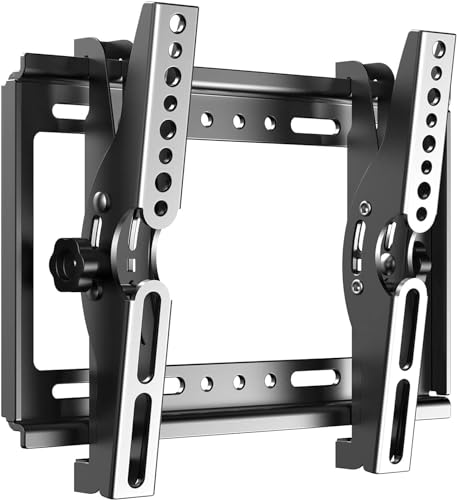
- Fits 14-42-inch screens and supports up to 55 lb
- Handles several common VESA mounting patterns
- 15-degree tilt with a slim 1.9-inch profile
Best For: Broadly compatible small TVs and monitors
Best for Simple Installation
Mount-It! 19-32-Inch Tilt Mount

- Built-in bubble level simplifies alignment
- Quick-release bracket removes without unmounting the plate
- Tilts 15 degrees down and 10 degrees up
Best For: DIY, RV, and space-constrained installations
Best Full-Motion Option
WALI 13-32-Inch Articulating Mount

- Offers tilt, swivel, and 360-degree rotation
- Extends 15 inches and retracts to 2 inches
- Supports displays up to 33 lb with common VESA patterns
Best For: Adjustable office, bedroom, and gaming setups
Best Compact Mount
Mount-It! 24-32-Inch Quick-Release Tilt Mount
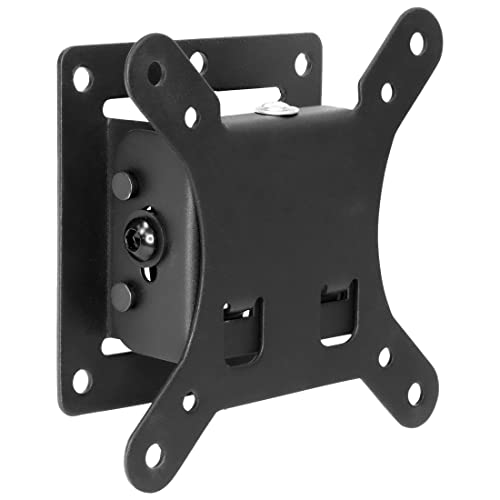
- Slim 1.65-inch profile keeps the display close
- Tilts 15 degrees down and 5 degrees up
- Quick-release design and lifetime warranty
Best For: Compact home, office, RV, and trailer installations
Best Full-Motion Monitor Arm
Adjustable Wall Mount for 13-32 Inch Screens

- Provides tilt, swivel, rotation, extension, and height adjustment
- Supports 13-32 inch monitors weighing 4.4-19.8 pounds
- Includes cable management and portrait/landscape rotation
Best For: Flexible home-office, gaming, and professional workstations
Best RV-Friendly Small Mount
Compact Swivel-Tilt Monitor Bracket

- Fits 10-26 inch screens up to 22 pounds
- Supports VESA 50x50, 75x75, and 100x100mm patterns
- Offers 30-degree tilt and 45-degree swivel adjustment
Best For: Small TVs and monitors in RVs and compact rooms
Best Low-Profile Pick

- Fits 17- to 32-inch monitors up to 17.6 pounds
- Offers tilt, swivel, rotation, and height adjustment
- Sits just 5.1cm from the wall
Best For: Ergonomic single-monitor and standing-workstation setups
Best for Viewing Range

- Fits 13- to 31-inch screens up to 33 pounds
- Extends to 15.9 inches with broad motion control
- Includes ±15° tilt, 180° swivel, and 360° rotation
Best For: Flexible viewing angles and extended monitor access
Best for Quick Installation

- Supports 13- to 32-inch screens up to 33 pounds
- Provides tilt, swivel, rotation, and 14.25-inch extension
- Retracts to 1.96 inches with a removable plate
Best For: Compact small-screen installations on suitable wall surfaces
Best Universal Fit – Slim 14-42-Inch Tilt Monitor Wall Mount
If you need tilting monitor wall mounts for a small display or TV, this JXMTSPW model covers a broad 14- to 42-inch size range and supports several common VESA patterns. Its slim 1.9-inch profile and 15-degree tilt make it suited to straightforward, space-saving installations.
Best For: Users mounting compatible small TVs or monitors where broad screen-size compatibility and a low-profile design matter.
Pros:
- Supports screens from 14 to 42 inches and up to 55 pounds.
- Compatible with multiple VESA patterns, including 75×75, 100×100, and 200x200mm.
- Offers up to 15 degrees of tilt and a 1.9-inch wall profile.
- Includes multiple screw sizes and a safety lock design.
Cons:
- Compatibility still depends on the display’s exact VESA pattern, weight, and stud location.
- It is a tilt-only mount rather than a swivel or articulating model.
- The listed product information does not include a warranty.
This is a practical choice when you want generous compatibility and strong weight capacity without an extending arm. Check the display specifications and wall structure before installation.
Best for Simple Installation – Mount-It! 19-32-Inch Tilt Mount
For tilting monitor wall mounts that emphasize straightforward installation, the Mount-It! MI-203T combines a built-in bubble level with a quick-release VESA bracket. It supports 19- to 32-inch displays up to 44 pounds and can tilt down 15 degrees or up 10 degrees.
Best For: DIY installers, RV owners, and users who want a compact tilt-only mount with alignment and quick-release features.
Pros:
- Built-in bubble level helps with accurate wall-plate alignment.
- Supports up to 44 pounds and VESA 75×75 or 100x100mm patterns.
- Low-profile 1.4-inch design keeps the display close to the wall.
- Quick-release bracket allows the display to be removed without taking down the wall plate.
Cons:
- It does not swivel side to side.
- Compatibility is limited to the listed VESA patterns and 19- to 32-inch range.
- Drywall alone is not supported; installation requires suitable studs or masonry.
The built-in level and lift-off bracket make this a particularly convenient option for first-time installers. Confirm the screen’s bolt spacing and wall construction before buying.
Best Full-Motion Option – WALI 13-32-Inch Articulating Mount
Among tilting monitor wall mounts, the WALI 1330LM stands out for users who need more than tilt adjustment. Its articulating arm provides 15 degrees of tilt, 180-degree swivel, and 360-degree rotation, while extending up to 15 inches and retracting to 2 inches from the wall.
Best For: Offices, bedrooms, and gaming setups that benefit from adjustable viewing angles and a monitor that can move away from the wall.
Pros:
- Supports 13- to 32-inch displays weighing up to 33 pounds.
- Provides tilt, swivel, and rotation adjustments.
- Extends 15 inches and retracts to 2 inches for flexible positioning.
- Can mount to wood studs, brick, or concrete.
Cons:
- Supports only 75x75mm and 100x100mm mounting patterns.
- Drywall alone is not supported.
- Its articulating arm is less low-profile than a fixed tilt mount when extended.
This is the most flexible choice in the group if you regularly change your viewing position. Choose a fixed tilt model instead if your priority is keeping the display permanently close to the wall.
Best Compact Mount – Mount-It! 24-32-Inch Quick-Release Tilt Mount
This Mount-It! model is a compact option among tilting monitor wall mounts, with a 1.65-inch profile designed to keep a 24- to 32-inch display close to the wall. It tilts down up to 15 degrees and up 5 degrees to help reduce glare without adding a swinging arm.
Best For: Small TVs and monitors in bedrooms, offices, RVs, or travel trailers where a slim, tilt-only installation is preferred.
Pros:
- Low-profile 1.65-inch design saves wall space.
- Supports up to 30 pounds and VESA 75×75 or 100x100mm patterns.
- Quick-release bracket allows removal without unmounting the wall plate.
- Includes mounting hardware, instructions, and a lifetime warranty.
Cons:
- It does not swivel side to side.
- Its 30-pound capacity is lower than some comparable mounts.
- Close wall placement may require checking cable and connector clearance before installation.
For a modest-size display that needs glare control but not full motion, this mount offers a neat and secure setup. Measure the VESA pattern, display weight, and cable clearance before mounting.
Best Compact TV/Monitor Mount – Small-Screen Tilt-Swivel Mount
For shoppers comparing tilting monitor wall mounts for a compact display, this Mount-It! model is designed around 19- to 32-inch TVs and monitors with common small-screen VESA patterns. It holds up to 44 pounds, sits 2.6 inches from the wall, and adds modest tilt and swivel adjustment.
Best For: Small TVs and monitors in bedrooms, kitchens, offices, dorms, RVs, and other spaces where a low-profile mount is useful.
Pros:
- Supports 19- to 32-inch screens up to 44 pounds with VESA 75x75mm or 100x100mm patterns.
- Tilts down up to 12 degrees and swivels up to 30 degrees left or right.
- Works with wood or metal studs, concrete, brick, and block walls when properly anchored.
- Includes mounting hardware and offers a lifetime manufacturer warranty with US-based support.
Cons:
- Requires installation into a stud or masonry; it is not intended for drywall alone.
- Swivel range may be reduced with larger or wider screens in its size range.
- Buyers must verify the screen size, weight, and VESA pattern before ordering.
This is a practical choice when you want a close-to-the-wall installation with basic glare and viewing-angle adjustment. Its 44-pound capacity is generous for the supported screen sizes, but careful VESA and wall-surface checks are essential.
Best Full-Motion Monitor Arm – Adjustable Wall Mount for 13-32 Inch Screens
This MOUNT PRO arm stands out among tilting monitor wall mounts for users who need more than a simple angle change. It supports 13- to 32-inch monitors up to 19.8 pounds and provides tilt, swivel, rotation, extension, and height adjustment for a flexible workstation setup.
Best For: Remote workers, gamers, content creators, traders, students, developers, and professionals who regularly reposition a single monitor.
Pros:
- Offers +90 to -45 degrees of tilt, 180-degree swivel, and 360-degree rotation.
- Extends up to 21.6 inches and supports portrait or landscape orientation.
- Fits 13- to 32-inch monitors with VESA 75x75mm or 100x100mm patterns.
- Includes detachable cable management and supports wood-stud or solid-concrete installation.
Cons:
- Supports monitors only from 4.4 to 19.8 pounds.
- Not compatible with 1000R, 1500R, or 1800R curved screens.
- Weight adjustment is required before use, and drywall alone is not an appropriate mounting surface.
Choose this model when positioning flexibility matters more than a shallow, fixed installation. Its extensive articulation can improve comfort and collaboration, provided your monitor falls within the weight and compatibility limits.
Best RV-Friendly Small Mount – Compact Swivel-Tilt Monitor Bracket
For compact installations, this USX MOUNT bracket is one of the simpler tilting monitor wall mounts to consider. It fits 10- to 26-inch TVs and monitors, supports up to 22 pounds, and uses a compact VESA range suited to smaller screens.
Best For: Small TVs and monitors in RVs, bedrooms, kitchens, and other locations using a single wood stud or concrete wall.
Pros:
- Supports 10- to 26-inch screens with VESA 50×50, 75×75, or 100x100mm patterns.
- Provides up to 30 degrees of tilt and 45 degrees of swivel.
- Uses a stated three-step installation process with an instructional manual.
- Its heavy-duty robot-welded structure is designed for single-stud or concrete-wall mounting.
Cons:
- Supports up to 22 pounds, less than some compact mounts.
- It is not intended for drywall alone.
- Concrete anchors are not included in the package and must be requested separately if needed.
This bracket makes sense for smaller displays where useful side-to-side adjustment and moderate tilt are more important than a long extension arm. Confirm the VESA pattern, screen weight, and wall type before installation, especially for concrete applications.
Best Low-Profile Pick – VIVO MOUNT-VW01A
The VIVO MOUNT-VW01A is a practical choice among tilting monitor wall mounts for a single 17- to 32-inch display. It supports monitors up to 17.6 pounds, offers straightforward height adjustment, and sits just 2 inches from the wall for a tidy setup.
Best For: Ergonomic single-monitor setups, including standing workstations where height adjustment matters.
Pros:
- Supports 17- to 32-inch screens up to 17.6 pounds with 75x75mm or 100x100mm VESA patterns.
- Provides +10° to -10° tilt, 20° swivel, 360° rotation, and 16cm of height adjustment.
- Low-profile 5.1cm wall distance and a 3-year manufacturer warranty.
Cons:
- Hardware for monitors with curved or recessed backs is not included.
- Limited to 100x100mm maximum VESA spacing.
Choose this mount when a compact, height-adjustable design is more important than a long-extension arm. Its combination of tilt, rotation, and portrait-orientation support makes it flexible for everyday desk or standing-desk use.
Best for Viewing Range – IWORKBOARD Full-Motion Mount
The IWORKBOARD full-motion mount is one of the more adjustable tilting monitor wall mounts for 13- to 31-inch displays. Its arm extends nearly 16 inches, while tilt, swivel, and rotation help position a monitor or small TV for different viewing angles.
Best For: Users who need substantial forward extension and broad viewing adjustment from a single-stud wall mount.
Pros:
- Fits many 13- to 31-inch flat or curved screens with 75x75mm to 100x100mm VESA patterns.
- Offers ±15° tilt, 180° swivel, 360° rotation, and an arm that extends to 15.9 inches.
- Retracts to about 2.34 inches from the wall and includes 10-year product support.
Cons:
- Must be installed on a single wood stud, concrete, or brick; it should not be mounted on drywall alone.
- Maximum listed VESA compatibility is 100x100mm.
This model stands out when you want to pull the screen forward for access or repositioning. Verify the wall construction and VESA pattern before buying, particularly if your display uses a larger mounting layout.
Best for Quick Installation – XINLEI MA1330
The XINLEI MA1330 is a compact full-motion option for 13- to 32-inch monitors and TVs. As tilting monitor wall mounts go, it combines ±15° tilt with swivel and rotation, while retracting to less than 2 inches from the wall when space is limited.
Best For: Small displays needing broad positioning flexibility and a compact, single-stud installation.
Pros:
- Supports many 13- to 32-inch screens up to 33 pounds with 75x75mm or 100x100mm VESA patterns.
- Provides 180° swivel, ±15° tilt, 360° rotation, and extension up to 14.25 inches.
- Retracts to 1.96 inches and includes a removable TV plate for easier single-person installation.
Cons:
- Do not mount on drywall; installation is intended for brick, concrete, or a wood stud.
- The 100x100mm plate may potentially block cables, so clearance should be checked before purchase.
- The listed 13- to 32-inch sizing is a reference; VESA and weight limits should be confirmed.
The MA1330 is a sensible pick for a small monitor or TV when you want full-motion adjustment without a bulky wall profile. Its narrow VESA range and wall-surface requirements make compatibility checks especially important.
How We Picked the Best Tilting Monitor Wall Mounts
We focused on mounts designed for smaller monitors and TVs, generally covering screens from about 10 to 42 inches. The selected products were compared for stated screen-size limits, VESA compatibility, supported weight, tilt or swivel functionality, profile depth, installation features, and intended use.
Because wall construction and monitor weights vary, treat the manufacturer’s specifications as the final authority. A mount’s maximum screen size alone does not confirm compatibility; the display’s VESA pattern and weight must also fall within the mount’s limits.
Quick Comparison
| Best For | What to Prioritize |
|---|---|
| Basic desk or bedroom setup | Simple tilt adjustment, a low profile, and a compatible VESA pattern |
| Gaming or flexible viewing | Full-motion swivel and tilt with easy post-install adjustment |
| Heavy or larger displays | A generous weight rating and a mount made for the screen size |
| RV or compact spaces | Locking hardware, shallow depth, and a secure swivel mechanism |
| Ergonomic computer use | Height adjustment, cable clearance, and accurate screen positioning |
Key Buying Factors for Tilting Monitor Wall Mounts
Screen Size, Weight, and VESA Pattern
Check all three specifications before ordering. Common VESA patterns include 75 x 75 mm and 100 x 100 mm, but some displays use wider layouts. Leave headroom below the mount’s maximum weight rating, particularly if the screen is older, unusually deep, or paired with an adapter.
Tilt Versus Full Motion
A tilt-only bracket is usually slimmer, simpler, and less expensive. It works well when the screen faces one seating position. Full-motion designs add swivel and extension, which help with glare, corner placement, and shared viewing, but they also project farther from the wall and create more leverage on the mounting surface.
Wall Type and Installation
Mount into studs whenever possible, or use anchors specifically rated for the wall material and the combined load. Drywall-only installation can be unsuitable for heavier displays. A built-in bubble level, quick-release feature, or included hardware can make installation easier, but hardware still needs to match the wall.
Profile, Clearance, and Cable Access
Measure the ports, power cable, and any HDMI or DisplayPort connectors before choosing a slim mount. Very shallow brackets save space but may leave limited room for cables or ventilation. For articulating mounts, confirm that the extended arm will not strike a nearby wall or cabinet.
Who Should Buy Which Tilting Monitor Wall Mounts?
Choose a basic tilting bracket if you want a clean, inexpensive installation for a monitor or small TV viewed from one main position. Pick a full-motion model if you regularly turn the screen toward a bed, sofa, workstation, or adjacent area. Height-adjustable monitor arms are better for ergonomic desk work, especially when the display must be positioned precisely above or beside the desk. For an RV, bedroom, or other moving environment, prioritize a secure mounting system and a compact swivel design over maximum articulation.