Reading pens can scan printed text, read it aloud, translate languages, and support learners who benefit from audio or simplified access to words. The right model depends on whether you need classroom controls, offline translation, dyslexia support, or broad language coverage.
We compare 10 reading pens across scanning accuracy, speech features, language tools, storage, connectivity, and ease of use so you can choose a practical fit for school, travel, work, or home learning.
Best 10 Reading Pens Picks for 2026
Best for Classrooms

- Includes teacher lock for supervised use
- Provides phonetics and paragraph photo scanning
- Works with Windows, Mac, and Chromebook
Best For: Teachers and students needing structured classroom reading support
Best AI Learning Features

- Adjusts reading speed, pauses, and accents
- Offers six reading levels and AI study tools
- Stores and exports scanned content in common formats
Best For: Students and dyslexic readers seeking customizable learning support
Best for Adult Learners

- Reads scanned text aloud for reading assistance
- Supports online and offline translation
- Adds camera recognition, mobile sync, and recording
Best For: Adult learners and office users needing multifunctional language support
Best AI Reading Pen
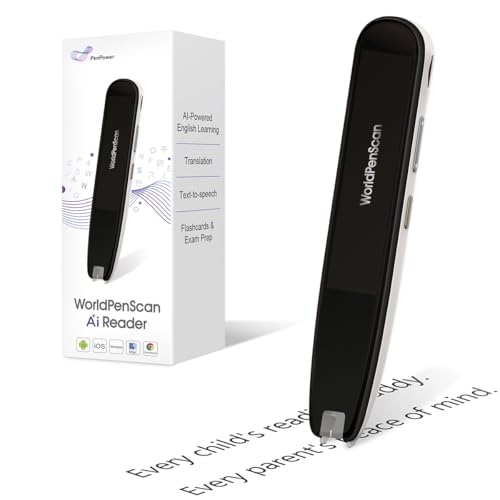
- AI explanations can simplify scanned text
- Includes dictionary, translation, and text-to-speech
- AI Reading Buddy adds quizzes and extra insights
Best For: Growing readers, ESL learners, and children needing comprehension support
Best Multilingual Reading Pen

- Translates more than 100 languages
- Reads text aloud with highlighted words
- Exports scans and supports Bluetooth headphones
Best For: Language learners, travelers, and auditory readers
Best All-in-One Reading Pen

- Combines OCR, translation, audio, and recording
- Supports 102 online translation languages
- Creates editable notes and study outlines
Best For: Students and learners wanting reading, translation, and study tools
Portable Language Learning Pick

- 60 online and 10 offline scan-translation languages
- Text-to-speech supports listening and speaking practice
- 142-language online voice translation
Best For: Language learners, reading support, and travel translation
Compact Scan-and-Translate Choice

- 142 online and 10 offline translation languages
- Scan-to-read audio with word highlighting
- Camera-based photo translation and text extraction
Best For: Students, travelers, and multilingual document reading
Study and Recording Pick

- Scan-to-read audio with highlighted words
- Smart notes and voice recording for classes or meetings
- 142 online and 10 offline translation languages
Best For: Students, professionals, and learning-support use
Best Multilingual Option – VORMOR Scan Reader Pen
For shoppers comparing reading pens, the VORMOR Scan Reader Pen stands out as a portable text scanner with broad language support. It scans text in 55 languages, reads text aloud, and adds photo translation, recording, Bluetooth connectivity, and two-way voice translation.
Best For: Travelers, multilingual learners, and users who want reading assistance plus translation and recording features.
Pros:
- Scans and reads text aloud in 55 languages.
- Supports two-way real-time voice translation in 112 languages.
- Includes photo translation, recording, Collins Dictionary, and computer text export.
- Offers Bluetooth support and a setting for left-handed scanning.
Cons:
- Some translation and voice features require an online connection.
- The many functions may be more than needed for basic reading assistance.
This is a versatile choice if you need one compact device for scanning, translation, audio recording, and language learning. Its broad feature set makes it especially practical for travel and multilingual study.
Best for Classrooms – Scanmarker Max Reading Pen
Among reading pens for school use, the Scanmarker Max is designed around classroom control and learning support. It scans printed text, reads it aloud, provides phonetic assistance, and connects with a web platform for vocabulary, comprehension, and text-export tools.
Best For: Teachers, students, exams, and classrooms supporting learners with reading differences.
Pros:
- Reads scanned text aloud in multiple languages.
- Teacher lock controls which features students can access.
- Phonetics support pronunciation, while photo scan handles full paragraphs.
- Works with Windows, Mac, and Chromebook through the Scanmarker platform.
Cons:
- Several learning and export features depend on connection to the web platform.
- Its classroom-focused controls may be unnecessary for casual home use.
The Scanmarker Max is a strong fit when supervision and structured learning matter as much as text-to-speech. Its compatibility with common school computers also makes it practical for classroom deployment.
Best AI Learning Features – NEWYES AI Pen
The NEWYES AI Pen is one of the more feature-rich reading pens for students and adults. Along with text-to-speech scanning, it offers AI dictionary and homework tools, adjustable reading settings, photo translation, six reading levels, and storage for exported files.
Best For: Dyslexic readers, students, and learners who want adjustable reading assistance with AI study features.
Pros:
- Offers adjustable reading speed, pause time, and British or American accents.
- Provides six reading levels for different stages of reading development.
- Supports text, photo, and voice translation across 112 languages.
- Includes 16GB storage and export to TXT, DOC, and PDF formats.
Cons:
- AI, translation, and chat functions may require connectivity.
- The broad feature set can be more complex than a basic scan-and-read pen.
This model is a good match for users who want reading support that can adapt over time. Its adjustable playback controls and multiple learning tools are particularly useful for personalized study.
Best for Adult Learners – UOOBEO Translator Reading Pen
The UOOBEO Translator Pen combines reading assistance with practical translation and note-capture tools. It scans printed text and reads it aloud, supports online and offline translation, extracts editable text to mobile devices, and includes a camera for photographing more complex text.
Best For: Adult learners, office workers, and users who need reading, translation, recording, and document-organizing features.
Pros:
- Provides text-to-speech scanning for reading difficulties and language learning.
- Supports 142-language online translation and 10-language offline scan and photo translation.
- Extracts scanned text for editable mobile files.
- Includes a 5MP camera for photo text recognition and smart voice recording.
Cons:
- Its 300 dpi resolution is lower than several competing models in this roundup.
- Online features require a Wi-Fi connection.
This pen is especially useful when reading support is only one part of the workflow. Its offline translation, mobile syncing, camera recognition, and recording features make it a practical all-purpose tool for adult study and office tasks.
Best AI Reading Pen – WorldPenScan AI Reader
For families comparing reading pens, the WorldPenScan AI Reader stands out for combining scanning with connected AI reading support. It can explain scanned words, sentences, and ideas in age-appropriate language, while offline tools such as text-to-speech, translation, and a built-in dictionary support reading beyond an internet connection.
Best For: Growing readers, ESL learners, and children who need extra vocabulary or comprehension support.
Pros:
- Quick AI can simplify difficult vocabulary, sentences, and concepts.
- AI Reading Buddy adds explanations, facts, and reading quizzes.
- Includes offline text-to-speech, translation, and dictionary tools.
- Supports English, Spanish, and Chinese.
Cons:
- Some AI features require an internet connection.
- Its 170 g weight may feel less lightweight than some portable alternatives.
This is a strong choice when comprehension support matters as much as word lookup. Buyers should note that the most advanced AI functions depend on Wi-Fi, while the core offline tools remain useful for uninterrupted reading.
Best Multilingual Reading Pen – Scanmarker Pal
The Scanmarker Pal is one of the more versatile reading pens for language learners, travelers, and readers who benefit from audio support. It scans text, translates more than 100 languages, reads text aloud with on-screen highlighting, and can export scanned content as a digital file.
Best For: Multilingual learners, travelers, auditory learners, and people seeking reading support for dyslexia or other reading difficulties.
Pros:
- Translates text in over 100 languages.
- Offers offline translation for English, Spanish, French, German, and Italian.
- Text-to-speech highlights words while reading them aloud.
- Can export scanned text and connect to Bluetooth headphones.
Cons:
- Offline translation covers fewer languages than its online translation feature.
- Computer use requires compatible Windows, macOS, or Linux systems with Bluetooth and USB support.
Choose the Scanmarker Pal if translation and portability are central to your needs. Its scan-and-export function also makes it practical for digitizing notes, although users should check device compatibility before relying on computer transfers.
Best All-in-One Reading Pen – SVANTTO Translator Pen
The SVANTTO Translator Pen is a multifunctional option among reading pens, combining OCR translation, adjustable text-to-speech, voice recording, and editable note-taking. It supports 102 translation languages, including several offline languages, making it useful for study materials, travel text, and audio-assisted reading.
Best For: Students, educators, dyslexia readers, ESL learners, travelers, and users who want scanning plus recording and digital notes.
Pros:
- Combines translation, text-to-speech, recording, and note-taking.
- Supports online translation in 102 languages and offline translation in five.
- Offers adjustable reading speeds and Bluetooth earbud compatibility.
- Can convert scans into editable memos, vocabulary lists, and study outlines.
Cons:
- Some online translation functions require Wi-Fi.
- Its additional recording and note-taking features may be more than needed for simple word lookup.
This pen is a good fit for buyers who want one device for reading assistance and study organization. Its recording and editable-note features add flexibility, while offline translation helps when Wi-Fi is unavailable.
Portable Language Learning Pick – Multifunction Reading Pen
This compact reading pen combines scanned-text translation, text-to-speech, and voice translation in a portable device. It is a practical option for language learners and users who want audio support while reading, with online and offline translation available.
Best For: Language learners, users with reading difficulties, and travelers who want translation and spoken output in one device.
Pros:
- Scans and translates text in 60 online and 10 offline languages.
- Reads translated text aloud to support listening and speaking practice.
- Supports online voice translation in 142 languages and multiple accents.
- Includes a dictionary, word library, recorder, music player, and other learning tools.
Cons:
- Many translation and voice features require an internet connection.
- The large feature set may be more than users seeking a basic reading pen need.
- Bluetooth headphones are supported, but the notes do not specify whether they are included.
Choose this model if you want a portable reading pen with broad translation coverage and built-in study and entertainment functions. Its offline language support adds flexibility when connectivity is unavailable.
Compact Scan-and-Translate Choice – S65pro Reading Pen
This lightweight reading pen offers scan-to-read, text extraction, image translation, and voice translation in a compact 2.56-ounce design. It supports online and offline use, making it useful for printed materials, signs, menus, and documents.
Best For: Students, language learners, business travelers, adults, and users who need a small scan-and-translate device.
Pros:
- Provides online translation in 142 languages and offline translation in 10 languages.
- Reads scanned text aloud and highlights words to support comprehension and pronunciation.
- Built-in camera enables online and offline photo translation.
- Text extraction helps capture important details from documents or images.
Cons:
- It is not suitable for blind users.
- Japanese text recognition supports horizontal text only, not vertical text.
- Bluetooth connectivity is supported, but the notes do not indicate that headphones are included.
Its combination of scanning, audio reading, photo translation, and text extraction makes this a versatile reading pen for study and travel. Consider the Japanese-text limitation if that language is a primary use case.
Study and Recording Pick – Smart Note Reading Pen
This reading pen pairs scan-to-read and translation features with smart note-taking and voice recording. Its 142 online and 10 offline translation languages make it suited to learning, travel, and situations where users need to capture information as well as hear it.
Best For: Students, language learners, special education settings, professionals, and users who want reading assistance plus recording tools.
Pros:
- Supports online translation in 142 languages and offline translation in 10 languages.
- Reads scanned text aloud and highlights words to support comprehension.
- Stores notes and memos directly on the device.
- Includes a smart voice recorder for classes, meetings, and work tasks.
Cons:
- It is not suitable for blind users.
- Japanese recognition is limited to horizontal text; vertical Japanese is not supported.
- Online functions require internet access, while offline translation covers only 10 languages.
This model is a strong fit when a reading pen needs to do more than translate: its note-taking and recording functions can help organize lessons, meetings, and study sessions. The language and text-orientation limits are worth checking before purchase.
How We Picked the Best Reading Pens
We focused on the features that most affect everyday use: OCR scanning, text-to-speech quality, translation coverage, offline functionality, dictionary access, storage, Bluetooth or app support, and controls suitable for students. We also considered whether each pen is positioned for dyslexia support, language learning, classroom use, or general reading assistance.
Because product specifications can vary by version and seller, check the current listing for supported languages, regional availability, included accessories, software compatibility, and whether subscriptions or a phone connection are required.
Quick Comparison
| Need | Features to prioritize | Best fit |
|---|---|---|
| Reading assistance | Accurate OCR, natural text-to-speech, adjustable playback | Students and adults who want printed text read aloud |
| Language learning | Dictionary, pronunciation, translation, saved words | Language learners and travelers |
| Classroom support | Lock functions, phonics tools, simple controls | Teachers, schools, and younger learners |
| Travel or field use | Offline languages, battery life, compact design | Users without reliable internet access |
| Advanced scanning | AI features, Bluetooth, app transfer, larger storage | Users who need digital notes or broader workflows |
Key Buying Factors for Reading Pens
Scanning Accuracy and Text Compatibility
Look for OCR that handles common fonts, varied print sizes, and full lines without requiring excessive rescanning. Reading Pens generally work best on clear, high-contrast printed pages; handwriting, glossy surfaces, columns, and unusual layouts may be more difficult.
Text-To-Speech and Reading Controls
Check voice clarity, pronunciation, speed adjustment, replay controls, and support for punctuation or phonics. These details matter more than a high language count if the primary goal is reading assistance.
Translation and Offline Support
A large language list does not always mean every language works offline or supports every feature. Confirm whether translation requires Wi-Fi, Bluetooth, a companion app, or cloud processing. Offline support is especially valuable for travel and classrooms with restricted connectivity.
Storage, Connectivity, and Battery
Built-in storage can help save scans, recordings, or vocabulary. Bluetooth and app connectivity are useful for transferring text, while a straightforward standalone design may be preferable for children or users who do not want a phone involved. Verify charging method and expected battery life before purchase.
Who Should Buy Which Reading Pens?
Choose a classroom-oriented pen if you need phonics assistance, restricted settings, or simple controls for students. A translation-focused model is better for multilingual reading and travel, while an AI-enabled reader may suit users who want explanations, broader text handling, or digital workflows. Adults with dyslexia or other learning difficulties should prioritize comfortable scanning, clear speech, and adjustable playback over the longest language list. For language learners, dictionary, pronunciation, saved vocabulary, and two-way translation tools may be more useful than basic text extraction alone.