A laptop lock can add a practical layer of protection when your home office shares space with visitors, children, roommates, contractors, or other people. The right cable helps secure a computer to a sturdy desk or fixed anchor without complicating your daily routine.
This roundup compares 10 laptop locking cables for home offices, covering standard T-bar locks, Nano and Dell-compatible designs, universal systems, tablet kits, and adhesive mounting solutions.
Best 10 Laptop Locking Cables for Home Offices Picks for 2026
Best Standard-Slot Pick
Kensington Combination Cable T-Bar Lock

- Resettable four-digit combination
- Six-foot cut-resistant cable
- For standard Kensington slots
Best For: Home offices with standard-slot devices
Best Complete Desktop Kit
Kensington Desktop Locking Kit 2.0
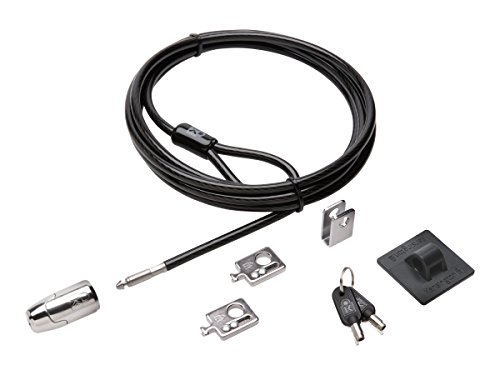
- Eight-foot carbon steel cable
- Includes adapters and cable trap
- Anchor plate for devices without slots
Best For: Desktop setups with multiple peripherals
Best Flexible Compatibility
Universal Laptop Combination Cable Lock

- Works with built-in slots or adhesive plate
- Resettable four-digit combination
- Six-foot-plus braided cable
Best For: Mixed devices with and without security slots
Best for Thin Laptops
Kensington Nano-Slot Combination Lock

- Slim head for nano-size slots
- Resettable four-digit combination
- Pivoting head supports port access
Best For: Thin laptops with nano security slots
Best Adhesive-Anchor Set

- Two adhesive anchor sets
- Six-foot galvanized steel cable
- Keyed lock for multiple devices
Best For: Home offices securing laptops, tablets, phones, or monitors
Best Standard Slot Lock
Kensington T-Bar Laptop Cable Lock

- Six-foot carbon steel cable
- Pivoting 10 mm T-Bar head
- Eight-year warranty and lifetime support
Best For: Devices with a standard Kensington security slot
Best Keyless Option
AboveTEK Combination Laptop Lock

- Four-digit keyless combination lock
- Two adhesive anchor sets
- Six-foot galvanized steel cable
Best For: Flat-surface setups securing multiple compatible devices
Dell Wedge-Slot Pick
Kensington N17 Combination Lock

- Fits Dell and Alienware wedge lock slots
- Resettable four-wheel combination
- Six-foot carbon steel cable
Best For: Dell and Alienware laptops with wedge-type lock slots
Adjustable Desk-Mount Pick
AboveTEK Laptop Locking Station

- Fits 12- to 16-inch laptops
- Includes 78.7-inch cable and keyed lock
- Adjustable viewing angle and mounting options
Best For: Users wanting an adjustable laptop holder with added tethering
Universal Slot Pick
Kensington 3-in-1 Combination Lock

- Supports standard, nano, and wedge slots
- Resettable four-number combination
- Six-foot carbon steel cable
Best For: Multi-device homes and offices with varied laptop slot types
Best Standard-Slot Pick – Kensington Combination Cable T-Bar Lock
For home offices using laptops or peripherals with a standard Kensington security slot, this combination lock provides a straightforward way to anchor equipment to a desk or other fixed structure. Its resettable four-digit code avoids the need to manage keys.
Best For: Standard-slot laptops, monitors, desktops, projectors, and other compatible office equipment.
Pros:
- Resettable four-wheel combination with 10,000 possible codes.
- Six-foot cut-resistant carbon steel cable anchors to desks, tables, or fixed structures.
- Push-button design supports one-handed attachment.
- Works with various devices featuring a standard Kensington security slot.
Cons:
- Not compatible with Dell and Alienware devices using Noble slots.
- May not fit some 2016-and-newer Dell laptops and tablets.
This is a practical choice for home offices that want broad standard-slot compatibility and key-free operation, but confirm the security-slot type before ordering.
Best Complete Desktop Kit – Kensington Desktop Locking Kit 2.0
Among laptop locking cables for home offices, this kit is aimed at securing a broader desktop setup rather than a laptop alone. It combines an eight-foot cable with adapters, a cable trap, and an anchor plate for devices that lack a Kensington security slot.
Best For: Desktop PCs and home-office peripherals that need a keyed locking solution or adapter-based installation.
Pros:
- Eight-foot cut-resistant carbon steel cable offers flexible anchoring.
- Includes two K-Slot adapters and a cable trap for peripheral accessories.
- Anchor plate helps secure devices without a Kensington security slot.
- Patented Hidden Pin Technology is designed to resist picking.
Cons:
- Uses a keyed lock rather than a resettable combination.
- Its desktop-focused components may be more than needed for a single laptop.
This kit makes sense when a home office includes a desktop and several accessories, especially where the included anchor plate can expand compatibility beyond built-in security slots.
Best Flexible Compatibility – Universal Laptop Combination Cable Lock
This laptop lock is designed for home offices with a mix of devices. It can connect to a built-in security slot or use the included adhesive lock-slot plate on devices without one, while the six-foot-plus cable provides room to anchor equipment around a desk.
Best For: Laptops, tablets, and other digital devices with or without built-in security-lock holes.
Pros:
- Supports both built-in lock slots and the included adhesive plate.
- Resettable four-digit combination provides more than 10,000 code options.
- Six-foot-plus braided cable is described as 30% thicker than normal.
- Rotating push-button lock head supports one-handed operation.
Cons:
- Adhesive plate installation adds a preparation step for devices without slots.
- Compatibility and holding strength may depend on the device surface and adhesive application.
Its included adhesive plate gives this model broader stated compatibility than slot-only locks, making it a useful option for varied home-office hardware when key-free access is preferred.
Best for Thin Laptops – Kensington Nano-Slot Combination Lock
Thin laptops often need a smaller lock head, and this Kensington model is built for nano-size security slots. Its five-foot carbon steel cable, resettable combination, and pivoting head suit a home-office desk where the laptop should remain stable while connected.
Best For: Thin laptops with nano-size security slots and users who want a compact, key-free lock.
Pros:
- Slim lock head is designed for laptops with nano-size slots.
- Resettable four-wheel code offers 10,000 possible combinations.
- Pivoting head and rotating anchor help preserve access to nearby ports.
- Five-foot carbon steel cable includes an anti-shearing plastic sleeve.
Cons:
- Designed for nano-size slots, so it is not a universal fit for every laptop.
- Five-foot cable is shorter than some competing options.
Choose this model when your laptop specifically uses a nano security slot and a low-profile lock head is more important than maximum cable length.
Best Adhesive-Anchor Set – AboveTEK Keyed Laptop Lock
For home offices that need flexible laptop locking cables for home offices, the AboveTEK keyed lock combines a six-foot galvanized steel cable with adhesive anchor plates. Its two included anchor sets can help secure multiple compatible devices, provided they are attached to suitable flat surfaces.
Best For: Home-office users securing laptops, tablets, phones, or monitors with a keyed setup.
Pros:
- Includes two adhesive sticker and anchor-plate sets.
- Six-foot cut-resistant galvanized steel cable allows some movement while secured.
- Uses a stainless steel lock with simple key operation.
- Works with laptops, notebooks, tablets, smartphones, and monitors.
Cons:
- Adhesive anchors are intended for flat surfaces and require careful placement.
- Keys can be less convenient than a combination lock.
This is a practical choice when you want one keyed cable system that can be moved among several devices. Verify that the adhesive mounting surface is appropriate before installation.
Best Standard Slot Lock – Kensington T-Bar Laptop Cable Lock
The Kensington T-Bar is a conventional option for laptop locking cables for home offices when your device has a compatible Kensington security slot. It uses a six-foot carbon steel cable, keyed locking head, and pivoting design for anchoring equipment to a desk or other fixed structure.
Best For: Home-office laptops, monitors, desktops, and other equipment with a Kensington security slot.
Pros:
- Six-foot carbon steel cable has a protective plastic sheath.
- Pivoting 10 mm T-Bar head fits many thin devices with standard Kensington slots.
- Hinged design helps reduce awkward locking angles.
- Includes an eight-year warranty and lifetime technical support.
Cons:
- Does not work with newer Dell devices using the wedge lock slot.
- Some HP models and Chromebooks use the separate NanoSaver slot.
- Requires a compatible security slot rather than an adhesive anchor.
Choose this model when your equipment already has a standard Kensington slot and you prefer anchoring to a desk or fixed structure. Check the laptop’s slot type before ordering, especially for newer Dell and selected HP devices.
Best Keyless Option – AboveTEK Combination Laptop Lock
If you prefer not to manage keys, this AboveTEK model offers a combination-based approach to laptop locking cables for home offices. The six-foot galvanized steel cable pairs with two adhesive anchor sets, making it suitable for compatible laptops, tablets, phones, and monitors used on flat surfaces.
Best For: Home-office users who want keyless security for multiple devices and flat-surface setups.
Pros:
- Four-digit combination lock eliminates the need for keys.
- Includes two adhesive stickers and anchor plates.
- Six-foot cut-resistant galvanized steel cable provides reach and flexibility.
- Supports laptops, tablets, phones, and monitors in compatible setups.
Cons:
- Adhesive mounting is designed for suitable flat surfaces.
- Compatibility is more dependent on adhesive anchoring than a built-in security slot.
This is the more convenient AboveTEK choice for shared home-office spaces where keeping track of keys is inconvenient. Plan the anchor location carefully and allow the adhesive setup to suit the intended device and surface.
Dell Wedge-Slot Pick – Kensington N17 Combination Lock
Kensington N17 Dell Laptop Computer Lock, Combination Security Locking Cable (K68008WW) Black
Check Price On AmazonFor Dell-focused laptop locking cables for home offices, the Kensington N17 is a straightforward choice when your laptop has a wedge-shaped security slot. It combines a resettable four-wheel combination with a six-foot carbon steel cable for anchoring to a desk or other fixed structure.
Best For: Dell and Alienware laptops with wedge-type lock slots.
Pros:
- Designed to fit Dell and Alienware wedge lock slots.
- Resettable four-wheel code offers 10,000 possible combinations.
- Push-button engagement supports one-handed attachment.
- Six-foot, cut-resistant carbon steel cable and five-year warranty.
Cons:
- Compatibility is limited to laptops with the appropriate wedge-shaped slot.
- Combination locks require remembering the selected code.
This is a focused option for a Dell home-office setup rather than a universal lock. Confirm your laptop’s slot shape before buying, then use the six-foot cable to secure it to a suitable fixed anchor.
Adjustable Desk-Mount Pick – AboveTEK Laptop Locking Station
For home offices that need both a physical laptop holder and laptop locking cables for home offices, the AboveTEK Locking Station offers an adjustable alternative. It accommodates 12- to 16-inch laptops and includes a two-meter cable, mounting options, and a pivoting design for flexible positioning.
Best For: Users seeking an adjustable, portable laptop station for MacBook, Surface, Chromebook, and similar devices.
Pros:
- Fits laptops from 12 to 16 inches, with adjustable arms for varied widths.
- Includes a 78.7-inch cable and keyed lock.
- Pivot hinge provides viewing angles from 45° to 125°.
- Lightweight 0.94-pound design includes dual lock clips.
Cons:
- The station is more involved than a basic cable lock.
- Compatibility still depends on laptop size, thickness, and proper clip selection.
- The supplied lock is keyed rather than combination-based.
This model makes the most sense when you want security plus a stable, adjustable workstation accessory. Its broad size range is useful, but check your laptop’s dimensions and the available desk-mounting arrangement before purchasing.
Universal Slot Pick – Kensington 3-in-1 Combination Lock
If you are comparing laptop locking cables for home offices across different computers, the Kensington Universal 3-in-1 is designed for broad slot compatibility. Its interchangeable tips support standard, nano, and wedge-shaped security slots, while the six-foot carbon steel cable and resettable combination add everyday convenience.
Best For: Homes or offices with laptops from different brands or generations.
Pros:
- Works with standard, nano, or wedge-shaped security slots.
- Resettable four-number dial provides 10,000 combinations.
- Six-foot carbon steel cable has a protective plastic sheath.
- Unused lock tips stay attached by a tether, and the lock includes a five-year warranty.
Cons:
- Interchangeable tips add setup steps compared with a slot-specific lock.
- It is still necessary to verify that your laptop uses one of the supported slot types.
This is the most flexible choice in the group for households managing multiple laptops. The universal tip system helps with changing devices, while the resettable combination avoids carrying a separate key.
How We Picked the Best Laptop Locking Cables for Home Offices
We evaluated these Laptop Locking Cables for Home Offices based on compatibility, attachment method, locking style, cable length, installation requirements, and everyday usability. The selection includes established Kensington models alongside versatile options from AboveTEK and other general-purpose designs.
Compatibility comes first. A cable lock is only useful if its connector matches your laptop’s security slot or can attach securely through an approved adhesive plate, case, or mounting station. We also considered whether each lock uses a key, resettable combination, or a device-specific connection.
Quick Comparison
| Lock type | Best suited for | Main advantage |
|---|---|---|
| Standard T-bar | Many business laptops | Widely supported connection |
| Nano or Dell-specific | Compatible newer laptops | Purpose-built fit |
| Universal or adhesive-anchor | Devices without a built-in slot | Broader device compatibility |
| Keyed lock | Shared or managed spaces | No combination to remember |
| Combination lock | Personal home offices | Key-free daily access |
Key Buying Factors for Laptop Locking Cables for Home Offices
Security-Slot Compatibility
Check whether your laptop has a standard T-Bar slot, Nano slot, or Dell-specific slot. Do not assume that every rectangular security opening accepts every cable lock. If your device lacks a compatible slot, choose a model with a reputable adhesive anchor or a dedicated locking station.
Keyed Versus Combination Access
Combination locks are convenient for home use because there is no key to store, but the code should be private and easy to manage. Keyed models can be preferable when several people need controlled access or when you want a lock that does not depend on remembering a combination.
Anchor Point and Cable Length
Attach the cable to a heavy desk frame or another fixed, difficult-to-move object—not a loose monitor stand or detachable accessory. A six-foot cable generally offers useful flexibility, but measure the distance and avoid leaving excessive slack that could make the setup easier to manipulate.
Installation and Surface Protection
Adhesive plates require a clean, smooth surface and adequate curing time. They may be unsuitable for textured, dusty, oily, or delicate finishes. For frequent travel or removable setups, a built-in security slot or purpose-made mounting station may be more practical.
Who Should Buy Which Laptop Locking Cables for Home Offices?
- Most standard business laptops: Choose a standard T-bar combination or keyed Kensington lock after verifying the slot.
- Compatible Dell or Nano-slot laptops: Select the matching Kensington connector for a closer fit and simpler installation.
- MacBooks, tablets, and slot-free devices: Consider an adhesive-anchor kit or adjustable locking station, provided the mounting surface is suitable.
- Shared home offices: A keyed lock or resettable combination model can make access easier to manage.
- Users securing multiple peripherals: A desktop and peripherals kit may offer better coverage than a laptop-only cable.
For the best result, confirm the connector and included hardware before buying, then pair the lock with a strong physical anchor and sensible room security.