A well-placed keyboard tray can free up desk space while bringing your keyboard and mouse closer to a comfortable working position. The best models combine sturdy mounting, smooth adjustment, and enough room for the peripherals you use every day.
We selected 10 keyboard trays with mouse platforms covering slide-out, swivel, height-adjustable, pole-mounted, and storage-drawer designs. Use the guide below to narrow the list based on desk compatibility, available space, and preferred typing posture.
Best 10 Keyboard Trays with Mouse Platforms Picks for 2026
Best Overall
HUANUO 360-Degree Adjustable Keyboard Tray

- Large 25 x 9.84-inch platform
- 6.3 inches of height adjustment
- Swivels, tilts, and slides under the desk
Best For: Flexible seated and standing desk setups
Best Warranty
Mount-It! Ball-Bearing Keyboard Drawer

- Lifetime manufacturer warranty
- Reversible 8 x 7.5-inch mouse platform
- Smooth ball-bearing slide-out track
Best For: Secure, permanently mounted home-office setups
Best No-Drill Option
BONTEC Pull-Out Keyboard and Mouse Tray

- Clamp-on installation for desks up to 1.97 inches thick
- 25.6 x 11.8-inch platform
- Supports up to 11 pounds
Best For: Renters and no-drill desk installations
Best Pole-Mounted Design
VIVO 26-Inch Pole Keyboard Tray

- Fits 1.1- to 2.4-inch poles
- 360-degree rotation and wide tilt range
- Steel tray with raised edges and wrist padding
Best For: Monitor-stand, wall-mount, and pole-based workstations
Best Large-Capacity Pick
Adjustable Steel Keyboard Tray
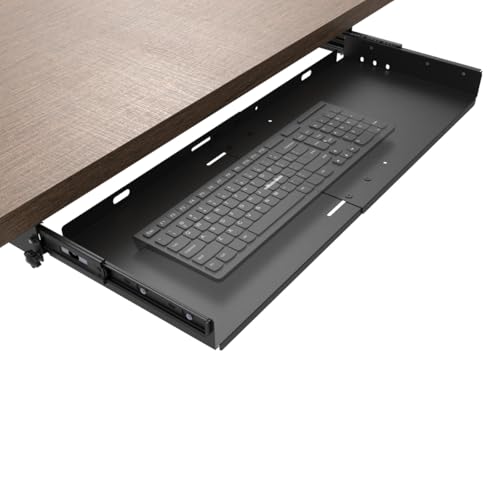
- 23-to-27-inch adjustable width
- Supports up to 11 pounds
- Smooth ball-bearing slide with locking stops
Best For: Larger keyboard and mouse setups
Best Versatile Ergonomic Pick
Klearlook Adjustable Keyboard Tray

- Works above or below the desk
- Multiple rotation, height, and tilt adjustments
- Includes mouse pad and organization features
Best For: Flexible home office and gaming setups
Best Rotating-Mouse-Platform Pick

- 360-degree swiveling mouse platform
- Three height settings with up to 1.4 inches of adjustment
- Quiet 14-inch galvanized slide tracks
Best For: Compact under-desk setups with stowable mouse space
Best with Extra Features
Mount-It! 15-Inch Slide-Out Keyboard Tray

- 15-inch full-size slide-out tray
- Reversible padded mouse platform
- Lifetime warranty and adjustable positioning
Best For: Wood or MDF desks in home offices, dorms, and gaming setups
Best With Lighting
LLDEPLL Adjustable Tray With Storage Drawer

- Integrated storage drawer and glowing mouse pad
- 180-degree rotation and 30-degree tilt
- Height adjusts up to 5.1 inches
Best For: Gaming or home-office desks where storage and lighting are useful
Best Overall – HUANUO 360-Degree Adjustable Keyboard Tray
Among keyboard trays with mouse platforms, the HUANUO stands out for its generous 25 x 9.84-inch surface, broad adjustment range, and full-motion design. It swivels, tilts, slides under the desk, and includes a wrist rest, but its installation requirements make careful measuring essential.
Best For: Users who want maximum adjustability for seated and standing desk setups.
Pros:
- Large platform accommodates a keyboard and mouse.
- Offers 6.3 inches of height adjustment, 180-degree swivel, and tilt adjustment.
- Includes a wrist rest and slides beneath the desk when not in use.
- Comes with installation hardware and instructions.
Cons:
- Requires substantial clearance around and beneath the desk.
- At roughly 11.5 pounds, it is heavier than some alternatives.
- The knob must be loosened and tightened for adjustment and sliding.
This is a strong choice when ergonomic positioning and movement matter more than a lightweight installation. Confirm desk thickness, width, crossbar clearance, and keyboard dimensions before ordering.
Best Warranty – Mount-It! Ball-Bearing Keyboard Drawer
This Mount-It! drawer is a practical option among keyboard trays with mouse platforms for users who prefer a secure, slide-out design. Its steel mounting bracket, ball-bearing tracks, integrated wrist rest, and reversible mouse platform support everyday office, classroom, and gaming use.
Best For: Buyers who value smooth operation and long-term warranty coverage.
Pros:
- Ball-bearing tracks extend the platform up to 10 inches and slide smoothly.
- Mouse platform can mount on either side for left- or right-handed use.
- Includes an integrated wrist rest and keyboard locking clamp.
- Backed by a lifetime manufacturer warranty and US-based support.
Cons:
- Designed for wood or MDF desks, not glass or metal.
- Height adjustment is limited to three settings within 1.25 inches.
- Requires drilling and bolting to the underside of the desk.
Choose this model if a firmly mounted drawer and reversible mouse placement are priorities. Its limited height range is less suitable for shoppers seeking extensive ergonomic adjustment.
Best No-Drill Option – BONTEC Pull-Out Keyboard and Mouse Tray
The BONTEC is one of the more convenient keyboard trays with mouse platforms for desks where drilling is undesirable. Its C-clamps attach to desktops up to 1.97 inches thick, while the 25.6 x 11.8-inch platform provides room for a standard keyboard and mouse.
Best For: Renters and users who need a clamp-on tray without permanent desk modification.
Pros:
- Installs with C-clamps instead of drilling.
- Supports up to 11 pounds and includes protective pads.
- Spacious pull-out surface fits a standard keyboard and mouse.
- Slides beneath the desk to free desktop space.
Cons:
- Does not suit curved, beveled, or rounded desk edges.
- Requires at least 31.3 inches of width and 11.8 inches of underside depth.
- Vertical mice, oversized keyboards, and split ergonomic keyboards may require additional clearance checks.
This tray makes sense for straightforward, reversible installation, provided the desktop has a flat, unobstructed underside. Measure the desk carefully because its clearance requirements are significant.
Best Pole-Mounted Design – VIVO 26-Inch Pole Keyboard Tray
For workstations built around a monitor stand, wall mount, or compatible pole, the VIVO offers a different approach to keyboard trays with mouse platforms. Its steel arm fits poles from 1.1 to 2.4 inches in diameter and provides 360-degree rotation, broad tilt adjustment, and a 25.7 x 9.8-inch typing surface.
Best For: Pole-mounted workstations that need a movable keyboard and mouse platform.
Pros:
- Fits poles measuring 1.1 to 2.4 inches in diameter.
- Provides 360-degree rotation and +90 to -90-degree tilt.
- Large surface includes raised edges, wrist padding, and mouse space.
- Includes cable management and a three-year manufacturer warranty.
Cons:
- Requires a compatible pole, monitor stand, or wall-mount structure.
- Extends 17 inches from the wall, so placement space is necessary.
- Its pole-mounted design is not a conventional under-desk installation.
This model is best when a compatible pole is already part of the workstation. Its rotation and tilt range make it especially useful for moving the tray aside or changing typing positions.
Best Large-Capacity Pick – Adjustable Steel Keyboard Tray
If you need keyboard trays with mouse platforms that can accommodate a larger setup, this under-desk slide-out tray offers adjustable width from 23 to 27 inches and 9.8 inches of depth. Its steel construction, ball-bearing slides, and locking stops make it a practical choice for everyday typing.
Best For: Larger keyboards and mouse combinations on desks at least 0.78 inches thick.
Pros:
- Adjustable 23-to-27-inch width provides generous workspace.
- Cold-rolled steel construction supports up to 11 pounds.
- Ball-bearing slides glide smoothly, while locking stops help prevent unwanted retraction.
- Includes screws and instructions for installation.
Cons:
- Requires screw mounting and assembly.
- Not suitable for desks thinner than 0.78 inches.
- The tray is fixed under the desk rather than height adjustable.
Choose this model when platform size and sturdy mounting matter more than advanced adjustability. Its broad surface is especially useful for keeping a keyboard and mouse together below the desktop.
Best Versatile Ergonomic Pick – Klearlook Adjustable Keyboard Tray
Among keyboard trays with mouse platforms, the Klearlook stands out for flexible placement and ergonomic adjustment. It can be used above or below the desk and combines a keyboard riser, mouse pad, wrist rest, storage drawer, phone slot, and headphone hanger.
Best For: Home offices, gaming setups, and users who want multiple positioning and organization features.
Pros:
- Supports both above-desk and under-desk installation.
- Offers 360-degree horizontal rotation, 237-degree arm adjustment, and 180-degree tilt.
- Includes an integrated mouse pad and wrist rest.
- Built-in drawer, phone slot, and headphone hanger help organize accessories.
Cons:
- Its feature-rich design is heavier and more complex than a basic tray.
- Specific desk compatibility and installation requirements should be checked before purchase.
- The supplied notes do not specify a maximum supported weight.
This is the most adaptable option of the three, particularly for users who switch between work, gaming, and leisure. Its broad adjustment range and included accessories can help create a more personalized workstation.
Best Rotating-Mouse-Platform Pick – Solid Steel Slide-Out Tray
For keyboard trays with mouse platforms that prioritize compact storage, this solid-steel model adds a 360-degree rotating mouse platform beneath the keyboard shelf. The platform folds under the tray when not needed, while three preset height settings provide some ergonomic flexibility.
Best For: Users who want a sturdy under-desk tray with a stowable, swiveling mouse surface.
Pros:
- 1 mm steel construction provides a stable alternative to plastic trays.
- 360-degree mouse platform rotates out for use and conceals under the tray for storage.
- Three height settings provide up to 1.4 inches of adjustment.
- 14-inch galvanized tracks are designed for smooth, quiet sliding.
Cons:
- Installation requires screws, a drill for pilot holes, and about 15 minutes of assembly.
- Not compatible with glass, marble, or desks with drawers.
- The mouse platform sits beneath the keyboard tray, which may not suit every setup.
This tray is a strong fit when you want steel durability and a mouse platform that disappears when not in use. Confirm desk compatibility first, especially if your workstation has a drawer or a glass or marble surface.
Best with Extra Features – Mount-It! 15-Inch Slide-Out Keyboard Tray
The Mount-It! is a strong choice among keyboard trays with mouse platforms if you want a full-size setup that slides completely out of sight. Its steel under-desk mount, adjustable positioning, and padded wrist supports suit extended work, study, or gaming sessions.
Best For: Home offices, dorm rooms, and gaming desks using wood or MDF desktops.
Pros:
- 15-inch slide-out reach provides space for a keyboard, mouse, and wrists.
- Mouse platform mounts on either side for right- or left-handed setups.
- Height, tilt, and 360-degree swivel adjustments support personalized positioning.
- Includes a lifetime manufacturer warranty and US-based product support.
Cons:
- Designed for wood or MDF desktops only; it is not suitable for glass, metal, or crossbar desks.
- The 12.38-pound steel tray may require careful installation despite the included hardware.
Choose this model when stability, broad adjustability, and a generous mouse platform matter more than a lightweight design. Verify your desktop material before ordering.
Best With Lighting – LLDEPLL Adjustable Tray With Storage Drawer
The LLDEPLL combines an under-desk keyboard tray with a storage drawer and glowing mouse pad. For shoppers comparing keyboard trays with mouse platforms, its 180-degree rotation, vertical tilt, and height adjustment offer flexible positioning for home-office or gaming use.
Best For: Users who want an adjustable tray with integrated storage and mouse-pad lighting.
Pros:
- Rotates 180 degrees horizontally, tilts 30 degrees, and adjusts up to 5.1 inches in height.
- Includes a storage drawer and glowing mouse pad.
- Slides out up to 9.8 inches from the desk edge.
- Hardware and instructions are included for installation.
Cons:
- Requires a desk at least 0.61 inches thick and enough legroom after installation.
- Not compatible with desktops that have beveled edges.
- The manufacturer recommends desks over 28 inches in length for optimal comfort.
This is a practical pick if lighting and storage are priorities, but measure the desk carefully. Its compatibility requirements and limited extension should be checked before purchase.
Best Height Range – AX WABER Adjustable Keyboard Tray
The AX WABER offers a broad adjustment range in a compact under-desk design. Among keyboard trays with mouse platforms, it stands out for height adjustment up to 6.5 inches, a soft protective pad, and a built-in mouse holder for gaming or office setups.
Best For: Users who need extra height adjustment and a padded black tray for a gaming or home-office desk.
Pros:
- Adjusts up to 6.5 inches in height, with 180-degree rotation and 30-degree tilt.
- Includes a soft protective pad for more comfortable use.
- Slides out up to 9.8 inches from the desk edge.
- Includes installation hardware, instructions, and technical support.
Cons:
- Requires a desk at least 0.61 inches thick and sufficient legroom.
- Not compatible with desktops that have beveled edges.
- The manufacturer recommends desks over 25 inches in length for optimal comfort.
The AX WABER is worth considering when height flexibility is more important than maximum slide-out distance. Confirm desk dimensions, thickness, and edge shape before installing it.
How We Picked the Best Keyboard Trays with Mouse Platforms
We focused on practical features that affect everyday usability: mounting style, tray dimensions, mouse-platform placement, adjustment range, slide quality, weight support, and wrist comfort. We also considered whether each design suits a compact workstation, a large keyboard and mouse setup, or a desk that needs additional storage.
Because desks vary widely, compatibility matters as much as materials. Before buying, check the product’s required clearance, mounting footprint, screw placement, and maximum supported thickness. A tray that works well under one desk may not fit a desktop with drawers, a crossbar, or limited knee room.
Quick Comparison
| Design | Best For | What to Check |
|---|---|---|
| Pull-out tray with swivel platform | Flexible mouse positioning | Platform size and swivel clearance |
| Fixed or ball-bearing slide | Smooth, simple access | Rail length and weight capacity |
| Height-adjustable tray | Custom typing posture | Adjustment range and stability |
| Pole-mounted tray | Desks where underside mounting is difficult | Pole compatibility and clamp location |
| Tray with storage drawer | Organizing accessories | Added depth and knee clearance |
Key Buying Factors for Keyboard Trays with Mouse Platforms
Mounting and Desk Compatibility
Under-desk models usually require a solid mounting surface and enough unobstructed space for screws and rails. Measure the underside before ordering, especially if your desk has a metal frame, modesty panel, drawers, or a beveled edge. Pole-mounted options can be useful when direct underside installation is impractical.
Tray and Mouse-Platform Size
Measure your keyboard, including any wrist rest or number pad. Then check the mouse platform separately. A compact platform may suit a small mouse, while wider models are better for low-sensitivity users who need more movement. Confirm that the platform does not collide with the desk edge or nearby furniture when swiveled.
Adjustment and Ergonomics
Height adjustment, tilt, and 360-degree rotation can help align your wrists and elbows, but more moving parts can also introduce wobble. Look for a secure locking mechanism and a slide that remains stable while typing. A padded or integrated wrist rest may improve comfort during long sessions.
Construction and Movement
Steel brackets generally provide stronger support, while lighter materials can make installation easier. Ball-bearing slides typically offer smoother extension than basic rails. Check the stated weight limit and account for the combined weight of your keyboard, mouse, wrist rest, and any accessories.
Who Should Buy Which Keyboard Trays with Mouse Platforms?
Choose a swivel mouse-platform tray if you want to place the mouse beside or slightly below the keyboard. A fixed pull-out design is a sensible choice for straightforward daily typing and fewer adjustment points. Height-adjustable models are better for users sharing a desk or fine-tuning posture. Consider a drawer-equipped tray if you need storage for small accessories, but verify that its extra depth will not reduce legroom.
For large keyboards, prioritize tray width and load capacity over compact installation. For small desks, measure the fully extended tray and mouse platform—not just the closed dimensions. Whichever style you choose, install it securely, test the slide and adjustment hardware, and keep the keyboard at a height that allows relaxed shoulders and nearly level wrists.