Heavy keyboards, oversized mice, and wrist rests need more than a basic sliding platform. The best keyboard trays for heavy devices provide stable support while freeing valuable desk space.
These 10 options include clamp-on and under-desk designs in several widths, plus adjustable and rotating platforms for different workstations. Use the guide below to narrow the list by capacity, fit, and installation needs.
Best 10 Keyboard Trays for Heavy Devices Picks for 2026
Sturdy Clamp-On Pick

- Supports up to 11 pounds
- Slide-out tray with ergonomic typing angles
- Fits desks up to 1.25 inches thick
Best For: Standard keyboard-and-mouse setups needing a sturdy clamp-on tray
Most Adjustable Option
HUANUO 360-Degree Under-Desk Tray

- Supports a 10-pound item weight
- Provides 6.3 inches of height adjustment
- Swivels and tilts for flexible positioning
Best For: Sit-stand users who need extensive keyboard positioning control
Extra-Wide Heavy-Duty Pick
VIVO MOUNT-KB15EB 34-Inch Tray

- Supports up to 11 pounds
- 33.9-inch extra-long tray surface
- Clamp span requires 39.4 inches of desk length
Best For: Wide desks and larger keyboard-and-mouse arrangements
Organizer-Friendly Choice
Klearlook Rotating Keyboard Tray

- 360-degree rotation for under-desk storage
- Includes drawer, phone slot, and headphone hanger
- Fits desktops up to 2.68 inches thick
Best For: Organized workspaces needing storage and swivel-away convenience
Compact Heavy-Duty Pick
VIVO 20-Inch Clamp-On Keyboard Tray
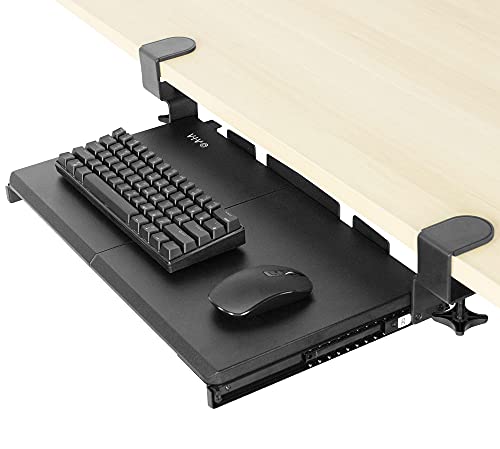
- Supports up to 11 pounds
- Compact 20 x 11-inch platform
- No-drill adjustable C-clamp installation
Best For: Small desks needing a sturdy keyboard-and-mouse tray
Spacious Clamp-On Choice

- 25.6 x 11.8-inch keyboard platform
- Supports up to 11 pounds
- Protective no-drill C-clamps
Best For: Large, flat desks with clear underside space
Best for Comfort
VIVO Adjustable Clamp-On Keyboard Tray

- 2.4 inches of height adjustment
- Supports up to 11 pounds
- Includes wrist pads and mouse pad
Best For: Users prioritizing customizable ergonomic positioning
Extra-Large Heavy-Duty Pick
XINLEI 25.6-Inch Keyboard Tray

- Large metal platform for keyboard, mouse, and accessories
- Smooth sliding rail with a protective back baffle
- Clamp or screw mounting options
Best For: Spacious workstations needing flexible installation
Ergonomic Adjustable Pick

- 5 inches of height adjustment
- Rubber padding and side-to-side rotation
- Includes mounting hardware
Best For: Standard desks where typing comfort and adjustability come first
High-Capacity Clamp Pick
AX WABER Adjustable Keyboard Tray

- Stated weight capacity up to 11 pounds
- Adjustable clamps fit desktops up to 1.9 inches
- Pulls out 5.7 inches for easier access
Best For: Clamp-mounted setups needing extra stated load capacity
Sturdy Clamp-On Pick – VIVO MOUNT-KB05E 27-Inch Tray
For keyboard trays for heavy devices, the VIVO MOUNT-KB05E is a sturdy clamp-on option with an 11-pound capacity. Its 27-inch-class platform provides room for a keyboard, mouse, and small accessories while freeing space on the desktop.
Best For: Users who want a durable, slide-out tray for a standard keyboard and mouse setup.
Pros:
- Supports up to 11 pounds.
- Sturdy C-clamps attach without drilling and fit desks up to 1.25 inches thick.
- Slides out for comfortable typing angles and retracts to save space.
Cons:
- Requires 32.5 inches of desk length for the clamps.
- Not compatible with beveled desk edges.
- Does not suit desktops thicker than 1.25 inches.
This tray is a practical heavy-device choice when your desk meets the clamp and clearance requirements. Confirm the desktop dimensions before ordering.
Most Adjustable Option – HUANUO 360-Degree Under-Desk Tray
Among keyboard trays for heavy devices, the HUANUO combines a 10-pound-rated platform with broad positioning control. It swivels, tilts, and adjusts vertically, making it useful for sit-stand setups and changing ergonomic preferences.
Best For: Users who need height adjustment and flexible positioning for a keyboard and mouse.
Pros:
- Offers 6.3 inches of height adjustment.
- Swivels left and right up to 180 degrees and tilts 6 degrees up or 22 degrees down.
- Includes a wrist rest and space for a full-size keyboard plus mouse.
Cons:
- Requires careful checking of crossbar, leg, obstacle, width, and desk-thickness clearances.
- The tray is intended for keyboards about 17.3 by 5.5 inches or smaller.
- The adjustment knob must be loosened and retightened for positioning.
The HUANUO is the strongest fit here for users prioritizing adjustability. Its installation requirements are more demanding, so measure the underside and surrounding desk space first.
Extra-Wide Heavy-Duty Pick – VIVO MOUNT-KB15EB 34-Inch Tray
For larger setups using keyboard trays for heavy devices, the VIVO MOUNT-KB15EB offers an extra-long 34-inch-class platform with an 11-pound capacity. The added surface can accommodate a keyboard, mouse, and small accessories while keeping them below the desktop.
Best For: Users with wide desks who want maximum tray length and a sturdy clamp-on design.
Pros:
- Supports up to 11 pounds.
- Extra-long 33.9-inch tray provides generous working space.
- Solid C-clamps attach to desks up to 1.25 inches thick and require no drilling.
Cons:
- Requires 39.4 inches of desk length from clamp to clamp.
- Not compatible with beveled desktops.
- Its larger footprint may not suit compact desks.
This is the better VIVO choice when a standard tray feels cramped. Measure the full clamp-to-clamp span, not just the tray surface, before buying.
Organizer-Friendly Choice – Klearlook Rotating Keyboard Tray
The Klearlook adds useful organization to the category of keyboard trays for heavy devices. Its stable platform supports keyboard-and-mouse use, while the 360-degree rotation, drawer, phone slot, and headphone hanger help keep the desktop organized.
Best For: Users who want a rotating keyboard tray with built-in storage and accessory organization.
Pros:
- Supports keyboard and mouse use on a generously sized platform with an integrated mouse pad.
- Rotates 360 degrees for storage under the desk.
- Includes a drawer, phone slot, and headphone hanger.
- Supports desktops up to 2.68 inches thick.
Cons:
- Height is not adjustable.
- Rotation requires at least 27.5 inches of table width on one side or 35 inches for both sides.
- Its listed tray holder dimensions are approximately 24.4 by 10 inches.
The Klearlook stands out for workspace organization rather than vertical adjustability. Choose it when storage features and swivel-away convenience matter more than a height-adjustable mechanism.
Compact Heavy-Duty Pick – VIVO 20-Inch Clamp-On Keyboard Tray
For shoppers comparing keyboard trays for heavy devices, the VIVO MOUNT-KB05ES offers a compact under-desk platform rated to support up to 11 pounds. Its sliding design keeps a keyboard below the desktop while preserving workspace, making it a practical choice for smaller desks.
Best For: Small desks and users who need a compact tray for a keyboard and mouse.
Pros:
- Supports up to 11 pounds.
- Slides out up to 9.5 inches for access and tucks under the desk.
- Adjustable C-clamps install without drilling and fit desks up to about 2 inches thick.
- Includes assembly and mounting hardware.
Cons:
- The 20 x 11-inch surface may be limiting for oversized keyboards or additional accessories.
- Clamp installation requires a compatible flat desk edge.
This is a sensible space-saving option when weight capacity matters but desk space is limited. Confirm the desktop thickness and available clearance before ordering.
Spacious Clamp-On Choice – BONTEC Pull-Out Keyboard Tray
The BONTEC KMT01-v02 is a spacious option among keyboard trays for heavy devices, with an 11-pound capacity and a 25.6 x 11.8-inch platform. It pulls out for use and slides beneath the desk to free room for monitors, paperwork, or accessories.
Best For: Workstations, home offices, and gaming setups with enough unobstructed space beneath the desk.
Pros:
- Wide platform accommodates a standard keyboard and mouse.
- Supports up to 11 pounds for stable everyday use.
- No-drill C-clamps fit desktops up to 1.97 inches thick.
- Protective pads help improve grip and reduce scratching.
Cons:
- Not compatible with curved, beveled, or rounded desk edges.
- Requires at least 31.3 inches of underside width and 11.8 inches of depth for smooth movement.
- Vertical mice, oversized keyboards, and split ergonomic keyboards require a clearance check.
The BONTEC provides more usable surface than a compact tray, but fit is especially important. Measure the desk underside and check for crossbars or support beams before purchasing.
Best for Comfort – VIVO Adjustable Clamp-On Keyboard Tray
For buyers seeking keyboard trays for heavy devices with more positioning flexibility, the VIVO MOUNT-KBST1 combines an 11-pound capacity with adjustable height and width. Its under-desk platform includes dedicated wrist-support accessories and slides out when needed.
Best For: Users who want to fine-tune tray height and accommodate different keyboard and mouse arrangements.
Pros:
- Offers 2.4 inches of height adjustment across five set points.
- Width adjusts from 8.8 to 10 inches from the desk, depending on the setting.
- Supports up to 11 pounds and includes a keyboard wrist pad, mouse pad, and mouse wrist rest.
- C-clamps fit desks up to 3.4 inches thick without drilling.
Cons:
- Not compatible with desktops featuring beveled edges.
- The split tray design and adjustable dimensions require careful fit checking.
- Its larger 14.37-pound item weight may make installation less convenient than smaller trays.
This model stands out when ergonomic positioning is a priority. Its broader compatibility range for desk thickness and multiple adjustment points are useful, provided the desktop edge is flat and the under-desk space is adequate.
Extra-Large Heavy-Duty Pick – XINLEI 25.6-Inch Keyboard Tray
For shoppers comparing keyboard trays for heavy devices, the XINLEI stands out with a large metal platform and sturdy C-clamps. Its 25.6-by-11.8-inch tray leaves room for a keyboard, mouse, and small accessories, though the 30-inch overall clamp span requires careful desk measurements.
Best For: Users who need a spacious under-desk platform and flexible clamp- or screw-mount installation.
Pros:
- Large surface accommodates a keyboard, mouse, and accessories.
- Metal sliding rail provides smooth in-and-out movement.
- Back baffle helps prevent the keyboard from falling off.
- Supports clamp or screw mounting for different desktop setups.
Cons:
- The 30-inch total length may not fit smaller desks.
- C-clamps fit desktops up to 1.63 inches thick.
- Thicker desktops reduce keyboard clearance.
The XINLEI is a practical choice when platform size and sturdy mounting matter most. Confirm the available desk width, thickness, and clearance before ordering.
Ergonomic Adjustable Pick – VIVO 25-Inch Under-Desk Tray
The VIVO MOUNT-KB03B is a compact option among keyboard trays for heavy devices, with a 25-by-10-inch tray and an adjustable track. Its rubber padding, height adjustment, and side-to-side rotation focus on typing comfort, while the desk must support the 10-pound mounted tray.
Best For: Users prioritizing ergonomic adjustment and a universal-size tray for a standard desk.
Pros:
- 25-by-10-inch tray fits most keyboards and mice.
- Offers 5 inches of height adjustment and side-to-side rotation.
- Rubber padding supports more comfortable typing.
- Mounting hardware is included for assembly.
Cons:
- Requires 14.25 inches between the desktop edge and crossbar.
- Height-adjustable desks need a separate spacer bracket.
- The desk must support the 10-pound under-mounted weight.
The VIVO makes the most sense for shoppers who value posture-oriented adjustments over an extra-large platform. Check the underside of the desk and its weight capacity before installation.
High-Capacity Clamp Pick – AX WABER Adjustable Keyboard Tray
For keyboard trays for heavy devices, the AX WABER combines a roomy pull-out platform with adjustable C-clamps and an 11-pound weight capacity. The 32.5-inch clamp-to-clamp span is substantial, so measure the desktop carefully and avoid beveled edges.
Best For: Users wanting a clamp-mounted tray with a higher stated weight capacity and easy slide-out access.
Pros:
- Supports up to 11 pounds.
- Adjustable C-clamps fit desktops up to 1.9 inches thick.
- Pull-out platform extends up to 5.7 inches from the desk edge.
- Includes assembly hardware and instructions.
Cons:
- The total clamp span is 32.5 inches.
- Not compatible with desktops that have beveled edges.
- The listed tray surface is narrower at 8.3 inches deep.
The AX WABER is a strong fit for users who prefer non-damaging clamp installation and a clear weight rating. Verify the desk’s thickness, edge shape, and available width before buying.
How We Picked These Keyboard Trays for Heavy Devices
We focused on trays with practical dimensions, sturdy mounting systems, and enough surface area for full-size keyboards and larger pointing devices. The selection includes compact models for smaller desks, extra-wide platforms for substantial setups, and adjustable options that can accommodate different sitting and standing positions.
We also considered installation style, clamp footprint, slide-out clearance, rotation, and the likelihood that a tray will remain stable during everyday typing. Because manufacturers do not always publish comparable weight ratings, desk compatibility and mounting construction are especially important when supporting heavier equipment.
Quick Comparison
| Best For | What to Look For |
|---|---|
| Large keyboards and accessories | Platforms around 27 inches or wider |
| Small or crowded desks | Compact 20- to 23-inch trays |
| Sit-stand workstations | Height adjustment or 360-degree rotation |
| Maximum mounting stability | Wide, padded C-clamps and reinforced hardware |
| Occasional use | Simple pull-out platforms with fewer moving parts |
Key Buying Factors for Keyboard Trays for Heavy Devices
Platform Size and Load Distribution
Measure your keyboard, mouse, wrist rest, and any controls you plan to keep on the tray. A little extra depth helps prevent equipment from crowding the front edge. Wider platforms can distribute weight more effectively, but they also need more clearance beneath the desk.
Clamp Strength and Desk Compatibility
Check the maximum desk thickness and the available space along the front or side edge. C-clamps should sit flat against a solid surface, ideally with padding to protect the desktop. Avoid mounting a heavy setup to thin, hollow, damaged, or unusually shaped desk edges unless the manufacturer specifically supports it.
Adjustment and Movement
Rotation and height adjustment can improve ergonomics, especially on sit-stand desks. However, every moving joint can introduce potential wobble if it is not tightened properly. For a stationary workstation, a simpler fixed or slide-out design may provide a more rigid feel.
Clearance and Installation
Confirm that drawers, support bars, armrests, and your legs will not interfere with the tray. Pull-out models need enough room to extend fully, while clamp-on designs may reduce usable space under the desk. Recheck screw tightness after installation and periodically during use.
Who Should Buy Which Keyboard Trays for Heavy Devices?
Choose a Wide Tray for Full Setups
Pick an extra-large model if you use a full-size keyboard with a separate mouse, wrist rest, macro pad, or other substantial accessories. The additional width reduces crowding and gives heavier equipment a more stable footprint.
Choose a Compact Tray for Limited Space
A 20- to 23-inch option suits smaller desks and basic keyboard-and-mouse arrangements. It is easier to position around desk legs and may leave more room for seated movement.
Choose an Adjustable Tray for Flexible Workstations
Rotation and height adjustment are most useful for sit-stand desks, shared workstations, and users who frequently change posture. Prioritize locking strength and clamp stability over the number of adjustment features.
Choose a Fixed Pull-Out Design for Simplicity
If you want a straightforward platform that stays in one position, a basic under-desk pull-out tray can be the best value. Match its dimensions to your equipment and verify the mounting surface before buying.