If you need clean text, accurate detail, and dependable everyday scanning, the right document scanner can save hours. This roundup focuses on models that balance image quality, speed, and workflow features.
Whether you are scanning contracts, receipts, reports, or mixed office stacks, these picks help you find the best fit for home, small business, or heavy daily use.
Best 10 High Resolution Document Scanners Picks for 2026
Premium Wireless Pick
ScanSnap iX2500 Wireless or USB High-Speed Document Scanner

- 45 ppm duplex scanning with 100-sheet feeder
- Wi-Fi 6 and USB-C connectivity
- Automatic naming, sorting, and image optimization
Best For: Shared offices and users who want fast, connected document scanning
Simple Photo-and-Document Scan
Canon CanoScan LiDE 300 Scanner

- 2400 x 2400 dpi optical resolution
- Auto Scan Mode for simple operation
- Compact USB-powered flatbed design
Best For: Light scanning tasks at home or in a small office
Office Efficiency Choice
Epson Workforce ES-400 II Duplex Desktop Scanner

- 50-sheet ADF with duplex scanning
- OCR and searchable PDF support
- Cloud upload and file-naming tools
Best For: Small offices and home offices that scan stacks of paperwork
Business-Ready Network Scanner
Brother ADS-4300N Professional Desktop Scanner

- Up to 40 ppm with duplex scanning in one pass
- 80-page ADF supports larger document batches
- Ethernet, USB, and broad driver support for workflow integration
Best For: Busy offices and workgroups needing fast shared scanning
Space-Saving Color Scanner
ScanSnap iX1300 Wireless or USB Scanner

- Compact design fits small desks and home offices
- Up to 30 ppm duplex scanning with auto image cleanup
- USB and Wi-Fi support for computers, mobile devices, and cloud
Best For: Small offices and home users who value simplicity and space-saving design
Photo-First High-Speed Scanner
Epson FastFoto FF-680W Scanner

- Batch-scans up to 36 photos at a time
- Single-step duplex capture preserves front and back details
- ScanSmart software adds OCR for readable document text
Best For: Photo archives and users who need fast scanning with restoration features
High-Volume Speed Pick
Epson Workforce ES-865 High Speed Color Duplex Scanner
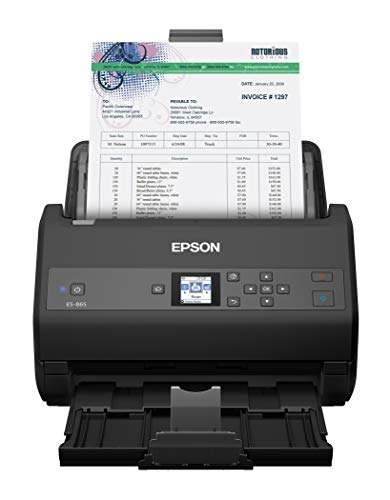
- Up to 65 ppm duplex scanning
- 100-page ADF for big jobs
- OCR for searchable and editable files
Best For: Offices that need fast, high-volume document scanning
Receipt Workflow Pick
Epson RapidReceipt RR-620W Wireless Desktop Scanner

- 600 dpi with 45 ppm duplex scanning
- Wi-Fi, USB, and touchscreen control
- AI-ready receipts and accounting sync
Best For: Receipt-heavy users who want cloud and accounting integration
Premium Wireless Pick – ScanSnap iX2500 Wireless or USB High-Speed Document Scanner
If you want high resolution document scanners that also emphasize speed and workflow, the ScanSnap iX2500 is built for busy desks. It combines 45 ppm duplex scanning, a 100-sheet feeder, Wi-Fi 6, USB-C, and automatic file optimization so you can move stacks of documents into organized digital files with less manual cleanup.
Best For: Users who want a fast, feature-rich scanner for shared office use, cloud workflows, and mixed document organization.
Pros:
- 45 ppm double-sided scanning with a 100-sheet ADF
- Built-in Wi-Fi 6 plus USB-C for flexible connections
- Touchscreen profiles and Quick Menu simplify frequent tasks
- Automatic naming, sorting, and image optimization help organize scans
Cons:
- Higher-end feature set may be more than a basic home user needs
- Requires compatible devices and supported operating systems for full use
The iX2500 stands out when you need speed, convenience, and connected scanning in one machine. Its strength is less about raw resolution numbers and more about making document capture fast, reliable, and easy to manage afterward.
Simple Photo-and-Document Scan – Canon CanoScan LiDE 300 Scanner
The Canon CanoScan LiDE 300 is a straightforward choice if you want high resolution document scanners for occasional home or small-office use. It uses USB power and offers 2400 x 2400 dpi optical resolution, making it a practical fit for digitizing documents, photos, receipts, business cards, and paper originals without adding much desk clutter.
Best For: Light scanning jobs where compact size, simple operation, and detailed image capture matter more than batch speed.
Pros:
- 2400 x 2400 dpi optical resolution
- Auto Scan Mode detects what you are scanning
- USB connectivity keeps setup simple
- Compact, lightweight design for easy placement
Cons:
- Single-sheet scanning is not built for large batches
- Less suited to high-volume document workflows
This model is best when you value detail and convenience over speed. It is a simple flatbed scanner that handles everyday digitizing tasks without the complexity of a larger office unit.
Office Efficiency Choice – Epson Workforce ES-400 II Duplex Desktop Scanner
For buyers comparing high resolution document scanners with a focus on office productivity, the Epson Workforce ES-400 II is designed to move paperwork quickly. It offers duplex scanning, a 50-sheet ADF, OCR tools, automatic file naming, and cloud sharing support, so it fits well in workflows where speed and searchable files matter most.
Best For: Home offices and small teams that need fast duplex scanning, OCR, and cloud-friendly file handling.
Pros:
- 50-sheet Auto Document Feeder supports stack scanning
- Duplex scanning with OCR for searchable PDFs and editable files
- Epson ScanSmart software adds preview, email, and cloud upload tools
- Double feed detection and skew correction help protect page flow
Cons:
- 300 dpi resolution is lower than some detail-focused scanners
- USB-only connection may limit placement flexibility
This is a strong fit if you care more about processing documents efficiently than scanning one item at a time. It balances practical automation features with the speed needed for regular office use.
Fast Simple Setup – Canon imageFORMULA R40II Office Document Scanner
The Canon imageFORMULA R40II is a practical option among high resolution document scanners when you want fast duplex capture and minimal setup. It scans both sides at up to 45 pages per minute, includes a 60-sheet feeder, supports a wide range of document types, and is designed to work with Canon CaptureOnTouch software for simple scanning tasks.
Best For: Users who want a straightforward office scanner for mixed document types and quick one-touch scanning.
Pros:
- Up to 45 ppm duplex scanning with a 60-sheet feeder
- Handles receipts, business cards, reports, contracts, and long documents
- Simple USB-C setup and one-touch operation
- Includes Canon CaptureOnTouch software for easy scanning
Cons:
- TWAIN and ISIS drivers are not supported
- Works exclusively with the included Canon CaptureOnTouch software
If you want speed and simplicity in a business document scanner, the R40II delivers a focused feature set. It is especially appealing for users who do not need broad driver support but do want reliable everyday scanning.
Business-Ready Network Scanner – Brother ADS-4300N Professional Desktop Scanner
Brother ADS-4300N Professional Desktop Scanner with Fast Scan Speeds, Duplex, and Networking,White
Check Price On AmazonIf you need high resolution document scanners for a busy office, the Brother ADS-4300N is built for fast, dependable everyday capture. It scans single- and double-sided pages in one pass, supports a wide range of scan-to destinations, and connects easily over Ethernet or USB.
Best For: Workgroups that want fast duplex scanning, network sharing, and straightforward integration with existing document workflows.
Pros:
- Up to 40 ppm scanning with single-pass duplex support
- 80-page ADF helps handle multi-page jobs efficiently
- Built-in Ethernet plus broad driver support, including TWAIN, WIA, ISIS, and SANE
- Scan-to options include email, cloud services, SharePoint, SFTP, and USB memory stick
Cons:
- Rated resolution is 300 dpi, so it is more work-focused than detail-focused
- Bulkier than compact desktop scanners at 6.1 pounds
The ADS-4300N makes sense when speed, network access, and workflow compatibility matter more than a small footprint. It is a practical fit for offices that need reliable document capture and secure sharing across teams.
Space-Saving Color Scanner – ScanSnap iX1300 Wireless or USB Scanner
The ScanSnap iX1300 is a strong pick if you want high resolution document scanners that are easy to live with on a small desk. It handles documents, receipts, photos, cards, and more, while delivering duplex scanning and automatic image cleanup without much setup.
Best For: Small spaces, home offices, and users who want simple one-touch scanning with flexible wireless or USB connectivity.
Pros:
- Space-saving design that stays out of the way on crowded desks
- Up to 30 ppm duplex scanning with automatic de-skew, color optimization, and blank page removal
- Connects by USB or Wi-Fi and can send scans to computers, mobile devices, and cloud services
- ScanSnap Home software helps organize documents, receipts, business cards, and photos
Cons:
- 20-sheet capacity is smaller than many office-focused scanners
- Not aimed at heavy-duty batch scanning compared with larger workgroup models
This model stands out for convenience and clean output rather than raw throughput. It is a practical choice when desk space is tight and you want an easy scanning experience across multiple file types.
Photo-First High-Speed Scanner – Epson FastFoto FF-680W Scanner
The Epson FastFoto FF-680W is geared toward users who need high resolution document scanners with a big emphasis on photos and mixed media. It can batch-scan up to 36 photos at once, includes OCR for documents, and supports both wireless and USB connections for flexible placement.
Best For: Anyone digitizing large photo collections who also wants fast document scanning and OCR.
Pros:
- Scans photos very quickly, with batch scanning for up to 36 photos at a time
- Single-step duplex capture preserves handwritten notes on the backs of photos
- Epson ScanSmart includes OCR for turning scanned documents into readable text
- Wireless and USB connectivity offer flexible setup options
Cons:
- Large and powerful unit at 8.2 pounds with a 680-watt rating
- 10-sheet capacity is lower than many office scanners
This scanner is best when photo preservation is the priority, but it still handles document jobs capably. If your workflow includes old prints, mixed-size batches, and searchable paperwork, it offers a well-rounded mix of speed and restoration tools.
Portable Everyday Pick – Canon imageFORMULA R10 Portable Document Scanner
If you want a practical option among high resolution document scanners, the Canon imageFORMULA R10 is built for simple, portable everyday digitizing. It offers 600 dpi scanning, duplex capture, and a 20-sheet feeder, while staying compact enough for home offices, classrooms, and remote work setups.
Best For: Mobile users who need a lightweight USB-powered scanner for everyday documents, receipts, and cards.
Pros:
- 600 dpi resolution with color, black-and-white, and grayscale output
- Duplex scanning at up to 12 pages per minute with a 20-sheet automatic feeder
- Built-in software with no installation required, plus automatic updates
- Handles receipts, business cards, plastic or embossed cards, reports, and legal documents
Cons:
- Not intended for scanning photographs on photo paper or photographic media
- Suggested daily volume is 500 scans, so it is not aimed at heavy-duty office use
- USB-powered design is convenient, but less flexible than wireless options
The R10 makes sense if portability and low-friction setup matter more than raw speed. For a compact scanner that still delivers 600 dpi output and straightforward document handling, it is a strong fit for light to moderate use.
High-Volume Speed Pick – Epson Workforce ES-865 High Speed Color Duplex Scanner
For buyers comparing high resolution document scanners that can move quickly, the Epson Workforce ES-865 is built around speed and throughput. It scans both sides in one pass at up to 65 ppm/130 ipm, includes a 100-page ADF, and supports searchable PDFs or editable Office files through bundled OCR software.
Best For: Busy offices that need fast duplex scanning with strong paper-handling capacity.
Pros:
- Up to 65 ppm/130 ipm with single-pass duplex scanning
- 100-page automatic document feeder for larger scan jobs
- Built-in Nuance OCR for searchable PDFs and editable Word or Excel files
- TWAIN driver and PC/Mac compatibility for broad software integration
Cons:
- 600 dpi resolution is solid, but the product is more speed-focused than detail-focused
- Larger desktop footprint than portable scanners
- Higher-power, office-style design may be more than casual users need
The ES-865 is the right choice when document volume matters most. Its fast duplex performance and generous feeder make it a better fit for workgroups than for occasional home scanning.
Receipt Workflow Pick – Epson RapidReceipt RR-620W Wireless Desktop Scanner
If your search for high resolution document scanners includes receipts and finance workflows, the Epson RapidReceipt RR-620W is designed for that job. It combines 600 dpi scanning with wireless and USB connectivity, a 4.3-inch color touchscreen, and AI-ready scanning that can organize receipts and documents for downstream software use.
Best For: Home offices and small businesses that want receipt capture with cloud and accounting workflow support.
Pros:
- 600 dpi scanning with fast double-sided capture up to 45 ppm
- 100-sheet ADF and wireless plus USB connectivity
- 4.3-inch color touchscreen enables computer-free scanning
- AI-ready scans and integration with QuickBooks, TurboTax, Excel, and cloud services
Cons:
- Primarily optimized for receipts and document workflow, not specialized media types
- Windows system requirement is listed, while Mac support is implied in the title but not detailed in the notes
- At 8.2 pounds, it is not a portable scanner
The RR-620W stands out if you want scanning to feed directly into financial or cloud-based organization. Its touchscreen and AI-ready workflow features add convenience that standard document scanners usually do not offer.
How We Picked the Best High Resolution Document Scanners
We focused on scan quality, duplex performance, feeder reliability, software convenience, and connectivity options. For High Resolution Document Scanners, image clarity matters, but so does consistency across multi-page jobs, OCR-friendly output, and ease of setup.
We also considered the kinds of documents most buyers actually scan: invoices, IDs, contracts, receipts, forms, and mixed-size office pages.
Quick Comparison
In this lineup, desktop business scanners are the best choice for volume and speed, compact models suit lighter home or desk use, and portable or USB-powered scanners are ideal when space is limited. If you need cloud capture, wireless models are the easiest fit. If you scan stacks every day, prioritize stronger feeders and faster duplex throughput.
Key Buying Factors for High Resolution Document Scanners
Resolution and Real-World Sharpness
Look beyond headline DPI. The best scanners produce crisp text, clean edges, and readable small print at practical office speeds. OCR performance also depends on consistent image capture, not just maximum resolution.
Duplex Speed and Feeder Capacity
Double-sided scanning is essential for productivity. Faster ppm ratings matter most when paired with a reliable automatic document feeder that can handle mixed batches without frequent jams.
Document Types and Size Flexibility
Some scanners are better for thin paper, while others handle cards, receipts, and longer pages more gracefully. If you scan photos or fragile originals, choose a model with gentler feed handling or specialty modes.
Connectivity and Workflow Features
USB is simple and stable, wireless adds convenience, and network support can be useful in shared offices. Cloud destinations, one-touch presets, and auto-crop or auto-deskew tools can make everyday scanning much faster.
Who Should Buy Which High Resolution Document Scanners?
Choose a compact desktop scanner if you want a simple home-office setup, a portable scanner if you travel or work from multiple locations, and a high-volume business model if you process stacks of pages regularly. Buyers who scan receipts or mixed paperwork should favor models with strong software automation, while teams that need dependable archive-quality output should lean toward the most consistent office scanners in the group.
If you are comparing High Resolution Document Scanners for long-term use, the best choice is usually the one that matches your volume, space, and workflow—not just the highest advertised speed or resolution.