A dependable laptop lock can help protect your computer in offices, classrooms, libraries, and shared workspaces. Combination models add convenient key-free access while providing a visible theft deterrent.
This roundup compares 10 combination laptop locking cables, including options for standard T-Bar, Nano, and wedge-shaped security slots. Use the guide below to match cable compatibility, strength, portability, and value to your setup.
Best 10 Combination Laptop Locking Cables Picks for 2026
Best Standard-Slot Pick
Kensington T-Bar Combination Lock

- Resettable four-digit combination with 10,000 codes
- Six-foot carbon-steel cable
- Push-button attachment for compatible standard slots
Best For: Laptops and equipment with standard Kensington security slots
Best Simple Budget Option
Sendt Notebook Combination Cable

- Six-foot security cable
- Four-dial lock with up to 10,000 combinations
- Designed to resist accidental resetting
Best For: School, library, college, and office use with compatible slots
Best for Nano Slots
Kensington Slim Laptop Combination Lock

- Slim head supports compatible Nano slots
- Five-foot carbon-steel cable
- Pivoting head and rotating anchor improve positioning
Best For: Thin laptops with Nano-sized security slots
Best Two-Pack Value
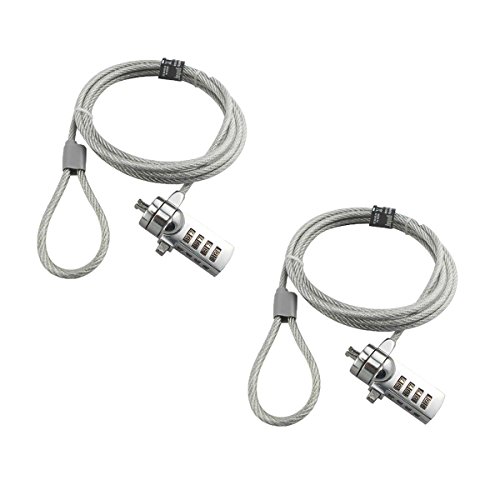
- Two locks included
- Six-foot galvanized wire ropes
- Four-digit resettable combinations
Best For: Securing two compatible notebooks or keeping a spare lock
Best Slim Standard-Slot Pick

- Slim head keeps thin laptops flat
- Resettable four-wheel code
- Six-foot cut-resistant cable
Best For: Thin laptops with a standard Kensington T-Bar slot
Best for Dell Laptops
N17 Dell Combination Security Cable

- Fits Dell and Alienware wedge slots
- 10,000 resettable combinations
- Six-foot carbon steel cable
Best For: Dell or Alienware laptops with a wedge-type lock slot
Best Universal Compatibility

- Supports K-Slot, Nano, and Wedge
- Resettable four-digit combination
- 360-degree rotating head
Best For: Mixed laptop fleets and travel across multiple slot types
Nano-Slot Specialist
Kensington NanoSaver Combination Lock

- Slim head keeps ports accessible and the laptop stable
- Resettable four-wheel code with 10,000 combinations
- Six-foot carbon steel cable for compatible nano slots
Best For: Select HP, Lenovo, and Asus laptops with nano-sized lock slots
Simple Standard-Slot Pick

- Fits standard 7mm x 3mm T-shaped slots
- Resettable four-digit code with 10,000 combinations
- 1.7-meter steel cable and pivoting ball-joint head
Best For: Slim laptops with a standard-size security slot
Most Versatile Fit
Kensington Universal 3-in-1 Lock

- Adapters fit standard, nano, and wedge-shaped slots
- Resettable four-number dial with 10,000 combinations
- Six-foot carbon steel cable with interchangeable tips
Best For: Mixed-device offices and laptops with different slot designs
Best Standard-Slot Pick – Kensington T-Bar Combination Lock
For laptops and other equipment with a standard Kensington security slot, this combination laptop locking cable pairs a resettable four-digit code with a six-foot carbon-steel cable. Its push-button design is convenient for regular use, but check your device’s slot type before buying.
Best For: Offices, classrooms, and shared spaces using laptops or other devices with a standard Kensington slot.
Pros:
- Offers 10,000 possible resettable combinations.
- Six-foot cut-resistant carbon-steel cable anchors to fixed objects.
- Push-button engagement supports one-handed attachment.
- Works with laptops, monitors, TVs, docking stations, projectors, and other compatible equipment.
Cons:
- Not compatible with Dell or Alienware devices using Noble slots.
- May not fit some 2016-and-newer Dell laptops and tablets.
This is a versatile standard-slot option with broad device compatibility and useful everyday handling. Confirm that your laptop has a Kensington T-Bar slot rather than a Nano or Noble slot.
Best Simple Budget Option – Sendt Notebook Combination Cable
The Sendt cable is a straightforward choice for shoppers seeking combination laptop locking cables for school, library, college, or office use. It has a six-foot cable and a user-settable four-dial lock designed to help prevent accidental combination changes.
Best For: Students and shared-workspace users with devices that have a compatible Kensington security slot.
Pros:
- Provides up to 10,000 user-settable combinations.
- Six-foot cable offers flexibility when securing a laptop.
- Zinc alloy construction and a design intended to prevent accidental resetting.
Cons:
- Does not fit Dell laptops or Kensington Nano and Noble wedge slots.
- Limited to devices with a compatible Kensington security slot.
Its uncomplicated design makes it suitable for routine laptop security where compatibility is clear. Verify the slot specification before ordering, especially for Dell systems and newer thin laptops.
Best for Nano Slots – Kensington Slim Laptop Combination Lock
Thin laptops with Nano-sized security slots need a slimmer lock head than standard-slot models. This Kensington combination laptop locking cable uses a low-profile head, a five-foot carbon-steel cable, and a resettable four-wheel code for compatible devices.
Best For: Thin laptops with Nano-sized security slots used in cafes, shared spaces, or while traveling.
Pros:
- Slim lock head is designed for Nano-sized slots and helps the laptop lie flat.
- Five-foot carbon-steel cable resists cutting attempts and anchors to fixed points.
- Provides 10,000 resettable four-digit combinations.
- Pivoting head and rotating anchor can improve access around the lock slot.
Cons:
- Compatible with Nano-sized slots rather than standard or Noble slots.
- Five-foot cable is shorter than the six-foot cables in some alternatives.
This is the most targeted choice here for newer, thin devices equipped with Nano slots. Confirm the slot size and shape before purchase, since the slim design is intended for that specific interface.
Best Two-Pack Value – AOMGD Dual Laptop Lock Cables
For securing two compatible devices or keeping a spare available, this two-pack provides combination laptop locking cables with six-foot galvanized wire ropes and four-digit resettable locks. Compatibility is selective, so review the listed exclusions and confirm your device uses a suitable 3-by-7mm keyhole.
Best For: Users who need two locks for compatible laptops or notebooks with suitable 3-by-7mm slots.
Pros:
- Includes two laptop security locks.
- Six-foot cables use galvanized wire rope and hardened stainless steel construction.
- Four-digit keyless locks offer 10,000 possible codes.
- Combination can be changed without carrying keys.
Cons:
- Not compatible with several listed Lenovo, Acer, Dell, and newer MacBook models.
- The combination-setting process requires a small flat-head screwdriver.
- The set combination cannot be reset if forgotten.
This pack can be practical for multi-device setups, but its compatibility warnings deserve careful attention. Test the newly set combination before attaching either lock and record the code securely.
Best Slim Standard-Slot Pick – Slim T-Bar Combination Lock
The Kensington K60600WW is a practical choice among combination laptop locking cables for thin-and-light laptops with a standard Kensington T-Bar slot. Its slim lock head, resettable four-wheel code, and six-foot cable suit offices, cafés, and other shared spaces.
Best For: Thin laptops and 2-in-1 devices with a standard Kensington lock slot that need to remain flat on a desk.
Pros:
- Slim head is designed not to lift ultra-thin or 2-in-1 laptops off the surface.
- Resettable four-wheel combination offers 10,000 possible codes.
- Six-foot cut-resistant carbon steel cable and pivoting head support flexible anchoring.
Cons:
- Not compatible with Dell or Alienware wedge slots.
- Not intended for Kensington NanoSaver slots.
This is a focused option when your laptop has the standard T-Bar slot and a low-profile fit matters. Check the slot type before buying, especially for Dell, Alienware, or Nano-equipped systems.
Best for Dell Laptops – N17 Dell Combination Security Cable
Kensington N17 Dell Laptop Computer Lock, Combination Security Locking Cable (K68008WW) Black
Check Price On AmazonThe Kensington N17 is one of the more targeted combination laptop locking cables, built specifically for Dell and Alienware laptops with wedge-type security slots. It combines a resettable four-wheel code with a six-foot carbon steel cable for use at desks, tables, and other fixed structures.
Best For: Dell and Alienware laptops equipped with a compatible wedge-shaped lock slot.
Pros:
- Designed to fit Dell and Alienware wedge-type lock slots.
- Resettable four-wheel combination provides 10,000 possible codes.
- Six-foot cut-resistant carbon steel cable supports flexible anchoring.
- Independently tested for several security and durability standards.
Cons:
- Its wedge-slot compatibility is specialized rather than universal.
- Compatibility should be confirmed before purchase.
Choose this model when your Dell laptop uses the wedge slot it was designed for. It is a better fit than a standard T-Bar lock for compatible Dell and Alienware systems, but it is not a universal cable.
Best Universal Compatibility – 3-in-1 Laptop Cable Lock
The AboveTEK TL-280C stands out among combination laptop locking cables for supporting three common slot types: K-Slot, Nano, and Wedge. Its resettable four-digit code, rotating head, and six included spacers make it a flexible option for mixed-device environments and travel.
Best For: Users who need one cable lock for laptops with K-Slot, Nano, or Wedge security slots.
Pros:
- 3-in-1 design supports K-Slot, Nano, and Wedge slots.
- Resettable four-digit combination provides 10,000 possible codes.
- 360-degree rotating head supports flexible positioning.
- Galvanized steel cable and zinc alloy head have a protective vinyl coating.
Cons:
- Slot compatibility should still be checked before purchase.
- Its universal design may be unnecessary if you only use one slot type.
This is the most adaptable choice in the group, particularly for offices, campuses, or business travel involving different laptop brands. Confirm your device’s slot type and use the included spacers as needed.
Nano-Slot Specialist – Kensington NanoSaver Combination Lock
For compatible ultra-thin laptops, the Kensington NanoSaver is a focused choice among combination laptop locking cables. Its slim lockhead is designed for select HP, Lenovo, and Asus laptops with a nano-sized security slot, while the resettable four-wheel code avoids carrying a key.
Best For: Select HP, Lenovo, and Asus laptops or compatible Kensington docking stations with a nano-sized lock slot.
Pros:
- Slim lockhead helps the laptop lie flat and keeps ports accessible.
- Four-wheel resettable combination provides 10,000 possible codes.
- Six-foot carbon steel cable resists cutting and includes a plastic sheath.
- Pivoting cable head supports flexible, one-handed attachment.
Cons:
- Compatibility is limited to devices with a nano-sized lock slot.
- It may not fit laptops with standard or wedge-shaped security slots.
This is a practical, low-profile option when you have confirmed the laptop’s slot type. Kensington also includes code-retrieval support through its Register & Retrieve program, plus a two-year warranty and lifetime technical support.
Simple Standard-Slot Pick – Slim 4-Digit Laptop Lock
This Multplx model is a straightforward choice for combination laptop locking cables when your device uses a standard 7mm x 3mm T-shaped lock slot. It combines a resettable four-digit code with a 1.7-meter steel cable and a pivoting lock head for easier positioning.
Best For: Slim laptops with a standard-size 7mm x 3mm security slot.
Pros:
- Resettable four-digit combination offers 10,000 possible codes.
- Easy flick switch supports quick locking and unlocking.
- 1.7-meter hard cut-resistant steel cable provides setup flexibility.
- Pivoting ball-joint lock head helps reduce stress on the laptop body.
Cons:
- Compatibility is limited to standard-size 7mm x 3mm lock slots.
- It does not include the multi-slot adapters offered with universal models.
Choose this lock if your laptop has the specified standard slot and you want uncomplicated combination access. Its compact, slim design and flexible head make it suited to everyday desk or table tethering.
Most Versatile Fit – Kensington Universal 3-in-1 Lock
The Kensington Universal 3-in-1 is the most adaptable option in this group of combination laptop locking cables. Interchangeable tips support standard, nano, and wedge-shaped security slots, making it useful for mixed-device environments or for buyers who want broader compatibility.
Best For: Households, offices, or shared spaces using laptops with different security-slot designs.
Pros:
- Works with standard, nano, or wedge-shaped laptop security slots.
- Included tips are easy to change, with a tether for storing unused adapters.
- Resettable four-number dial provides 10,000 possible combinations.
- Six-foot carbon steel cable offers cut and theft resistance.
Cons:
- The interchangeable-tip design is more involved than a single-slot lock.
- Compatibility still depends on using the appropriate included adapter.
This is the strongest pick when device compatibility is the main concern. Its universal tip system helps accommodate different laptop generations and brands, while Kensington’s Register & Retrieve service can help recover a forgotten combination.
How We Picked the Best Combination Laptop Locking Cables
We focused on compatibility, locking convenience, cable construction, resettable combination features, and practical workspace use. The selection includes standard T-Bar locks, Kensington Nano-compatible models, Dell N17 options, and universal cables designed for more than one slot style. We also considered cable length, portability, included quantity, and whether a product makes sense for a single laptop or a shared equipment area.
Compatibility comes first: a strong cable is not useful if its locking head does not fit your laptop. Product descriptions and manufacturer specifications should be checked against the security slot on your specific computer.
Quick Comparison
| Type | Best For | What to Check |
|---|---|---|
| Standard T-Bar | Many business laptops and monitors | Confirm the laptop has a standard T-Bar slot |
| Nano-compatible | Thin laptops and newer business models | Look for a Kensington Nano security slot |
| Wedge-compatible | Selected Dell and other compatible laptops | Verify wedge-slot support and fit |
| Universal 3-in-1 | Mixed-device environments | Check the included interchangeable heads or adapters |
| Multi-pack | Classrooms, offices, and shared equipment | Compare cable quality and combination setup |
Key Buying Factors for Combination Laptop Locking Cables
Security Slot Compatibility
Identify the slot before buying. Standard T-Bar, Kensington Nano, and wedge-shaped slots are different formats. Universal locks can simplify purchasing across mixed fleets, but they may be bulkier than a dedicated model.
Cable and Lock Construction
Look for a steel cable with a cut-resistant design and a locking head that fits securely without excessive movement. A longer cable can make it easier to reach a desk leg or other fixed anchor, while a shorter cable is usually easier to carry.
Combination Convenience
Resettable four-digit combinations eliminate the need to carry a key and make shared-device management easier. Set a code that is memorable but not obvious, and store it securely if multiple people need access.
Portability and Installation
Consider cable thickness, lock-head size, and how often the laptop travels. A slim model suits frequent commuters, while a heavier cable may be preferable for a permanent desk. Always attach the cable to a genuinely immovable anchor point.
Who Should Buy Which Combination Laptop Locking Cables?
Choose a standard T-Bar model if your laptop has the common rectangular security slot and you want a straightforward office lock. Choose a Nano-compatible cable for many ultra-thin laptops with the smaller Kensington slot. Dell users should specifically verify whether an N17 or wedge-style lock is required.
A universal 3-in-1 cable is the practical choice for IT departments, schools, and households with different laptop brands. If you need several locks for a classroom or shared workspace, a multi-pack can reduce cost and simplify deployment. For frequent travel, prioritize a compact combination lock with a manageable cable length; for fixed desks, favor robust construction and easy reach to a secure anchor.