The APILDELLA P7 Triple Laptop Screen Extender review is all about one thing: turning a normal laptop into a true mobile workstation.
If you want more screen space without a full docked monitor setup, this is one of the most compelling options.
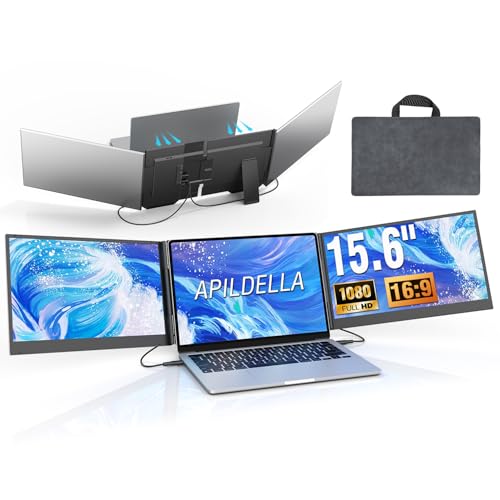
APILDELLA P7 Review Summary
If you spend your day juggling spreadsheets, code, charts, inboxes, or research tabs, the APILDELLA P7 Triple Laptop Screen Extender can be a smart productivity upgrade.
It is especially attractive for remote workers and frequent travelers who want three-screen workflow benefits without carrying a separate monitor stand, display arm, or bulky desk rig.
What makes the APILDELLA P7 stand out is its clamp-free, plug-and-play design.
Instead of relying on a top clamp that can add pressure to a laptop lid, it uses a more laptop-friendly approach and aims to reduce hinge stress.
That design choice matters if you are worried about long-term wear on a thin notebook.
The tradeoff is that compatibility is more demanding than a standard portable monitor.
You need the right ports, and some MacBook users may need the listed adapter solution.
If your laptop matches the requirements, though, this is an efficient way to build a portable dual-external-display setup with far less friction than a traditional dock and monitor combo.
Quick Scorecard
| Category | Score | Why it matters |
|---|---|---|
| Setup and convenience | 9.0/10 | Plug-and-play operation with no driver download and a simplified two-cable connection helps reduce setup hassle for mobile workers. |
| Display quality | 8.0/10 | The 15.6-inch IPS panels, 1080p-class resolution, HDR support, and wide color coverage suggest sharp, vibrant visuals for work and media. |
| Portability | 8.0/10 | The ultra-thin, lightweight aluminum design and included travel bag make it well suited to travel and desk-to-desk use. |
| Compatibility | 7.0/10 | Supports a broad range of laptops and operating systems, but requires specific USB-C DisplayPort or HDMI combinations and may need an extra adapter for some MacBooks. |
| Build and laptop protection | 8.0/10 | The clamp-free design avoids top clamps and is intended to reduce hinge stress and screen damage, while the metal shell adds a premium feel. |
| Viewing flexibility | 8.0/10 | Foldable 0-180° adjustment and support for extension, mirroring, and second-screen modes make it adaptable for productivity workflows. |
Overall, the APILDELLA P7 is best for buyers who value speed, portability, and triple-display productivity more than absolute simplicity.
If your laptop is compatible, it is a very practical buy.
Key Features and Specifications of APILDELLA P7
The APILDELLA P7 is a portable triple laptop screen extender with two attached 15.6-inch displays.
In plain terms, it gives your notebook two extra monitors that travel with the laptop and fold into a compact workstation.
| Specification | Detail |
|---|---|
| Brand | APILDELLA |
| Model | P7 |
| Screen size | 15.6 inches each |
| Display type | IPS |
| Aspect ratio | 16:9 |
| Resolution | 1920 x 1200 pixels max listed; marketed as 1080p FHD |
| Refresh rate | 60 Hz |
| Response time | 2 ms |
| Color gamut | 120% sRGB |
| Picture enhancement | HDR |
| Finish | Glossy |
| Dimensions | 2″ D x 28″ W x 16″ H |
| Weight | Approx. 4 lb |
| Material | Aerospace-grade aluminum alloy shell |
| Viewing adjustment | Foldable 0-180° |
| Modes | Extension, mirroring, second-screen |
| Compatibility | 13-inch to 17.3-inch laptops; Mac, Windows, Chrome, Switch |
| Connection requirement | 2 USB-C ports with DisplayPort support or 1 USB-C plus 1 HDMI port |
| MacBook note | M1-4 chip MacBook requires H5-T adapter/cable solution |
Those specs tell you a lot about the target buyer.
This is not a casual accessory for occasional movie watching.
It is designed for serious multitasking, especially where each extra screen can save real time.
The dual-monitor setup uses an independent video signal for each panel while sharing power.
That matters because it improves practical workflow flexibility and helps avoid the messy cable situation that some competing portable dual-monitor systems create.
The included accessories are also useful: a travel bag, two USB-C to C cables, one USB-A to C cable, one HDMI to C cable, and a power adapter.
For a mobile productivity device, the bundle is sensible and gives you a better shot at getting started quickly.
Pros and Cons of APILDELLA P7
Here is the APILDELLA P7 Triple Laptop Screen Extender pros and cons breakdown from a buyer’s perspective.
Pros
- Fast setup with minimal friction thanks to plug-and-play operation and no driver download.
- Two external screens in one portable unit for real multi-tasking gains.
- Portable enough for travel with an ultra-thin profile and included bag.
- Clamp-free design is a thoughtful choice for reducing top-lid pressure and hinge stress.
- Good visual specs for work, streaming, and light content creation.
- Multiple display modes give you extension, mirroring, and second-screen flexibility.
- Aluminum shell gives the unit a more premium, durable feel than many plastic rivals.
Cons
- Compatibility is the biggest hurdle; you need the right USB-C DisplayPort or HDMI combination.
- Some MacBook owners need extra setup, especially M1-4 chip users who require the listed H5-T solution.
- Glossy panels can reflect light in bright offices or near windows.
- Bulkier than a single portable monitor because it carries two displays at once.
- Not ideal for ultra-minimalists who only need one extra screen.
The bottom line: the strengths are about productivity and portability, while the weaknesses are mostly about compatibility and bulk.
That is a fair tradeoff for this category.
How the Triple Screen Setup Works
The APILDELLA P7 is built around a simple idea: turn the laptop into the center display and add two side screens.
That gives you a multi-panel workflow without needing a dock, separate monitor stand, or a desk full of hardware.
For many buyers, the real appeal is workflow speed.
You can keep your main app in the middle, use one side for email or chat, and reserve the other for documents, browser tabs, trading charts, or reference material.
That kind of arrangement is especially useful for analysts, programmers, project managers, accountants, and students doing heavy research.
The foldable 0-180° adjustment helps here.
If you work in a coffee shop, on a train table, or at a small shared desk, being able to tune the angle matters.
It is also helpful when you want the screens positioned more vertically for reading or more open for collaboration.
Because each monitor receives an independent video signal, the setup is better suited to real productivity use than cheap split-screen gimmicks.
You are not just widening the canvas; you are creating a more organized workspace.
Best use case: turning a laptop into a travel-ready command center for multitasking work.
Worst use case: casual users who only open a browser and a few tabs.
For buyers comparing a triple screen laptop monitor attachment with a simple portable monitor, the APILDELLA P7 clearly targets the more demanding workflow user.
Compatibility and Port Requirements
This is the section buyers should read carefully before ordering.
The APILDELLA P7 review would not be complete without stressing that compatibility is good, but not universal.
According to the product data, the unit works with 13-inch to 17.3-inch laptops and supports Mac, Windows, Chrome, and Switch.
That is broad enough for many buyers, but the real requirement is the right output configuration: either two USB-C ports with DisplayPort support or one USB-C plus one HDMI port.
That means some laptops will be a perfect fit while others will need an adapter or simply will not be worth the trouble.
A USB-C port alone is not enough unless it carries video output.
Before buying, check your laptop’s port specs and do not assume every USB-C port is display-capable.
MacBook users should pay special attention.
The listing notes that M1-4 chip MacBook compatibility requires the H5-T adapter/cable solution.
That is not necessarily a deal-breaker, but it is a real consideration because it adds complexity and can affect whether the product remains as easy to use as it appears.
If your setup already uses a dock or hub, compare the APILDELLA P7 with your current workflow.
Some buyers will prefer a standard laptop screen extender with USB-C, while others will appreciate the cleaner, integrated approach of this model.
Buying advice: confirm your ports first, then choose the APILDELLA P7 if you want portability and screen count over absolute plug-anywhere convenience.
Display Quality for Work and Media
The display package is one of the strongest parts of this product.
The two 15.6-inch IPS panels are marketed as 1080p FHD-class, with a listed maximum resolution of 1920 x 1200 pixels.
That combination should deliver a sharp enough workspace for office use, browsing, video calls, and light creative tasks.
The 120% sRGB color gamut and HDR support are especially welcome in this category.
Those specs suggest richer colors than the bare minimum portable display, which helps if you use the screens for media, design mockups, photo browsing, or color-sensitive productivity work.
The 60Hz refresh rate is standard for this category, and the 2 ms response time is more than adequate for day-to-day use.
The glossy finish is a mixed bag.
On the positive side, glossy panels can look punchier and more vibrant.
On the negative side, they are more likely to reflect windows, lamps, and overhead lighting.
If you work in bright environments, that is one of the main drawbacks to factor in.
For media, the APILDELLA P7 should be pleasant enough for streaming and casual viewing.
But the bigger win is not entertainment; it is the efficiency of having three screens in a portable form factor.
If you are comparing it with a portable IPS monitor for laptop use, remember that the APILDELLA P7 gives you twice the extra screen real estate in one product.
That is its core advantage.
Travel Use and Desk Setup
The portable design is one of the APILDELLA P7’s strongest selling points.
At roughly 4 pounds and only about 0.16 inches thick in profile, it is clearly meant to travel.
The included carry bag reinforces that intent and makes it more realistic to move between home, office, hotel room, and coworking space.
Still, buyers should not confuse “portable” with “small.” This is a dual-monitor accessory attached to a laptop, so it will be physically larger than a single external display.
If your bag space is already tight, or if you often work in very cramped settings, the added bulk may matter.
On a desk, the APILDELLA P7 should create a surprisingly tidy setup because the design reduces the need for external monitor stands and extra power bricks.
That convenience is a major reason this product can make sense for mobile professionals.
It also makes setup and teardown quicker than traditional monitor-based workstations.
Where it shines: hotel desks, temporary offices, client visits, campus work, and flexible remote work.
Where it is less ideal: ultra-light travel where every ounce and inch of bag space matters.
If you are comparing it with a portable dual monitor for laptop setups, the APILDELLA P7 offers more screen space but also more physical presence.
That is the trade.
What’s Included in the Box
The included accessories are practical and well matched to the device:
- APILDELLA P7 triple screen extender
- Travel bag
- 2 USB-C to C cables
- 1 USB-A to C cable
- 1 HDMI to C cable
- Power adapter
This is a solid bundle because it acknowledges real-world setup differences.
Not every laptop owner uses the same ports, and having multiple cable types is a sensible design decision.
It also reduces the chance that you will need to immediately buy extra accessories just to test the unit.
The one thing to verify is whether your device needs the additional MacBook solution mentioned in the product details.
If so, factor that into your buying decision before checking out.
APILDELLA P7 Alternatives to Consider
If the APILDELLA P7 seems close but not quite right, consider a few common alternatives sold on Amazon.
- ASUS portable monitor — a good option if you want a single well-known portable display instead of a triple extender.
- Lenovo portable monitor — worth considering for shoppers who prefer a mainstream brand with a simpler setup.
- portable dual monitor for laptop — useful if you want extra screens but do not need the full three-screen footprint.
- laptop screen extender with USB-C — better if your priority is maximum USB-C convenience and broad accessory choice.
Compared with these options, the APILDELLA P7 is more specialized.
It wins when your priority is all-in-one triple-screen productivity, not when your priority is lowest complexity.
Who Should Buy APILDELLA P7?
The APILDELLA P7 is a good fit for people who want a serious productivity boost without committing to a fixed desk setup.
- Remote workers who move between home and office.
- Analysts, traders, coders, and project managers who need multiple panes open at once.
- Students and researchers who keep notes, sources, and writing windows visible simultaneously.
- Frequent travelers who want a fast, repeatable multi-screen setup in hotels or coworking spaces.
- Users who dislike top clamps and want a more laptop-friendly attachment style.
It is less suitable for buyers who want a simple, universal display accessory.
You should probably skip it if:
- your laptop ports do not match the required output setup,
- you use a MacBook and do not want to deal with the H5-T workaround,
- you only need one extra screen,
- you work in very bright spaces and dislike glossy panels.
In other words, this is not a casual add-on.
It is a purpose-built productivity tool for buyers who know they will use the extra screens every day.
Design and Usability: Why the APILDELLA P7 Feels Different
One reason the APILDELLA P7 stands out is its design philosophy.
Many laptop screen extenders lean heavily on clamps and rigid support points that can make a laptop feel top-heavy.
APILDELLA’s clamp-free approach is meant to avoid that issue, and from a usability perspective, that is a meaningful improvement.
The aerospace-grade aluminum shell also helps the product feel more refined than many generic accessories.
For a device that will be opened, folded, packed, and unpacked repeatedly, metal construction is a good choice.
It suggests the product was designed for real-world movement rather than just a desk demo.
The 0-180° adjustment is another practical detail.
A triple-screen layout is only helpful if the screens can be positioned well in different environments.
This adjustment range gives buyers more control than a fixed-angle design would.
The biggest usability issue remains setup compatibility, not the hardware itself.
Once connected correctly, the experience should be straightforward.
But if your laptop is a marginal fit, that convenience advantage quickly fades.
That is why checking ports before purchase is essential.
Is APILDELLA P7 Worth It?
Yes — the APILDELLA P7 Triple Laptop Screen Extender is worth it for the right buyer.
If you genuinely need portable triple-screen productivity, want a faster setup than a dock-and-monitor rig, and have a compatible laptop, this is a smart and practical choice.
The strongest reasons to buy are clear: easy plug-and-play use, portable dual-screen expansion, clamp-free laptop protection, and respectable display quality.
Those benefits make it especially appealing to mobile professionals who want a travel-friendly workstation that can be packed away quickly.
The reasons to hesitate are also clear: compatibility matters a lot, some MacBook owners need extra equipment, and the glossy panels may not suit every workspace.
If you are the type of buyer who wants universal simplicity, a single portable monitor or a conventional laptop screen extender may be the safer option.
My verdict is straightforward: buy the APILDELLA P7 if your laptop meets the port requirements and you will truly use all three screens.
If that sounds like you, it offers strong productivity value and a thoughtful design that fits modern mobile work.
Final buying advice: check your ports, confirm Mac compatibility if needed, and choose the APILDELLA P7 when you want a portable multi-monitor setup that feels more like a workstation than an accessory.