Accurate color depends on more than a good monitor. Ambient light, screen brightness, white balance, and room conditions can all affect how your work looks and how reliably it reproduces elsewhere.
We selected 10 calibration tools and light meters for photographers, video creators, designers, and color-managed offices. The lineup includes monitor colorimeters, portable light meters, and workflow kits for different levels of control.
Best 10 Color Calibration Tools with Ambient Light Sensor Picks for 2026
Best Standalone Light Meter

- Measures ambient and flash lighting characteristics
- Bluetooth app provides real-time readings
- Supports multiple meters and up to 40 hours of use
Best For: Photo, video, and lighting production measurements
Best Projector-Friendly Option

- Calibrates monitors and projectors
- Diffuser arm supports ambient-light measurement
- Repeatable optical design and integrated tripod mount
Best For: Mixed monitor, projector, and ambient-light workflows
Best Advanced Workflow

- Supports displays up to 12,000 nits and modern backlights
- Adds display analysis, 3D LUTs, and multi-monitor tools
- Adapts profiles using ambient-light readings and meter integration
Best For: Professional multi-display photo, video, and design work
Best Mapping Meter
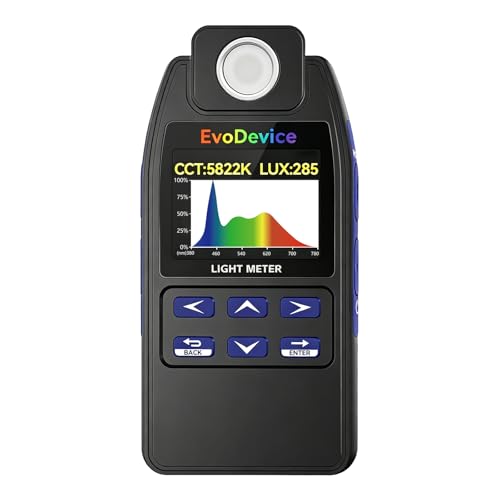
- Measures lux and CCT for many common light sources
- Maps up to 99 points to assess light distribution
- Spectrum mode is scoped to certain white LEDs
Best For: Lighting checks and multi-point uniformity testing
Best Monitor Calibration Choice

- Calibrates monitors and projectors for display color precision
- Monitors room light and supports automatic profile changes
- Includes tools for matching multiple displays
Best For: Professional photo and video display workflows
Best Smart Lighting Analyzer

- Measures lux, CCT, EML, mEDI, contrast, and uniformity
- Connects to iOS and Android through Bluetooth
- Offers AAA-battery or Micro-USB power
Best For: Professional lighting and circadian-environment analysis
Easy Workflow Pick

- Guided 1 2 3 calibration workflow
- Supports up to two displays
- Includes before-and-after comparison
Best For: Creators who want simple calibration for one or two monitors
Ambient-Light-Aware Choice

- Monitors room light and can change profiles automatically
- Guided single-click calibration workflow
- Supports multiple laptop and desktop monitors
Best For: First-time users who need calibration with room-light monitoring
Capture-to-Edit Kit

- Combines monitor and camera profiling tools
- Supports RAW custom camera profiles
- Works with mini LED, OLED, and Apple XDR displays
Best For: Photographers building a consistent capture-to-edit workflow
Best High-Brightness Pick – Display Pro HL
For photographers and designers working with bright LCD, Mini LED, OLED, or HDR displays, this is one of the more capable color calibration tools with ambient light sensor functionality. Its high-luminance sensor measures up to 3000 nits, while the included PROFILER software provides detailed control over display targets and validation.
Best For: Creative professionals calibrating modern high-brightness displays, Apple XDR screens, multiple monitors, or compatible projectors.
Pros:
- Measures displays up to 3000 nits, including LCD, Mini LED, OLED, and compatible projectors.
- PROFILER software supports custom white point, luminance, contrast, gamma, presets, and patch sets.
- Includes profile validation, uniformity checks, flare correction, and multi-monitor workflow tools.
- USB-C connectivity includes a USB-A adapter, plus a travel pouch and tripod-style mounting thread.
Cons:
- Its advanced features may be more than casual users need.
- High-luminance capability is most valuable on premium or HDR-capable displays.
The Display Pro HL stands out when calibration accuracy on bright, modern panels is the priority. It is a strong choice for users who also want detailed validation and repeatable multi-display workflows.
Best Standalone Light Meter – LightColor Meter
The Datacolor LightColor Meter is designed for measuring the light around your setup rather than directly profiling a monitor. For shoppers comparing color calibration tools with ambient light sensor capabilities, it offers broad ambient and flash-light readings, Bluetooth app integration, and portable operation.
Best For: Photographers, filmmakers, and production teams checking changing light levels, color temperature, and green-magenta balance.
Pros:
- Measures lux, chromaticity, color temperature from 1,600K to 20,000K, and DUV balance.
- Works with LED, tungsten, HMI, fluorescent, strobe, and outdoor lighting.
- Bluetooth 4.0 LE sends readings in real time to the free mobile app.
- Supports multiple meters up to 80 feet away and runs for up to 40 hours on two AAA batteries.
Cons:
- It is a light and color meter, not a monitor colorimeter by itself.
- Its app-connected workflow requires a compatible mobile device.
This is a specialized companion for measuring room or production lighting. Choose it when environmental light data matters as much as display calibration, particularly in photo and video environments.
Best Projector-Friendly Option – ColorChecker Display Pro
The Calibrite ColorChecker Display Pro is a practical monitor and projector colorimeter with an optical design intended for repeatable profiling. Its rotatable diffuser arm also supports ambient light measurement, making it relevant for buyers seeking color calibration tools with ambient light sensor functionality.
Best For: Users who need dependable monitor calibration plus occasional projector profiling or ambient-light checks.
Pros:
- Supports monitor and projector calibration with the supplied ccProfiler or i1Profiler software.
- Optical design promotes repeatable results across the same display and different display types.
- Rotatable diffuser arm works as a tabletop projector stand, ambient-light aid, and optics cover.
- Integrated tripod mount helps with projector profiling in larger venues.
Cons:
- The supplied notes do not specify a high-luminance measurement range.
- Software and feature support may depend on the selected profiling application.
This model is especially useful when a calibration workflow includes both screens and projectors. Its diffuser arm and mounting options add flexibility beyond basic monitor profiling.
Best Advanced Workflow – SpyderPro Monitor Calibrator
The datacolor SpyderPro combines monitor calibration, display analysis, and room-light adaptation in a single workflow. It is a strong contender among color calibration tools with ambient light sensor capabilities, supporting modern backlights, deep calibration options, and integration with the Datacolor LightColor Meter.
Best For: Professional photo, video, and design users managing multiple displays, wide-gamut workflows, or changing room lighting.
Pros:
- Supports Wide LED, OLED, QD-OLED, Apple Liquid Retina XDR, and Mini LED displays up to 12,000 nits.
- Offers deeper grayscale calibration, unlimited gamma, white point, and brightness settings.
- Includes projector calibration, display analysis, 3D LUT export, uniformity checks, and multi-monitor tools.
- Ambient-light reading and LightColor Meter integration can adapt profiles to room lighting.
Cons:
- Its extensive professional features may be unnecessary for simple monitor calibration.
- Some room-light integration features rely on the separate Datacolor LightColor Meter.
- It requires a nonstandard battery according to the supplied details.
SpyderPro is the most workflow-focused option here for users who need calibration, analysis, and consistency across several displays. Its broad display support and room-light features make it well suited to demanding production environments.
Best Mapping Meter – E130 Light Meter
If you need color calibration tools with ambient light sensor capabilities for evaluating a physical lighting environment, the E130 measures lux and color temperature (CCT) across sources such as LEDs, fluorescent lights, HID, and sunlight. Its 99-point mapping feature helps reveal uneven illumination instead of relying on a single reading.
Best For: Lighting checks, room or workspace comparisons, and before-and-after assessments where coverage and distribution matter.
Pros:
- Measures illuminance and CCT across a broad range of common light sources.
- Records up to 99 measurement points for evaluating lighting uniformity.
- Includes hold/freeze controls and a handheld design with simple controls.
Cons:
- The spectrum mode is intended for phosphor-converted white LEDs using 420nm/450nm chips.
- Spectrum curves are not intended for analysis of sunlight, sodium, metal halide, or CFL lighting.
The E130 is a practical choice when you want portable lux and CCT readings plus a more complete picture of light distribution. Its spectrum limitation is important to note if you need broad-spectrum analysis.
Best Monitor Calibration Choice – Datacolor Spyder X Elite
For display-focused color calibration tools with ambient light sensor monitoring, the Datacolor Spyder X Elite is designed for professional photographers and motion imagemakers. It supports monitor and projector calibration, room-light monitoring, automatic profile changes, and matching multiple displays.
Best For: Photographers, video professionals, and users who need precise monitor, projector, or multi-display calibration.
Pros:
- Uses a lens-based color engine for monitor calibration and display matching.
- Monitors room light and can automatically change profiles.
- Includes StudioMatch Assistant, SpyderProof comparisons, and guided calibration tools.
- Supports calibration settings for TV and video standards.
Cons:
- Its focus is monitor and projector calibration rather than measuring general room illumination.
- The supplied details list a one-year manufacturer warranty.
The Spyder X Elite is the most directly suited option here for screen color work. Its room-light monitoring and multi-display features make it particularly useful in professional editing environments.
Best Smart Lighting Analyzer – In.Licht Pro Light Meter
The In.Licht Pro is a compact option among color calibration tools with ambient light sensor capabilities, combining illuminance and CCT readings with light-uniformity and circadian-light metrics. Bluetooth connectivity lets you review real-time data through its iOS and Android app.
Best For: Architects, lighting designers, horticulturists, and workspace planners assessing visual and circadian lighting conditions.
Pros:
- Measures illuminance, CCT, EML, mEDI, visual contrast, and uniformity.
- Connects to iOS and Android devices for real-time analysis.
- Compact 40g design includes a magnetic form and lanyard hole.
- Supports either three AAA batteries or Micro-USB power.
Cons:
- App use requires downloading the In.Licht Pro Lighting Meter app and connecting through Bluetooth.
- Its broad metric set may be more than needed for basic lux or CCT checks.
The In.Licht Pro stands out when lighting evaluation extends beyond color temperature and brightness. Its app-based workflow and circadian metrics make it a strong fit for health-conscious or professionally designed environments.
Easy Workflow Pick – Calibrite Display 123
For creators seeking color calibration tools with ambient light sensor features, the Calibrite Display 123 emphasizes a straightforward monitor-calibration process. Its guided workflow, USB-C connection, and before-and-after check make it approachable for photo editing and everyday color-accurate viewing.
Best For: Photographers and creators who want simple calibration for one or two displays.
Pros:
- Guided Easy 1 2 3 workflow helps simplify setup.
- Supports calibration for up to two monitors.
- Includes brightness target choices and a before-and-after comparison.
- Compact body with an adjustable counterweight for screen placement.
Cons:
- Its feature set is focused on approachable monitor calibration rather than a broader camera-to-edit workflow.
- The supplied notes do not specify an ambient-light monitoring function.
The Display 123 is a practical choice when ease of use and dual-display consistency matter most. It offers useful confirmation tools without making the calibration process feel overly technical.
Ambient-Light-Aware Choice – Datacolor Spyder X Pro
The Datacolor Spyder X Pro is a strong fit for shoppers comparing color calibration tools with ambient light sensor capability. Its room-light monitoring, automatic profile changing, and guided software workflow are designed to help maintain more consistent screen color as viewing conditions change.
Best For: First-time users and photographers calibrating multiple laptop or desktop displays.
Pros:
- Room-light monitoring supports adjustments for changing surroundings.
- Offers automatic profile changing and a lens-based color engine.
- Single-click calibration and a wizard workflow make setup approachable.
- SpyderProof provides a before-and-after view using your own images.
Cons:
- The supplied details do not mention USB-C connectivity.
- Its listed one- to two-minute calibration time may not describe every setup or target.
Among these options, the Spyder X Pro is the clearest match for users who specifically want room-light monitoring alongside monitor calibration. It balances automated assistance with multiple calibration targets and multi-display support.
Capture-to-Edit Kit – Calibrite Photo Kit
The Calibrite Photo Kit combines monitor calibration with camera profiling, making it a broader option among color calibration tools with ambient light sensor considerations. It pairs the Display Pro HL colorimeter with ColorChecker Passport Photo 2 to support a more consistent RAW capture-to-edit workflow.
Best For: Photographers who want monitor calibration and custom camera profiling in one kit.
Pros:
- Combines Display Pro HL monitor calibration with ColorChecker Passport Photo 2.
- Supports custom camera profiles for RAW photography.
- Designed for modern mini LED, OLED, and Apple XDR displays.
- Includes white-balance and exposure references plus customizable software targets.
Cons:
- It is a more specialized and involved kit than a monitor-only calibrator.
- The supplied notes do not specify an ambient-light sensor or room-light monitoring feature.
- Its camera-profiling tools may be unnecessary for users who only need screen calibration.
This kit makes the most sense when color consistency begins in the camera and continues through editing. If you only need a simpler display calibration process, its added Passport and profiling capabilities may be more than necessary.
How We Picked the Best Color Calibration Tools with Ambient Light Sensor
We focused on tools that help measure or manage color in real working conditions, including monitor calibration devices with ambient-light awareness and handheld meters that measure illuminance or color temperature. We considered measurement range, supported display types, software quality, connectivity, portability, workflow simplicity, and suitability for photography, video, design, and print preparation.
Because these products do different jobs, we did not treat a monitor colorimeter and a room-light meter as interchangeable. The right choice depends on whether you need to profile a display, evaluate the light around it, or build a more complete capture-to-edit workflow.
Quick Comparison
- Best for modern high-brightness displays: Calibrite Display Pro HL.
- Best for professional monitor control: Datacolor SpyderPro or Spyder X Elite.
- Best for straightforward monitor calibration: Calibrite ColorChecker Display Pro or Spyder X Pro.
- Best for simple plug-and-play use: Calibrite Display 123.
- Best for measuring room or studio lighting: Datacolor LightColor Meter, E130, or In.Licht Pro.
- Best for a broader photo workflow: Calibrite Photo Kit with Display Pro HL and ColorChecker Passport Photo 2.
Key Buying Factors for Color Calibration Tools with Ambient Light Sensor
Monitor Support and Brightness Range
Check whether the device supports your panel type, including LCD, Mini LED, OLED, wide-gamut, and high-dynamic-range displays. High-brightness screens may require a colorimeter designed for substantially higher luminance than standard office monitors.
Ambient-Light Measurement and Control
An ambient sensor can help software account for changing room conditions or recommend a suitable display brightness. For detailed lighting audits, a dedicated meter is usually more useful because it can measure lux, color temperature, uniformity, or multiple points around a space.
Software and Calibration Flexibility
Look for software that supports target white point, gamma, luminance, profile creation, validation, and multiple displays. Advanced users may value deeper controls, while beginners often benefit from guided steps and automatic recommendations.
Connectivity and Workflow
USB-C compatibility, Bluetooth, cable length, app support, and operating-system compatibility can affect everyday convenience. Also check whether the product is intended for one computer, several displays, or mobile and studio measurements.
Who Should Buy Which Color Calibration Tools with Ambient Light Sensor?
Choose a monitor colorimeter if your priority is consistent on-screen color for photo editing, design, or video. Pick a dedicated light meter if your main concern is the light falling on a subject, workspace, or display. A professional photographer or colorist working with HDR or high-brightness OLED and Mini LED panels should prioritize a high-range device such as the Display Pro HL or an advanced Spyder model.
For occasional editing, an easier guided calibrator can provide the essential benefits without a steep learning curve. Studio photographers, cinematographers, and teams managing several workstations may benefit from combining a monitor calibrator with a Bluetooth or handheld light meter. If you want color consistency from capture through editing, a kit that pairs display calibration with a camera color target is the most complete option.