The best offline reading pens can scan printed text, read it aloud, translate selected languages, and support learners when Wi-Fi is unavailable. They are useful for students, travelers, language learners, and people with dyslexia or other reading difficulties.
This roundup compares 10 scanning and translation pens by offline language support, text-to-speech tools, ease of use, storage, connectivity, and assistive features.
Best 10 Offline Reading Pens Picks for 2026
Best Connected Learning Pen

- Reads scanned text aloud in 57 languages with Wi-Fi
- Includes dictionary, thesaurus, and pronunciation tools
- Saves scans and recordings through ScanNote
Best For: Connected study, dyslexia support, and language learning
Best Offline Language Coverage

- Offline translation for English, Spanish, Japanese, Chinese, and French
- Online translation supports 102 languages
- Combines scanning, audio, notes, and recording
Best For: Students, ESL learners, and travelers needing offline translation
Best for Offline Translation Variety

- Text translation in 10 offline languages
- Online voice translation supports 142 languages
- Adds text-to-speech, dictionary, notes, and recording
Best For: Travelers and language learners wanting broad translation tools
Best Vocabulary Database

- Includes more than 240 dictionaries
- Offers a 2.75-million-term English word library
- Supports scanning, excerpts, recording, and 117-language online translation
Best For: Vocabulary study, textbooks, IELTS, and TOEFL preparation
Best Offline Translator Pen

- Reads scanned text aloud with highlighted words
- Offline translation for five major languages
- Exports scans and includes wireless earbuds
Best For: Travelers and language learners wanting a lightweight reading pen
Best AI Reading Pen

- Adjustable reading levels, speed, and pause time
- Translates 112 languages with text, photo, or voice input
- Includes AI study tools and 16GB exportable storage
Best For: Students and dyslexic readers seeking customizable study features
Best Multilingual Offline Pen

- Offline translation in 10 languages and online support for 142
- Reads and highlights scanned text for comprehension
- Records classes and syncs extracted text to a phone
Best For: Students and travelers needing offline languages plus recording
Best with Extra Features
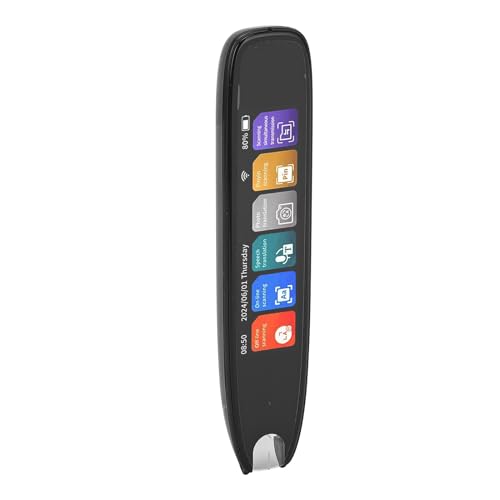
- 10 offline scanning languages plus 142 online languages
- 98% stated scanning accuracy with fast processing
- Touch screen and text-to-speech for study or travel
Best For: Travelers, students, and language learners needing offline scanning
Best Assistive Reading Features
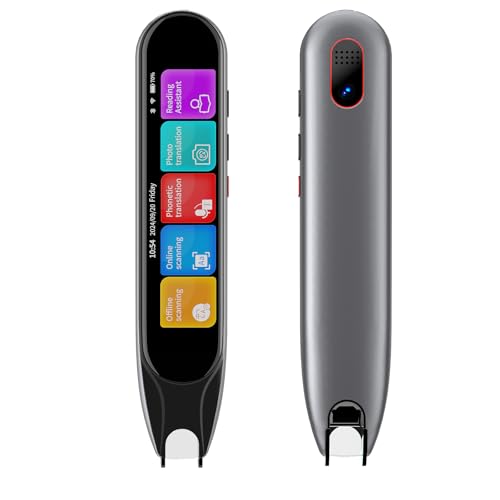
- Offline translation for 10 major languages
- Reads and highlights scanned text aloud
- Lightweight design with Bluetooth headphone support
Best For: Students, ESL learners, and users needing reading assistance
Best Battery and Export Tools

- 13 offline scanning languages and 9 offline voice languages
- Photo translation with a 5-megapixel camera
- Exports scanned text by QR code or USB
Best For: Travelers and students needing translation plus document capture
Best Connected Learning Pen – WorldPenScan Go
The PenPower WorldPenScan Go is a strong choice for shoppers comparing offline reading pens, especially when connected features matter more than offline use. It scans words, phrases, and sentences, reads text aloud, and supports definitions, examples, and pronunciation in 57 languages with Wi-Fi.
Best For: Students, language learners, and readers with dyslexia who want text-to-speech, dictionary support, and PC-based review tools.
Pros:
- Reads scanned text aloud in 57 languages with Wi-Fi.
- Includes a dictionary, thesaurus, example sentences, and pronunciation support.
- ScanNote can save text and recordings for review on computers and Chromebooks.
- Includes an AI Reading Buddy for paragraph simplification and summaries.
Cons:
- Its multilingual recognition and speech features require a Wi-Fi connection.
- It may be more feature-rich than needed for simple offline word lookup.
Choose this model if you want a connected reading ecosystem with adjustable digital review tools and broad language coverage. It is less suitable if offline operation is your primary requirement.
Best Offline Language Coverage – SVANTTO Translator Pen
The SVANTTO S7 stands out among offline reading pens because it combines scanning, audio reading, note-taking, and translation. It supports online translation in 102 languages and offline translation in English, Spanish, Japanese, Chinese, and French, making it practical for study and travel without constant Wi-Fi access.
Best For: Students, dyslexia readers, ESL learners, and travelers needing a mix of offline translation and audio-assisted reading.
Pros:
- Provides offline translation for five languages.
- Offers online translation support for 102 languages.
- Converts scans into editable notes, vocabulary lists, and study outlines.
- Supports adjustable text-to-speech speeds and Bluetooth earbuds.
Cons:
- Offline translation covers fewer languages than its online mode.
- The listed dimensions make it less compact than some pen-style readers.
The S7 is a versatile pick when offline translation is essential but you also want recording and study-management features. Consider it for multilingual households, classrooms, and travel preparation.
Best for Offline Translation Variety – Reading Translator Pen
This reading and translation pen is a flexible option for comparing offline reading pens, with text translation in 10 offline languages and 60 online languages. It also adds text-to-speech, voice translation, a dictionary, word library, recorder, and other built-in media features.
Best For: Language learners, travelers, and readers with learning difficulties who want offline text translation plus broader online voice-translation capabilities.
Pros:
- Supports text scanning and translation in 10 offline languages.
- Offers online text translation in 60 languages and voice translation in 142 languages.
- Converts translated text into voice output and supports Bluetooth headphones.
- Includes dictionary, word library, word book, recorder, and text excerpt functions.
Cons:
- Most of the broader language coverage is online rather than offline.
- The notes do not specify a warranty, battery life, or display details.
This model is appealing when you want more offline text-language options than basic translator pens and a wide range of travel-oriented voice features. Verify the exact offline language set before buying for a specific trip.
Best Vocabulary Database – Wisoqut Reading Pen
The Wisoqut translator pen is worth considering among offline reading pens if vocabulary building is the priority. It combines scanning and text-to-speech functions with more than 240 dictionaries and a 2.75-million-term English word library, while online translation supports 117 languages.
Best For: Students, adult learners, and readers who need extensive English vocabulary support for textbooks, newspapers, IELTS, or TOEFL study.
Pros:
- Includes more than 240 authentic dictionaries with explanations and illustrations.
- Provides a 2.75-million-term English word database for advanced vocabulary needs.
- Scans picture books, textbooks, and newspapers.
- Also supports text excerpts, scanning input, and recording.
Cons:
- The supplied notes specify online translation for 117 languages but do not confirm offline translation.
- Battery life, warranty, and detailed text-to-speech language coverage are not provided.
This is the most academically focused option in the group based on its dictionary and terminology database. Choose it for vocabulary research and study support rather than assuming it provides broad offline translation.
Best Offline Translator Pen – Scanmarker Pal
The Scanmarker Pal is a practical choice for shoppers comparing offline reading pens for language learning, dyslexia support, studying, and travel. It scans printed text, reads it aloud with highlighted words, and provides offline translation for English, Spanish, French, German, and Italian.
Best For: Language learners, travelers, auditory learners, and users seeking a lightweight reading pen with core offline translation support.
Pros:
- Scans, translates, and reads text aloud while highlighting words on screen.
- Supports translation in more than 100 languages, with five offline languages listed.
- Can export scanned text as a digital file and connect to Bluetooth headphones.
- Compact 5.67-gram design includes wireless earbuds, a USB cable, and a one-year warranty.
Cons:
- Offline translation is limited to English, Spanish, French, German, and Italian.
- Requires Bluetooth and USB support for its listed Windows, macOS, and Linux requirements.
Choose the Scanmarker Pal if your priority is a very lightweight offline reading pen with straightforward scanning, read-aloud functionality, and export features. Its offline language coverage is narrower than its online language count, so check that your preferred offline languages are included.
Best AI Reading Pen – NEWYES AI Pen
The NEWYES AI Pen is a feature-rich option for shoppers considering offline reading pens alongside broader study and translation tools. It combines scan-to-speech, adjustable reading controls, photo OCR, AI study features, and 16GB storage in a Bluetooth-enabled pen scanner.
Best For: Students, adults, and readers with dyslexia who want adjustable reading support, multilingual translation, and document export options.
Pros:
- Offers adjustable reading speed and pause time, plus British and American accent options.
- Supports translation between 112 languages through printed text, photos, or voice input.
- Includes AI dictionary, homework checker, image recognition, and scan-to-solve functions.
- Provides six reading levels, 16GB storage, Bluetooth, and TXT, DOC, and PDF export support.
Cons:
- The supplied information does not specify which languages or features work offline.
- At 10 ounces, it is heavier than some compact reading-pen alternatives.
- Its broad AI feature set may be more than users need for basic scanning and read-aloud use.
The NEWYES AI Pen stands out when customizable dyslexia support and study assistance matter as much as scanning. If offline use is essential, verify offline language and AI availability before buying, since those details are not specified in the supplied product information.
Best Multilingual Offline Pen – Scan Translation Pen
This Scan Translation Pen is a strong contender for shoppers specifically comparing offline reading pens with recording and translation capabilities. It supports online translation in 142 languages, offline translation in 10 languages, scan-to-speech reading, text syncing, photo translation, and classroom recording.
Best For: Students, ESL learners, travelers, elderly users, and anyone who needs broader offline language coverage plus lecture-recording features.
Pros:
- Provides offline translation for 10 major languages and online translation in 142 languages.
- Reads scanned text aloud and highlights words to support pronunciation and comprehension.
- Can capture, edit, and sync scanned text to a phone in 52 languages.
- Adds photo translation, classroom recording, Bluetooth headphone support, and left- or right-hand modes.
Cons:
- It is not suitable for blind users, according to the supplied product notes.
- Vertical Japanese text cannot be recognized; horizontal Japanese text is supported.
- At 70 grams, it is heavier than the Scanmarker Pal.
For buyers who prioritize offline reading pens with the widest stated offline language coverage among these options, this model is compelling. Its recording and text-sync tools also suit classroom use, but users should review the Japanese-text limitation and accessibility note before purchasing.
Best with Extra Features – ZAICOLER Scan Reader Pen
For shoppers comparing offline reading pens, the ZAICOLER Scan Reader Pen stands out for its stated support for 10 offline scanning languages alongside 142 online scanning and photo-translation languages. Its touch screen, text-to-speech features, and compact design make it a practical option for studying, travel, and reading foreign-language material.
Best For: Travelers, students, language learners, and users who need offline scanning with text-to-speech support.
Pros:
- Supports 10 offline scanning languages and 142 online scanning or photo-translation languages.
- Claims 98% scanning accuracy and fast full-line processing.
- Works with printed pages, digital screens, and labels without marking soft paper.
- Includes a 3.7-inch touch screen, rechargeable battery, and expandable memory.
Cons:
- Wi-Fi is needed for the online language and photo-translation features.
- The listed manufacturer warranty is 90 days.
Choose this model if broad online coverage and a simple touch-screen workflow matter most. Its offline language selection is useful, though buyers should confirm that their preferred offline languages are included.
Best Assistive Reading Features – MOIDYOU Scan Translation Pen
The MOIDYOU Scan Translation Pen combines offline reading pens functionality with scan reading, text-to-speech, translation, and note-taking tools. It supports 10 offline translation languages and is designed for students, dyslexia support, language learning, and portable use.
Best For: Students, ESL learners, users with dyslexia or learning difficulties, and travelers who want Bluetooth audio support.
Pros:
- Offers online translation in 142 languages and offline translation in 10 major languages.
- Reads scanned text aloud while highlighting words on the screen.
- Supports note-taking, recording, Wi-Fi, and Bluetooth headphones.
- Lightweight 2.33-ounce design fits in a pocket or pencil case.
Cons:
- Bluetooth connection is required for compatible wireless headphone use.
- Offline language support is narrower than online coverage.
- The product notes say it is not suitable for blind users.
This is a strong fit when auditory reading assistance and portability are priorities. Its offline mode covers major languages, while the scan-reading and highlighting features add practical support for comprehension and pronunciation practice.
Best Battery and Export Tools – M60 Translation Reading Pen
The M60 is one of the more feature-rich offline reading pens in this group, combining scan reading, offline translation, photo translation, voice translation, recording, and text export. Its 3.99-inch screen and stated 4-to-6-hour continuous-use battery rating make it suitable for travel, study, and document capture.
Best For: Users who want offline language coverage plus photo translation, note export, recording, and vocabulary tools.
Pros:
- Supports offline scanning translation in 13 languages and offline voice translation in 9 languages.
- Offers online support for 142 languages, with photo translation through its 5-megapixel camera.
- Can export scanned text using a QR code or USB connection without downloading an app.
- Includes text-to-speech, recording, dictionary, IELTS and TOEFL vocabulary lists, and Bluetooth audio.
Cons:
- Continuous battery use is listed at 4 to 6 hours, depending on usage.
- Online functions require 2.4 GHz Wi-Fi or a mobile hotspot.
- At 10.9 ounces, it is heavier than the MOIDYOU model listed here.
The M60 is a compelling choice for buyers who need more than basic scanning, especially those digitizing text or translating signs and menus. Its broader offline scanning list and export functions add flexibility, but its larger, heavier body may matter for frequent carrying.
How We Picked the Best Offline Reading Pens
We focused on the features that matter most in everyday reading: accurate OCR scanning, clear text-to-speech playback, useful offline language coverage, simple controls, and portability. We also considered whether each pen supports translation, recording, photo or voice input, text extraction, Bluetooth, Wi-Fi, and learner-friendly functions.
Because product specifications can vary by region, app version, and included language pack, check the current listing before buying. In particular, confirm which languages work offline rather than only through an internet connection.
Quick Comparison
| Feature | What to check | Why it matters |
|---|---|---|
| Offline support | Number of downloadable or built-in languages | Allows reading or translation without Wi-Fi |
| OCR and scanning | Supported fonts, line-by-line scanning, and recognition accuracy | Determines how reliably printed text is captured |
| Text to speech | Voice quality, speed controls, and pronunciation options | Makes reading assistance more comfortable |
| Connectivity | Wi-Fi, Bluetooth, app requirements, and USB charging | Shows how easily the pen connects and updates |
| Design | Screen size, battery, weight, and physical controls | Affects portability and ease of use for children or adults |
Key Buying Factors for Offline Reading Pens
Offline Language Coverage
Do not judge a pen by its total language count alone. A device may advertise support for dozens of languages online but offer far fewer offline. If independent use is important, verify the exact offline languages and whether they must be downloaded first.
Reading and Translation Features
Look for adjustable speech speed, word definitions, pronunciation playback, and the ability to scan a single line cleanly. Translation is helpful for travel and language study, while text-to-speech and definitions may be more valuable for dyslexia support or classroom reading.
Ease of Use and Accessibility
A responsive touchscreen, clear menus, large text, physical scan buttons, and headphone support can make a major difference. For children, prioritize straightforward controls and durable construction. Adults may prefer richer tools such as recording, photo translation, AI assistance, or text export.
Battery, Storage, and Connectivity
Check battery capacity, expected scanning time, charging method, and internal storage. Wi-Fi is often needed for updates, cloud translation, or extra features, but the pen should remain useful when disconnected if offline reading is your priority.
Who Should Buy Which Offline Reading Pens?
Students and dyslexic readers: Choose a pen with dependable line scanning, natural text-to-speech, adjustable playback, and simple navigation.
Language learners: Prioritize pronunciation tools, definitions, audio playback, and broad offline language support.
Travelers: Look for compact designs, offline translation, photo or voice translation, and strong battery life.
Families and classrooms: Favor durable, easy-to-share models with recording, text extraction, or AI learning tools if those features will be used regularly.