If you need more screen space without hauling a full desktop setup, this Vixtan 14-Inch Triple Screen Laptop Extender review is for you.
It turns a laptop into a portable multi-monitor workstation with surprisingly strong mobility.
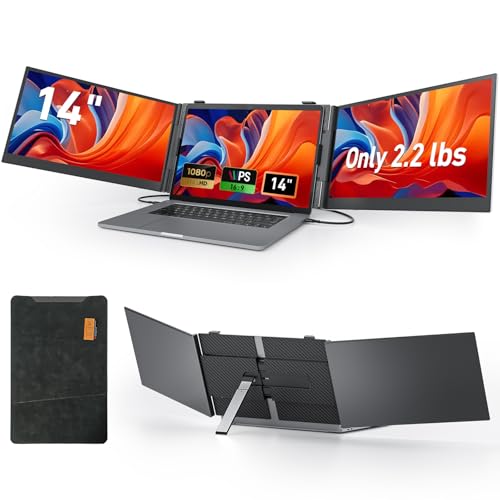
Vixtan Triple Screen Review Summary
The Vixtan 14-Inch Triple Screen Laptop Extender is built for buyers who care about productivity, portability, and fast mobile setup more than minimalist simplicity.
If you work across spreadsheets, browser tabs, dashboards, code windows, charts, or timelines, this is the kind of accessory that can meaningfully change how you use a laptop every day.
What makes it stand out is the combination of triple-screen workspace, FHD IPS panels, and a travel-friendly design that still feels premium.
It is especially appealing for remote workers, traders, analysts, creators, and road warriors who want a real workstation in a compact form factor.
Quick scorecard
| Category | Score | Takeaway |
|---|---|---|
| Portability | 9.0/10 | Very thin, lightweight, and easy to travel with. |
| Display Quality | 8.0/10 | FHD IPS panels with strong color coverage and wide viewing angles. |
| Multi-Screen Productivity | 9.0/10 | Excellent for multitasking-heavy workflows. |
| Compatibility | 8.0/10 | Broad OS support, with some Mac-specific setup notes. |
| Setup Convenience | 7.0/10 | Often plug-and-play, but power and cable selection matter. |
| Stability and Build | 8.0/10 | Aluminum construction and a widened stand inspire confidence. |
Overall, the Vixtan feels like a smart buy for users who want a portable monitor extender that behaves like a real workflow tool, not a novelty gadget.
The main tradeoff is that the triple-screen format adds complexity, so it fits best for people who will actually use all that extra screen real estate.
Key Features and Specifications of Vixtan Triple Screen
The Vixtan 14-Inch Triple Screen Laptop Extender is designed around one clear goal: give you more usable desktop space while staying compact enough to carry.
The spec sheet is strong for a productivity-focused accessory, and it explains why this product has such a specific appeal.
| Specification | Details |
|---|---|
| Brand | Vixtan |
| Screen size | 14 inches |
| Resolution | 1920 x 1080 FHD |
| Aspect ratio | 16:9 |
| Panel type | IPS |
| Brightness | 300 nits |
| Color gamut | 100% sRGB |
| Viewing angle | 178 degrees |
| Screen surface | Glossy with anti-glare treatment |
| Thickness | 0.18 inches |
| Weight | 2.2 lbs |
| Laptop compatibility | 13 to 17 inch laptops |
| OS support | Windows, Mac, Chrome OS, Android, and more |
| Power | No built-in battery; may require external power |
| Included accessories | Type-C x2, USB-C to USB-A, HDMI, H5-T cable, carry bag, leather case |
Several design choices are worth calling out.
The 0.18-inch ultra-thin body and 2.2-pound weight are what make this product practical for travel.
The aerospace-grade aluminum construction is another important detail, because it helps with both durability and heat dissipation.
For buyers who care about visual comfort, the 300 nit brightness, 100% sRGB color gamut, and 178-degree viewing angle are a strong combination.
This is not a gaming-first product, but the image quality is more than sufficient for office work, content creation, browsing, meetings, and analysis.
Pros and Cons of Vixtan Triple Screen
Every product in this category involves a tradeoff between convenience and capability, and the Vixtan 14-Inch Triple Screen Laptop Extender pros and cons make that clear.
Pros
- Extremely portable for a triple-screen setup, especially compared with traditional portable monitors.
- Excellent productivity value for multitaskers who need several windows visible at once.
- FHD IPS panels deliver a crisp and practical viewing experience for work.
- Wide compatibility across major laptop ecosystems and operating systems.
- Stable adjustable stand improves ergonomics and screen positioning.
- Multiple included cables and carry accessories reduce the need to buy extras immediately.
Cons
- External power may be required, so it is not as effortless as a simple single-monitor add-on.
- Mac M1/M2/M3 users may need specific cable and driver steps, which can make setup less plug-and-play.
- Glossy screens can catch reflections in bright rooms or near windows.
- Triple-screen gear is inherently bulkier in use than a single portable monitor or basic docking station.
From a buyer perspective, the biggest advantage is obvious: you get workstation-level screen expansion without committing to a desk-bound monitor rig.
The biggest drawback is equally obvious: if you only need one extra window, this is probably more system than you need.
How the triple-screen setup works
The core value of the Vixtan 14-Inch Triple Screen Laptop Extender is the way it transforms one laptop into a multi-monitor layout.
That can mean extended mode for spreading out tasks, mirrored mode for presentations, or portrait-style workflows for documents, code, or vertical timelines.
For many buyers, this is the reason the product exists.
A laptop display, even on a large machine, can feel cramped when you are juggling communication tools, spreadsheets, research tabs, and a live application.
With three panels, the Vixtan gives you room to keep essential windows visible without constant tab switching.
This is especially useful for:
- Remote work where you need email, chat, and documents open at once
- Trading and financial analysis where charts and tools matter simultaneously
- Content creation for timelines, editing controls, and preview windows
- Development and technical work where code, output, and reference material can live side by side
The tradeoff, of course, is that a triple-screen setup adds weight, hinge complexity, and a little more desk management.
Still, for the right user, the productivity jump is substantial enough to justify it.
Compatibility with Mac and Windows laptops
Compatibility is one of the most important buying factors for any portable monitor extender, and the Vixtan performs well here with a few caveats.
It supports Windows, Mac, Chrome OS, Android, and more, and it is designed for laptops in the 13 to 17 inch range.
That said, laptop support should never be assumed blindly.
Buyers should check whether their machine has the right full-featured USB-C support or whether HDMI and the included cables are the better route.
This matters because portable monitor extenders often depend on how the laptop handles video and power over USB-C.
Mac users deserve special attention.
The product notes mention M1, M2, and M3 compatibility with the included H5-T cable and a driver requirement.
That does not make the Vixtan incompatible with Apple systems, but it does mean the setup may be a little more involved than on a straightforward Windows laptop.
If you use a MacBook, the best way to think about the Vixtan is this: it can be a strong fit, but only if you are comfortable checking cable requirements before you buy.
For Windows users, setup is usually simpler and the product is easier to recommend without hesitation.
Display quality for work and travel
Display quality is another reason this product stands out in the portable monitor category.
The Vixtan uses 14-inch IPS panels with 1920 x 1080 resolution, 100% sRGB coverage, and 300 nits of brightness.
In practical terms, that means text looks sharp, interface elements are easy to read, and colors should be more than good enough for office use and light creative work.
The 178-degree viewing angle is especially helpful when you are sharing your screen, adjusting the hinge position, or viewing from a less-than-perfect angle in a hotel, coworking space, or kitchen table setup.
The screen is also described as anti-glare and eye-care oriented, which should help reduce fatigue during longer sessions.
However, there is a clear limitation here: the screen surface is glossy.
That means reflections can still become noticeable in bright environments.
If you often work near windows or under strong overhead lighting, that is worth considering before you buy.
In a realistic buyer comparison, the Vixtan’s display seems better suited to professional productivity than to color-critical creative work.
Designers will appreciate the color coverage and IPS consistency, but users doing highly precise print-color matching may still prefer a more specialized monitor.
Included cables, power, and setup needs
This is where the Vixtan review becomes especially practical, because setup is often what separates a good portable monitor from a frustrating one.
The extender includes Type-C x2, USB-C to USB-A, HDMI, and H5-T cables, along with a carry bag and drop-proof leather case.
That is a solid bundle and shows the product is designed to be used in multiple environments, not just on one desk.
The biggest setup detail to understand is power.
The Vixtan does not have an internal battery, and some configurations need an external 5V/2A or higher adapter.
That is not unusual for a triple-screen extender, but it does mean buyers should not expect true one-cable simplicity in every scenario.
For many users, the practical rule is simple:
- If your laptop provides enough power and video support, setup may feel close to plug-and-play.
- If your machine is limited, you should expect to use the included power and possibly a specific cable arrangement.
This is one of the main reasons I would call the Vixtan a high-capability accessory rather than a casual add-on.
It is easier to recommend to users who are comfortable reading compatibility notes and following setup steps.
Design, stability, and everyday usability
In daily use, the Vixtan benefits from a thoughtful physical design.
The widened aluminum stand and multi-level height adjustment are important because a multi-screen accessory only works well if the screens stay aligned at a comfortable viewing height.
The 180-degree horizontal rotation also adds flexibility for meetings, screen sharing, and awkward workspaces.
The aluminum body should do more than look premium.
It helps the product feel more rigid and should assist with heat dissipation, which matters in compact electronics.
A portable monitor extender has to handle movement, repeated folding, and transport, so build quality is not just a nice-to-have.
It is part of whether the accessory will age well.
At the same time, the design is still purpose-built.
This is not a sleek single-panel monitor that disappears into a bag.
Even though the Vixtan is impressively thin, the triple-screen format means it will always be more noticeable to carry and set up than a basic portable display.
That is the price of getting three displays in one package.
For the right user, though, the ergonomics are a net positive.
Good stand control and stable positioning matter more than minimalism when you are using the extender for hours at a time.
Alternatives to consider before you buy
If you are still deciding whether the Vixtan 14-Inch Triple Screen Laptop Extender is the right fit, it helps to compare it against a few common alternatives.
- Dual-screen portable monitor – A simpler step up from a laptop screen, usually easier to power and manage than a triple setup.
- Single 14-inch portable monitor – Best if you only want one extra display and value simplicity over maximum workspace.
- Laptop docking station with monitor support – A better desktop-style option if you already use external monitors at a fixed location.
- Portable monitor for MacBook – Worth considering if your main priority is smoother Apple compatibility.
- Folding dual-screen laptop extender – A middle ground for buyers who want portability without going all the way to triple-screen.
Compared with these options, the Vixtan’s advantage is obvious: it offers more screen real estate than most portable competitors.
The downside is that it demands more attention to setup and compatibility.
Who should buy Vixtan Triple Screen?
The Vixtan 14-Inch Triple Screen Laptop Extender is a strong fit for buyers who genuinely need a compact, mobile productivity boost.
If you spend your day moving between apps, tabs, and documents, this kind of device can save time and reduce friction.
Best for:
- Remote workers who want a travel-ready multi-monitor setup
- Traders and analysts who need multiple charts and windows visible at once
- Designers and content creators working on the move
- Business travelers who need a laptop workstation in hotels or coworking spaces
- Users with 13 to 17 inch laptops who want more screen space without buying a full monitor setup
Who should skip it:
- Buyers who only need one extra screen
- Users who want the simplest possible plug-and-play experience
- People who work in very bright spaces and dislike glossy displays
- Mac users who do not want to deal with extra setup steps or cable checks
Put simply, the Vixtan is for buyers who will actively use the extra screens.
If that sounds like you, the value proposition makes sense.
Vixtan Triple Screen Review Summary
So, what is the bottom line on the Vixtan 14-Inch Triple Screen Laptop Extender review?
This is a well-designed portable productivity accessory with real benefits for multitaskers, especially anyone who works away from a traditional desk.
The strongest reasons to buy are its ultra-portable build, FHD IPS picture quality, wide compatibility, and triple-screen workflow flexibility.
The main reasons to hesitate are the need for external power in some setups, the extra complexity of triple-screen hardware, and the Mac-specific considerations.
If you want a portable monitor extender that can seriously improve productivity, the Vixtan makes a lot of sense.
If you want the lightest, simplest, least fussy screen accessory possible, a single portable monitor or a dual-screen model may be the better choice.
Is Vixtan Triple Screen Worth It?
Yes, the Vixtan 14-Inch Triple Screen Laptop Extender is worth it for the right buyer. It is not the most minimal portable monitor solution, but it is one of the more compelling options for people who truly need more screen space on the move.
My verdict is simple: buy it if productivity is your priority and you want a travel-friendly multi-monitor workstation.
The display quality is solid, the build feels thoughtful, and the accessory bundle is practical.
The caveat is that you should go in expecting a more involved setup than a single monitor, especially on Mac.
If you are shopping specifically for a portable monitor extender that boosts serious multitasking without turning your bag into a desktop tower, this is an easy shortlist candidate.
For remote work, financial workflows, and frequent travel, the Vixtan offers a strong balance of capability and portability.
Final buying advice: choose the Vixtan if you want maximum screen utility in a compact form and you are comfortable checking compatibility before purchase.
If that matches your workflow, it is a smart, work-focused buy.