If you want a distraction-free digital notebook, this reMarkable Paper Pro Move review shows why it stands out.
It is built for people who take handwritten notes all day and want them organized in one place.
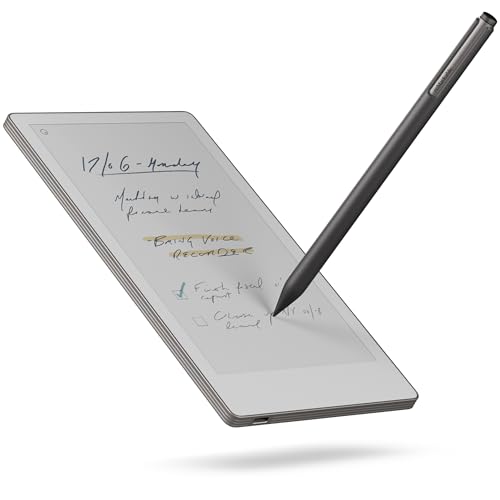
Paper Pro Move Review Summary
The reMarkable Paper Pro Move is a highly specialized e-note tablet that makes the most sense for buyers who care more about handwriting than apps, streaming, or multitasking.
With its 7.3-inch color display, compact footprint, and paper-like pen feel, it is a strong fit for meeting notes, quick sketching, travel journaling, and daily idea capture.
If you are asking is reMarkable Paper Pro Move worth it, the answer depends on your workflow.
For note-takers, the answer is often yes because it combines portability, organization tools, handwriting conversion, and long battery life in a device that feels purpose-built instead of bloated.
For shoppers who want a general tablet, it is the wrong category.
Scorecard
| Category | Score | Why It Matters |
|---|---|---|
| Writing Feel | 9.0/10 | Paper-like handwriting on a color display suits note-taking and sketching. |
| Portability | 10.0/10 | Exceptionally compact and light for carrying anywhere. |
| Organization Tools | 9.0/10 | Tags, folders, and searchable handwriting improve daily workflow. |
| Note Conversion & Sharing | 8.0/10 | Handwriting-to-text conversion and one-tap sharing add real utility. |
| Battery Life | 9.0/10 | Long runtime is ideal for travel and back-to-back meetings. |
| Included Accessories | 8.0/10 | Marker Plus, spare tips, and USB-C cable make setup easy. |
| Connectivity & Sync | 8.0/10 | USB, Wi‑Fi, and cloud sync keep notes accessible across devices. |
Bottom line: the Paper Pro Move is best for people who want a premium digital notepad, not a full tablet.
Its strengths are focused and practical, and that focus is exactly what makes it compelling.
Key Features and Specifications of Paper Pro Move
The Paper Pro Move is designed around the needs of people who write by hand and want better organization without turning their workspace into a notification machine.
Here are the main specifications and features buyers should know before choosing it.
| Spec | Details |
|---|---|
| Brand | reMarkable |
| Model | reMarkable Paper Pro Move |
| Screen size | 7.3 inches |
| Display | Canvas Color |
| Resolution | 954 x 1696 pixels |
| Storage | 64 GB |
| Battery life | 15 days |
| Connectivity | USB, Wi‑Fi |
| RAM | 2 GB |
| Processor speed | 1.7 GHz |
| Dimensions | 7.7 x 4.2 x 0.26 inches |
| Weight | 248.4 grams |
| Color | Silver |
| Input | Touchscreen with stylus support |
| Included accessories | Marker Plus, 6 spare Marker tips, USB-C cable |
- Paper-like handwriting experience: the core appeal of the device.
- Searchable notes: find handwritten content through tags, folders, and Connect-based search.
- Handwriting conversion: convert notes to typed text when you need cleaner sharing.
- Tap-to-share workflow: useful for sending notes after meetings or classes.
- Cloud sync: keeps notes and documents available on supported devices.
- Ultraportable body: small enough to carry in a bag or jacket pocket.
From a buyer’s standpoint, the spec sheet tells a clear story: this device is built for capture, organize, and move on.
That design choice matters because it limits distractions and keeps the experience centered on writing.
Pros and Cons of Paper Pro Move
Understanding the reMarkable Paper Pro Move pros and cons is essential because this is not a product for everyone.
Its strengths are excellent, but they are also very specific.
| Pros | Cons |
|---|---|
| Very portable and easy to carry | Small screen can feel cramped for dense layouts |
| Paper-like writing feel | Not a full-featured multimedia tablet |
| Helpful note search, tags, and folders | Some advanced search features require a Connect subscription |
| Handwriting conversion and sharing | Best value depends on whether you want a dedicated note device |
| Long battery life | Less suitable for app-heavy users |
| Core accessories included | Limited workspace compared with larger e-notebooks |
The biggest advantage is focus. The biggest drawback is also focus.
If you want one device to do everything, the Paper Pro Move will feel restrictive.
If you want a dedicated writing tool, the limitations start to look like benefits.
Who Should Buy Paper Pro Move?
The Paper Pro Move is an especially strong fit for people who write a lot and want a better system for keeping that writing organized.
It is well suited to professional note-takers, students, consultants, managers, and travelers who carry ideas between meetings, classes, and airports.
Buy it if you:
- Take handwritten notes every day and want a cleaner digital archive.
- Prefer a device that feels focused rather than app-heavy.
- Need something ultraportable for bags, desks, and travel.
- Want handwriting conversion, syncing, and sharing in one workflow.
- Value battery life and low-friction note capture.
Skip it if you:
- Want a general-purpose tablet for media, games, email, and apps.
- Need a large screen for sketching, planning, or working on long documents.
- Do not want to think about subscription-based features.
- Mostly type notes instead of writing them by hand.
In short, this device is for buyers who know they want a digital notebook, not an entertainment device with a stylus attached.
Who the Paper Pro Move is for
Among digital paper tablets, the Paper Pro Move is one of the easiest to recommend for mobile note capture.
The compact design helps it disappear into everyday carry, which is a real advantage for field work, client visits, lectures, and commuting.
Professionals who live in meetings will appreciate the way it keeps note-taking fast and distraction-free.
Students can use it as a central notebook replacement, while travelers may like having a thin, light writing surface that does not compete for attention with a phone or laptop.
It is especially good for users who think in handwritten lists, diagrams, and rough drafts. If your workflow depends on drawing boxes, arrows, or side notes, the stylus-first design feels more natural than typing into a generic notes app.
How the handwriting and search tools work
The handwriting experience is the headline feature, and for good reason.
The 7.3-inch Canvas Color display is designed to mimic paper in both feel and sound, so the stylus interaction stays close to what many users want from a real notebook.
That makes writing feel less slippery and less fatiguing than on a typical glass tablet.
Search and organization are where the device becomes more than a digital pad.
You can sort notes with tags and folders, search through handwritten notes with a Connect subscription, and convert handwriting to typed text for cleaner sharing.
This is a practical productivity stack for people who need to retrieve notes later instead of just collecting them.
The handwriting-to-text conversion is not meant to replace a keyboard for long-form drafting, but it is genuinely useful for meeting summaries, action items, and quick professional handoffs.
That is the kind of feature that saves time in real workflows.
Portability for travel and meetings
Portability is one of the strongest reasons to buy the reMarkable Paper Pro Move.
At 248.4 grams and with dimensions of 7.7 x 4.2 x 0.26 inches, it is built to be carried often and used quickly.
The form factor makes sense for people who want a notebook they can actually keep with them.
This is where the device wins against larger e-notebooks.
Bigger screens are helpful for drawing or working on more detailed documents, but they also become less convenient to bring around.
The Paper Pro Move is the opposite strategy: accept a smaller workspace in exchange for much better daily carry.
For commuting and frequent meetings, that tradeoff is smart. The device is easy to pull out, use, and pack away, which encourages real-world adoption instead of occasional use.
Included accessories and setup
One of the nicest parts of the box is that reMarkable includes the essentials buyers actually need.
The Marker Plus, 6 spare Marker tips, and USB-C cable give the device a complete starter setup without forcing immediate accessory hunting.
The Marker Plus is important because the writing experience depends on a reliable stylus.
Spare tips matter too, since anyone who uses a pen-like input regularly will eventually wear parts down.
Including them upfront improves the value perception and makes the device easier to recommend to first-time e-note buyers.
Setup should also be approachable for buyers who want a no-fuss workflow.
With USB and Wi‑Fi connectivity, notes can be moved and synced without awkward workarounds.
The hardware feels intentionally simple, and that simplicity is part of the product identity.
Storage, sync, and organization options
The 64 GB storage capacity is generous for a device built around notes and documents rather than large media files.
For a paper replacement, that is more than enough for most buyers, especially since handwritten documents are typically lightweight compared with video or app libraries.
Cloud sync is a core part of the value proposition.
It lets users access notes across supported devices, which is especially helpful if you move between home, office, and travel.
The ability to keep documents organized with folders and tags gives the Paper Pro Move a real edge over a pile of paper notebooks that are easy to misplace.
There is one important caveat: some searchable note features depend on a Connect subscription.
That does not make the product less useful, but it does mean buyers should understand the full cost and feature set before committing.
Paper Pro Move compared with alternatives
If you are shopping the reMarkable Paper Pro Move review category, a few alternatives are worth considering.
The right choice depends on whether you want more screen space, more app flexibility, or a lower-commitment note-taking device.
- reMarkable 2 Amazon search — A larger, well-known option if you want the same minimalist philosophy with more room.
- Amazon Kindle Scribe Amazon search — Better if you want reading plus note-taking in one device.
- BOOX Note Air Amazon search — A stronger choice for buyers who want a more flexible Android-based e-ink tablet.
- Supernote A6 X2 Amazon search — Worth considering if you want another compact handwriting-focused note device.
Compared with those options, the Paper Pro Move is the most focused on portability and writing feel.
It is not the most versatile, but it may be the easiest to live with day to day if note-taking is your main priority.
Design and usability analysis
From a design perspective, the Paper Pro Move gets a lot right by refusing to be everything at once.
The silver finish, slim build, and touchscreen-plus-stylus interaction make it feel clean and modern without becoming busy.
That restraint matters because clutter would undermine the whole point of the product.
Usability is helped by the fact that the interface is built around writing rather than app browsing.
For some people, that will feel limiting, but for the right buyer it is exactly what reduces friction.
You pick it up, write, organize, and move on.
The one practical concern is workspace.
The compact display is a benefit for portability but a compromise for users who draft dense outlines, annotate large documents, or sketch with lots of detail.
In other words, the device is easy to carry because it is small, and it is small because it is easy to carry.
Final verdict on the Paper Pro Move
The Paper Pro Move is a smart product for a very clear audience: people who want a premium, pocketable digital notebook with excellent handwriting ergonomics.
It earns its place by being highly focused, not by trying to replace your laptop or tablet.
This is a strong buy for note-takers, travelers, students, and meeting-heavy professionals. It is less compelling for buyers who want a broad-feature tablet or a large sketching surface.
If you fit the target user profile, the value is easy to understand.
Is Paper Pro Move Worth It?
Yes, Paper Pro Move is worth it if your main goal is handwritten note-taking in a device that is easy to carry and easy to trust. It offers excellent portability, a convincing paper-like writing experience, and practical organization features that make daily notes more useful over time.
The tradeoffs are real: the small screen, subscription-dependent search features, and limited tablet-style flexibility mean it is not for everyone.
But those are not flaws so much as design choices, and they align well with the product’s purpose.
Buy the Paper Pro Move if you want a focused digital notebook that encourages better habits. Skip it if you want a general-purpose tablet, but for the right buyer, this is one of the most appealing compact e-paper devices in its class.