KTC 15.
6-inch Portable Monitor review searches usually come from buyers who want a simple second screen that actually earns space in a backpack.
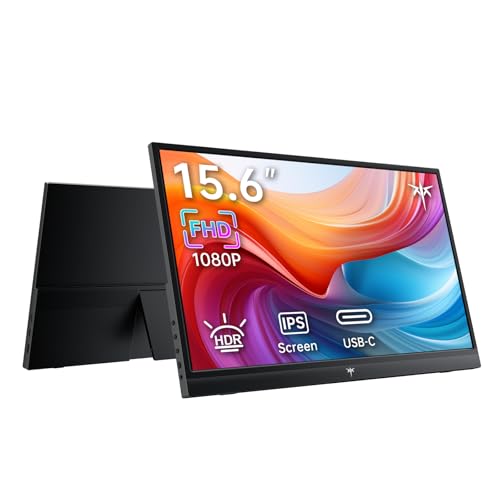
KTC Portable Monitor Review Summary
The KTC 15.6-inch Portable Monitor is a smart pick if you want a lightweight external display for laptops, phones, consoles, and compact desktop setups.
It combines a 15.6-inch 1080p IPS panel, HDR support, and dual USB-C plus mini HDMI connectivity in a package that is clearly built for travel, hybrid work, and casual gaming.
If your priority is easy dual-screen productivity without carrying a bulky monitor, this KTC portable monitor makes a lot of sense.
It is especially appealing for remote workers, frequent travelers, students, and console players who want a dependable display that is easy to connect and easy to move.
Quick Scorecard
| Category | Score | Why it matters |
|---|---|---|
| Display quality | 8.7/10 | IPS panel, HDR support, 1080p resolution, 1000:1 contrast ratio, 300 cd/m² brightness, and 16.7 million colors create a capable all-purpose picture. |
| Portability | 9.0/10 | At about 1.4 lb and 15.6 inches, it is easy to pack for travel or move between rooms. |
| Connectivity | 8.8/10 | Two full-featured USB-C ports and one mini HDMI port keep it flexible for modern devices and older source gear. |
| Compatibility | 8.9/10 | Supports laptops, phones, mini PCs, and game consoles including Xbox, PS4, PS5, and Switch. |
| Ease of setup | 9.1/10 | Plug-and-play operation with no extra drivers is a major win for presentations and quick desk expansion. |
| Work and travel utility | 8.6/10 | Well suited to spreadsheets, video calls, and presentation use while on the move. |
Bottom line: the KTC 15.6-inch Portable Monitor is a practical, buyer-friendly portable display that prioritizes convenience and versatility over luxury extras.
If you want a reliable second screen that works fast and travels light, it is an easy product to consider.
Key Features and Specifications of KTC Portable Monitor
The KTC 15.6-inch Portable Monitor is built around a portable-first design, and the spec sheet supports that goal well.
Here is a closer look at the key hardware and features buyers should care about.
| Specification | Details |
|---|---|
| Brand / Model | KTC / H15F9 |
| Screen size | 15.6 inches |
| Resolution | FHD 1080p |
| Panel type | IPS |
| Aspect ratio | 16:9 |
| Brightness | 300 cd/m² |
| Contrast ratio | 1000:1 |
| Color support | 16.7 million colors |
| Screen surface | Matte |
| Ports | 2 full-featured USB-C, 1 mini HDMI |
| Included cable | HDMI to mini HDMI cable |
| Weight | About 1.4 lb |
| Use modes | Duplicate, extend, second screen |
- IPS display: better viewing angles and more consistent color than many basic portable panels.
- HDR support: useful for more dynamic visuals in supported content, even if this is still a travel monitor rather than a full-size HDR reference display.
- Matte finish: helps reduce glare in offices, coffee shops, classrooms, and hotel rooms.
- Two USB-C ports: a practical design choice that improves convenience and compatibility with modern devices.
- Mini HDMI port: keeps older laptops, consoles, and mini PCs in the mix.
- No driver setup: the plug-and-play approach keeps onboarding simple.
From a buying standpoint, the most important numbers are the 15.6-inch size, 1080p resolution, 300 cd/m² brightness, and 1.4 lb weight.
That combination tells you exactly what the monitor is meant to be: portable, sharp enough for work, and light enough to carry all day.
Pros and Cons of KTC Portable Monitor
Every portable monitor is a compromise between size, image quality, and convenience.
The KTC 15.6-inch Portable Monitor pros and cons make those tradeoffs easy to understand.
| Pros | Cons |
|---|---|
| Very portable and lightweight | No built-in battery mentioned |
| Easy plug-and-play setup | Requires compatible source devices and cabling |
| Wide device compatibility | 15.6-inch size may feel small for some users |
| Good visual specs for the category | No stand or case details provided in the product data |
| Useful for productivity and gaming | USB-C video support depends on the connected device |
| Dual USB-C and mini HDMI connectivity | Not designed to replace a full desktop monitor |
Best strengths: portability, easy setup, and flexible connectivity.
Main drawbacks: the lack of a built-in battery and the fact that your source device must support the right video output standard.
Who Should Buy KTC Portable Monitor?
The KTC 15.6-inch Portable Monitor is best for buyers who need a second screen that does not stay on a desk full-time.
It fits a clear group of users very well.
- Travelers: if you need a monitor that slips into a backpack, this is a strong fit.
- Remote workers: ideal for hotel workstations, shared spaces, and temporary home offices.
- Students: great for note-taking, research, and multitasking in dorms or study areas.
- Professionals: useful for presentations, client meetings, spreadsheets, and video calls.
- Console gamers: a compact display for Switch, PS4, and PS5 can be very appealing on the move.
- Minimalist desk users: good if you want a simple secondary display without a large setup.
Who should skip it?
Buyers who want a large desktop replacement, a battery-powered screen for cable-free use, or a monitor with a deeply adjustable stand should look elsewhere.
This is a convenience-first portable monitor, not a full-featured desktop monitor.
How the KTC Monitor Handles Dual-Screen Work
For productivity, the KTC portable monitor makes the most sense as a genuine workflow upgrade rather than a novelty accessory.
The supported duplicate, extend, and second-screen modes let you tailor it to the job at hand.
In extend mode, the monitor becomes the most useful.
You can keep email, chat, research, or a reference document open while working on your main laptop screen.
That matters for spreadsheets, editing timelines, comparing documents, or running video meetings alongside notes.
For business users, the real advantage is not just having more pixels; it is the reduction in constant app switching.
For presentations, duplicate mode is especially useful.
You can mirror your laptop for a client or classroom audience without a complicated dock.
That makes the KTC 15.6-inch Portable Monitor a good fit for trainers, consultants, and students who present often but do not want to haul a full-size monitor.
The 1080p resolution is the right call at this size.
It keeps text readable and gives you enough workspace for typical office tasks without making the interface feel cramped.
A 15.6-inch portable display is still compact, but on a resolution-to-size basis, it is practical and balanced.
Portability and Travel Use Cases
Portability is where the KTC 15.6-inch Portable Monitor clearly earns attention.
At about 1.4 lb, it is light enough to carry with a laptop without turning your bag into a burden.
The slim 15.6-inch class also makes packing easier than with larger portable monitors.
This is the kind of accessory that works well in real-world travel situations: hotel rooms, coworking spaces, client offices, airport work sessions, or temporary project setups.
The matte screen surface is another smart choice because bright indoor lighting and overhead lamps can make glossy portable monitors frustrating to use.
The main limitation is that portability does not automatically mean self-sufficiency.
Since no built-in battery is mentioned, this monitor depends on the source device or an external power path.
That is normal in this category, but buyers should still plan their setup carefully.
Buying tip: if you travel often, check whether your laptop can send video through USB-C.
If not, you may need to rely on mini HDMI and the right power connection to get the full experience.
Connection Options and Device Compatibility
Connectivity is one of the best reasons to consider the KTC portable monitor.
The combination of two full-featured USB-C ports and one mini HDMI port gives it a very flexible profile.
USB-C is the easiest path when supported, because it can simplify the whole setup into one cable for video and power on compatible devices.
That is excellent for newer laptops, tablets, and phones that support video over USB-C.
The mini HDMI port expands the monitor’s usefulness with older computers and gaming consoles.
The product data lists broad compatibility with laptops, phones, mini PCs such as Mac Mini and iMac, Xbox, PS4, PS5, and Switch.
That is a meaningful advantage because many portable monitors are narrower in scope or require more trial and error during setup.
Still, compatibility is the point where buyers need to be careful.
USB-C support varies by device, especially on phones and laptops, so do not assume every USB-C port can output video.
If your device does not support DisplayPort Alt Mode or equivalent video output over USB-C, you may need adapters or another connection path.
For most buyers, this is not a dealbreaker.
It simply means the KTC 15.6-inch Portable Monitor is strongest for users who are comfortable checking cable standards before buying.
Gaming and Console Performance
As a casual gaming display, the KTC portable monitor has a lot going for it.
The 1080p IPS panel, HDR support, and 300 cd/m² brightness suggest a screen that can handle game visuals cleanly without feeling washed out in normal indoor use.
For Switch players, the size is especially appealing.
A 15.6-inch portable screen is much easier to carry than a TV or traditional monitor, so it suits dorms, travel, and split-location gaming.
For PlayStation and Xbox users, the monitor can serve as a second-room display or a compact entertainment screen for shared spaces.
That said, buyers should keep expectations realistic.
This is not a high-refresh-rate gaming monitor built for competitive play.
The real value is convenient, good-looking casual gaming with simple wiring and fast setup.
If you care more about portability than esports-grade performance, it fits the brief well.
Compared with gaming-focused portable monitors, the KTC is broader and more versatile.
Compared with a battery-powered portable monitor, it offers less freedom away from outlets but generally better simplicity and lower setup friction.
What’s in the Box and Setup Tips
The included HDMI to mini HDMI cable is a useful starting point and reduces the chance that you will open the box and immediately need to shop for accessories.
That matters, because portable monitors often become frustrating when the necessary cables are missing.
The product data also notes support for connectivity setup guidance and help with missing accessories or damaged items.
That is reassuring, especially for buyers who are new to portable monitors and may not know which connection path is best for their device.
Setup should be straightforward in most cases:
- Connect via USB-C if your device supports video over USB-C.
- Use mini HDMI for devices that need a different video path.
- Make sure power delivery is adequate if your source device cannot power the monitor alone.
- Select duplicate, extend, or second-screen mode in your operating system.
Setup advice: before buying, confirm your laptop, console, or phone supports the connection method you intend to use.
That small step can prevent the most common portable monitor headaches.
Comparisons and Alternatives to Consider
The KTC 15.6-inch Portable Monitor competes in a crowded but very practical category.
If you are still deciding, these Amazon-friendly alternatives are worth a look depending on your needs: