If you need a compact security display, the Haiway 10.
1-inch Security Monitor review quickly gets to the point: this is a practical, multi-input monitor built for cameras and small setups.
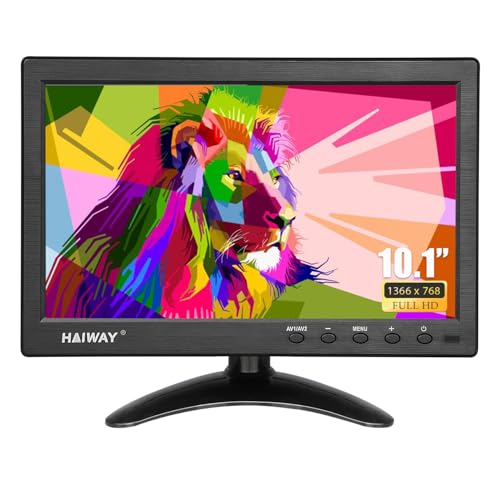
Haiway Monitor Review Summary
The Haiway 10.1-inch Security Monitor is a straightforward choice for buyers who want a small, reliable screen for CCTV, DVR/NVR systems, or a compact secondary display.
It stands out for dedicated BNC/AV support, multiple modern and legacy inputs, and an easy plug-and-play setup that reduces friction in security and monitoring environments.
If you are outfitting a home surveillance corner, warehouse station, workshop desk, or vehicle-based monitoring setup, this monitor is aimed directly at that use case.
The small footprint, built-in speakers, remote control, and dual power options make it especially attractive for buyers who value convenience over high-end picture quality.
At the same time, the Haiway 10.1-inch Security Monitor is not built to impress as a productivity or media display.
Its 1366 x 768 resolution and glossy panel are perfectly workable for surveillance and basic tasks, but buyers chasing sharp text, rich color, or large-screen comfort should look elsewhere.
Scorecard
| Category | Score | Why it matters |
|---|---|---|
| Security camera compatibility | 9.0/10 | Dedicated BNC/AV inputs make it well suited to CCTV and surveillance camera hookup. |
| Connectivity versatility | 9.0/10 | HDMI, VGA, BNC, AV, and USB support covers many device types. |
| Display clarity | 7.0/10 | 1366 x 768 resolution is practical, but not premium. |
| Setup convenience | 8.0/10 | Remote control, dual speakers, and multiple power options simplify use. |
| Mounting and placement | 8.0/10 | Compact size, adjustable stand, portrait/landscape support, and VESA 75mm x 75mm compatibility help in tight spaces. |
| Value for monitoring tasks | 8.0/10 | Designed as a no-fuss monitor for surveillance and secondary-display duties. |
Bottom line: the Haiway Monitor is a smart buy for security-focused users who need a small, flexible, and easy-to-install display.
Key Features and Specifications of Haiway Monitor
The specifications tell you a lot about where this product fits.
The Haiway 10.1-inch Security Monitor is designed around simplicity, compatibility, and compactness rather than workstation-level image quality.
| Screen size | 10.1 inches |
|---|---|
| Native resolution | 1366 x 768 pixels |
| Aspect ratio | 16:9 |
| Display type | LCD with LED backlighting |
| Finish | Glossy |
| Brightness | 400cd/m² |
| Contrast ratio | 400:1 |
| Refresh rate | 60 Hz |
| Viewing angle | 178° |
| Pixel pitch | 0.177 |
| Power consumption | 12 watts |
| Voltage | 12 volts |
| Dimensions | 6.5″ D x 9.92″ W x 1.3″ H |
| Mount support | VESA 75mm x 75mm compatible |
| Inputs | HDMI, VGA, BNC, AV, USB |
| Audio | Dual built-in speakers |
- Compact 10.1-inch panel for tight spaces
- Dedicated BNC and AV ports for CCTV and legacy gear
- HDMI and VGA support for modern and older devices
- USB input for broader compatibility in mixed setups
- Included remote control for source switching and quick adjustments
- Dual built-in speakers for basic audio without extra hardware
- Landscape and portrait use for flexible positioning
- Low-power 12-watt design that suits continuous monitoring
From a buyer’s perspective, the standout feature is not one flashy spec but the combination of small size, low power use, and multiple input options.
That mix is what makes the Haiway Monitor appealing for practical installations.
Haiway Monitor Pros and Cons
Before deciding whether this monitor fits your setup, it helps to look at the Haiway 10.1-inch Security Monitor pros and cons in plain terms.
Pros
- Easy plug-and-play use for security cameras and other devices
- Broad connectivity across HDMI, VGA, BNC, AV, and USB
- Compact footprint that works well on a desk, shelf, or wall mount
- Built-in speakers reduce the need for extra audio gear
- Remote control adds convenience for source changes and settings
- Portrait or landscape support helps in different mounting situations
- Low power consumption is useful for always-on monitoring
Cons
- 1366 x 768 resolution is modest for users who want crisp desktop detail
- 10.1-inch size is small for long work sessions or entertainment
- Glossy screen can reflect light in bright rooms
- VESA compatibility is helpful, but the mount is not included
- Best suited to monitoring tasks, not premium media or color-critical use
That balance makes the product easier to judge.
The strengths are practical and specific, while the drawbacks are mostly about expectations.
If you buy it for the right job, the limitations are acceptable.
Who Should Buy Haiway Monitor?
The Haiway 10.1-inch Security Monitor is a good match for buyers who need a compact display with real security-system compatibility.
It is especially sensible for anyone building a small CCTV station, a back-room monitor setup, or a secondary display that must handle mixed inputs.
- Home security users who want a monitor for DVR/NVR or camera feeds
- Small business owners who need a monitoring screen in an office, warehouse, or shop
- DIY installers who work with HDMI, VGA, BNC, and AV equipment
- Users with limited space who want a lightweight, low-profile display
- Portable or vehicle-based setups where dual power options can help
It is also a decent fit for buyers who need a secondary monitor for a Raspberry Pi, set-top box, or compact PC station, as long as expectations stay grounded.
In those cases, the monitor’s flexibility matters more than raw resolution.
Who should skip it?
If your main goal is office productivity, photo editing, or watching movies at a desk for hours, this is probably too small and too basic.
Buyers wanting a sharper, more immersive display should move up to a larger full-HD monitor.
Best Uses for CCTV and Secondary Displays
This is where the Haiway Monitor makes the most sense.
The product is clearly designed as a monitoring-first display, and that means it performs best when the job is simple and repetitive rather than visually demanding.
For CCTV, the dedicated BNC and AV support is the key advantage.
Many security installations still rely on older output types, and this monitor handles that without forcing you into adapters or awkward workarounds.
That is a major plus for anyone using legacy analog camera systems or mixed camera hardware.
As a secondary display, the monitor works well when you need a compact screen for dashboards, status panels, door camera feeds, testing gear, or a small desktop extension.
The 16:9 aspect ratio is more familiar than a square monitor, and the 178° viewing angle makes it easier to read from different positions.
The dual speakers are not a replacement for a real audio setup, but they are useful for alert tones, camera audio, or casual video playback.
For monitoring tasks, that is often enough.
Ports, Inputs, and Device Compatibility
If you are comparing small monitors, compatibility should be one of your top decision factors.
The Haiway 10.1-inch Security Monitor does well here because it supports a wide range of input types.
- HDMI for modern PCs, consoles, TV boxes, and media devices
- VGA for older computers and industrial equipment
- BNC for direct CCTV/surveillance connections
- AV for analog video sources
- USB for added flexibility depending on the device and setup
This level of input support is one of the product’s strongest selling points.
It reduces the chance that you will need an external converter or a second monitor later.
For buyers managing mixed hardware, that convenience can be more valuable than a slightly sharper screen.
Compatibility is the reason to choose this monitor over a basic HDMI-only display. If your setup includes older cameras or nonstandard gear, the Haiway Monitor becomes much more attractive.
Mounting Options and Desk Setup
Placement is another area where the Haiway Monitor shows clear category awareness.
Its compact dimensions — 6.5 inches deep, 9.92 inches wide, and 1.3 inches high — make it easy to position in spaces where a larger display would feel awkward.
The included adjustable stand supports both landscape and portrait use, which is helpful if you want to tailor the screen to a camera bank, notification panel, or narrow workspace.
The monitor also supports VESA 75mm x 75mm mounting, so it can be attached to compatible arms or brackets.
That said, buyers should note an important caveat: the mount itself is not included.
If you plan to wall-mount or arm-mount the monitor, budget for the hardware separately.
For many buyers, the stand will be enough, but installers should confirm placement before ordering.
The lightweight design also makes the monitor easier to move between workstations or install temporarily in a vehicle or test bench.
That is a subtle but meaningful advantage for techs and DIY users.
Display Quality for Monitoring
Let’s be clear about what to expect from the picture.
The Haiway Monitor’s 1366 x 768 resolution is serviceable, not premium.
It is suitable for camera feeds, menus, dashboards, and basic video, but it will not deliver the crispness of a modern full-HD monitor.
That said, the panel has a few traits that make it workable for its intended role.
The 400cd/m² brightness helps visibility in typical indoor use, and the 178° viewing angle makes it easier to glance at the screen from the side.
The 60 Hz refresh rate is perfectly fine for monitoring and light use.
The tradeoff is the glossy finish.
In a controlled environment, it can look reasonably clear, but in brighter rooms or near direct light, reflections may be noticeable.
For a security station in a shop, garage, or office, that is usually manageable.
For a sunlit workspace, it may become annoying.
This is not a picture-quality monitor for content creators. It is a purpose-built utility screen, and in that role the display specifications are fair for the category.
Remote Control and Everyday Convenience
One of the most practical features here is the included remote control.
On a small monitor, the ability to switch inputs or make quick changes without reaching behind the unit is a real convenience.
That matters more than people expect, especially in setups where the monitor is mounted or tucked into a corner.
The dual speakers also add convenience.
They are best thought of as functional speakers for alerts, basic audio, or simple playback rather than room-filling sound.
Still, having them built in means fewer cables and less clutter.
Setup is another strength.
The monitor’s plug-and-play nature, along with the availability of both AC/DC adapter power and a vehicle coiled spring cable, gives it flexibility across multiple environments.
That makes it appealing for buyers who want a simple monitor they can move or repurpose easily.
The low 12-watt power consumption is also worth noting.
For continuous monitoring, lower energy use is a practical benefit, even if it is not the headline feature shoppers first notice.
Alternatives to Consider
If you are still deciding, it can help to compare this monitor against a few common alternatives that are easy to find on Amazon.
The right choice depends on whether you want more resolution, a different size, or a simpler HDMI-only design.
- small CCTV monitor with BNC input — best if your setup is surveillance-first and you want similar direct camera compatibility.
- 10-inch HDMI monitor with speakers — a good option if you mainly use modern HDMI devices and do not need BNC.
- portable security camera monitor — useful for installers and mobile setups.
- small monitor for Raspberry Pi or PC — worth considering if your secondary display use is more hobbyist or desktop oriented.
- compact secondary monitor with VESA mount — better if mounting flexibility is your top priority.
Compared with these alternatives, the Haiway Monitor is strongest when you want a blend of surveillance compatibility and all-around input flexibility.
If you only need HDMI, a simpler monitor may be enough.
If you need BNC plus convenience features, Haiway starts to look more compelling.
Is Haiway Monitor Worth It?
Yes — for the right buyer, the Haiway 10.1-inch Security Monitor is worth it. It offers the exact mix that many security-focused shoppers need: compact size, broad connectivity, direct CCTV support, easy setup, and enough convenience features to make daily use painless.
The value case is strongest if you are buying it for surveillance, a small office station, a workshop setup, or a portable monitoring role.
In those scenarios, the monitor’s modest resolution is not a dealbreaker because the practical benefits matter more than premium image detail.
On the other hand, if you want a main desktop monitor, a bright media screen, or a sharp productivity display, this is not the right purchase.
Its limitations are real, especially the 10.1-inch size and 1366 x 768 resolution.
Final verdict: the Haiway 10.1-inch Security Monitor is a strong buy for CCTV and secondary-display users who want convenience, compatibility, and compact design in one package. If that sounds like your use case, it is a sensible, low-friction choice.