A laptop mount can free valuable desk space, raise your screen to a more comfortable height, and make a home-office setup easier to adjust. The right choice depends on your laptop size, monitor arrangement, desk construction, and preferred mounting style.
We compared 10 laptop mounts for home offices, from portable risers and rotating stands to full-motion desk and wall arms. Use the guide below to narrow the options by stability, adjustability, compatibility, and everyday convenience.
Best 10 Laptop Mounts for Home Offices Picks for 2026
Best 2-in-1 Desk Mount
HUANUO Adjustable Monitor Arm with Laptop Tray

- Ventilated 14 x 12-inch laptop tray
- Supports monitors up to 32 inches and 22 pounds
- Adjustable arm with clamp or grommet mounting
Best For: Flexible laptop-and-monitor home-office setups
Best Portable Riser
BESIGN LS03 Aluminum Laptop Stand

- Fits 10- to 15.6-inch laptops
- Raises laptops about 5.7 inches
- Folds flat and uses an open aluminum design
Best For: Portable tabletop laptop elevation
Best Large-Laptop Arm

- Fits laptops up to 17 inches
- Removable tray converts for compatible monitors
- 22-pound capacity with ventilated cooling tray
Best For: Large laptops and adaptable desk setups
Best Rotating Stand
LOXP Adjustable Laptop Stand with 360° Base

- 360-degree rotating base
- Adjustable height and viewing angle
- Foldable design for portable use
Best For: Rotating and repositioning 10- to 16-inch laptops
Best 2-in-1 Heavy-Duty Pick

- Supports up to 17-inch laptops and 34-inch monitors
- Full-motion arm with 17.3-inch height adjustment
- Ventilated tray with clamp or grommet installation
Best For: Dedicated home offices needing a sturdy laptop-or-monitor mount
Best for Everyday Use

- Supports 10- to 16-inch laptops up to 22 pounds
- Ventilated panel and anti-slip silicone pads
- Folds flat for travel and hybrid work
Best For: Portable laptop elevation without clamps or desk installation
Best Cable-Managed Flexible Mount

- Supports laptops up to 17 inches and monitors up to 32 inches
- Full-motion adjustment with 17.3-inch height range
- Ventilated tray, latches, and built-in cable management
Best For: Organized home-office setups switching between laptop and monitor use
Best Adjustable Desk Arm
MOUNTUP 2-in-1 Laptop Arm Mount
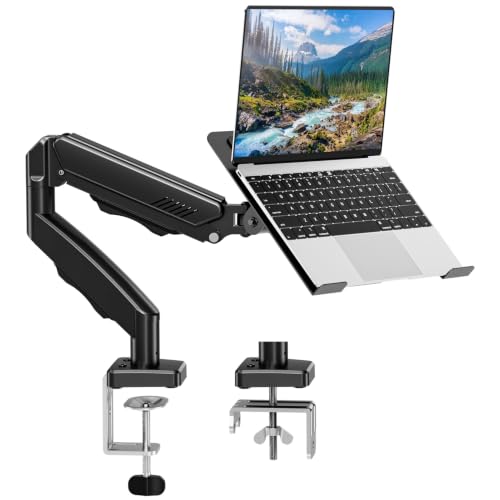
- Supports 14–17-inch laptops or VESA monitors
- Full-motion arm with extensive height and reach adjustment
- Includes clamp and grommet mounting options
Best For: Flexible laptop-or-monitor setups in home offices
Best Versatile 2-in-1 Mount

- Holds laptops up to 17 inches or monitors up to 34 inches
- Switches between tray and VESA monitor modes
- Pre-assembled arm and ventilated, secured laptop tray
Best For: Home offices planning to alternate between laptop and monitor use
Best Wall-Mounted Option

- Supports 11–17-inch laptops and 13–32-inch monitors
- Frees desk space with a floating wall-mounted setup
- Includes ventilated tray, straps, and cable management
Best For: Small or cluttered home offices with a suitable solid wall
Best 2-in-1 Desk Mount – HUANUO Adjustable Monitor Arm with Laptop Tray
For home offices that need flexible screen positioning, this HUANUO model combines a laptop tray with a monitor arm. It is a practical option among laptop mounts for home offices, especially if you want to clear desk space while keeping a monitor and laptop at a comfortable height.
Best For: Home-office users who want one adjustable mount for a laptop or monitor, with either clamp or grommet installation.
Pros:
- 14 x 12-inch ventilated tray fits laptops and includes a raised front lip.
- Supports 13- to 32-inch VESA monitors weighing up to 22 pounds.
- Offers tilt, swivel, rotation, height adjustment, and integrated cable management.
- Includes C-clamp and grommet mounting hardware for compatible wooden desks.
Cons:
- Mounting options are specified for wooden desks only.
- Monitor compatibility depends on meeting the stated size, VESA, and weight limits.
This is a versatile choice when you may switch between laptop and monitor use. Its broad adjustment range and cable routing add flexibility, but check your desk material and device specifications before installation.
Best Portable Riser – BESIGN LS03 Aluminum Laptop Stand
The BESIGN LS03 is a straightforward tabletop riser for shoppers who prefer a portable, non-clamp option. As one of the simpler laptop mounts for home offices, it elevates compatible notebooks for a higher viewing position while folding flat for storage or transport.
Best For: Users with 10- to 15.6-inch laptops who want a lightweight, detachable stand for ergonomic desk positioning.
Pros:
- Compatible with laptops from 10 to 15.6 inches, including MacBook, Dell, HP, Lenovo, ASUS, and Chromebook models.
- Raises the laptop up to approximately 5.7 inches for a higher viewing level.
- Aluminum construction supports up to 8.8 pounds.
- Open design promotes airflow, while rubber grips help protect and stabilize the laptop.
Cons:
- Does not provide monitor-arm movement or desk-clamp mounting.
- Its stated compatibility stops at 15.6-inch laptops.
The LS03 suits compact workstations and users who value easy setup and storage. Its detachable, fold-flat design is convenient, although it offers less positioning flexibility than an articulating desk mount.
Best Large-Laptop Arm – HUANUO Laptop Desk Mount
This HUANUO desk mount is designed for users who want a larger tray and the option to convert the setup for monitor use. It stands out among laptop mounts for home offices with a ventilated tray rated for laptops up to 17 inches, plus an articulating arm that helps free space below.
Best For: Home-office users with laptops up to 17 inches who want adjustable positioning and the option to use a 15- to 32-inch monitor instead.
Pros:
- 13.8 x 11.8-inch tray fits laptops up to 17 inches.
- Tray can be removed for a VESA monitor between 15 and 32 inches.
- Supports up to 22 pounds and provides tilt, swivel, and 360-degree rotation.
- Ventilated tray, cable clips, and clamp or grommet mounting help support an organized workspace.
Cons:
- Installation options are specified for wooden desks.
- Monitor use requires a compatible VESA 75 x 75 mm or 100 x 100 mm display.
This model is a strong fit for a home office that may change devices over time. Its removable tray adds versatility, while the 15-inch pole and articulated movement provide useful positioning range for seated work.
Best Rotating Stand – LOXP Adjustable Laptop Stand with 360° Base
The LOXP adjustable stand focuses on tabletop flexibility rather than permanent desk mounting. Its 360-degree rotating base and foldable design make it a useful choice among laptop mounts for home offices when you want to turn or reposition a laptop without moving the entire stand.
Best For: Users with 10- to 16-inch laptops who want a portable, height-adjustable stand with full rotation.
Pros:
- 360-degree rotating base allows the laptop to be turned to different angles.
- Height and angle adjustments support seated or standing use.
- Foldable design works for home, office, or outdoor use.
- Metal construction and nonslip silicone help provide stability and protect the laptop.
Cons:
- Supports laptops only up to 16 inches.
- It is a tabletop stand, not a clamp- or grommet-mounted arm.
- The supplied notes do not state a maximum supported weight.
The LOXP is a convenient pick for users who value rotation and portability. It offers more movement than a fixed riser, but shoppers needing a fixed desk mount or a stated weight rating may prefer another style.
Best 2-in-1 Heavy-Duty Pick – WALI Laptop Desk Mount
For home offices that need both laptop and monitor flexibility, the WALI is a substantial choice among laptop mounts for home offices. Its articulated arm supports a laptop or a larger monitor, while clamp and grommet installation help accommodate different desks.
Best For: Users who want a heavy-duty mount for a laptop or monitor, with broad adjustment and a space-saving setup.
Pros:
- Supports laptops up to 17 inches and monitors up to 34 inches.
- Offers tilt, swivel, rotation, and up to 17.3 inches of height adjustment.
- Includes a ventilated tray plus clamp and grommet mounting options.
Cons:
- Its 6.4-pound weight may make installation less convenient than a simple tabletop stand.
- The mount is designed for desks between 0.39 and 2.76 inches thick.
The WALI stands out when stability, screen-size capacity, and monitor compatibility matter more than portability. It is a strong fit for a dedicated workstation that can support a full desk mount.
Best for Everyday Use – Nulaxy Ergonomic Laptop Stand
The Nulaxy is a tabletop riser rather than an articulating arm, making it a straightforward option among laptop mounts for home offices. Its foldable design, dual-rod support, and ventilated panel suit users who want adjustable elevation without desk hardware.
Best For: Hybrid workers and laptop users who need a portable, stable stand for 10- to 16-inch computers.
Pros:
- Dual-support rods are designed to provide a wobble-free typing platform for devices up to 22 pounds.
- Vent openings promote airflow beneath the laptop.
- Folds flat for transport and includes anti-slip silicone protection.
Cons:
- It supports laptops only, not separate monitors.
- Compatibility is listed for laptops from 10 to 16 inches.
- As a tabletop stand, it does not offer the arm-style reach or rotation of a desk mount.
Choose the Nulaxy if portability and simple setup are priorities. It provides a stable way to raise a laptop for calls or typing while remaining easy to move between a home desk, office, and travel setup.
Best Cable-Managed Flexible Mount – MOUNT PRO Laptop Arm
The MOUNT PRO combines a laptop tray and monitor arm in a compact desk-mounted design. For shoppers comparing laptop mounts for home offices, its full-motion adjustment, built-in cable management, and ventilated tray make it useful for a tidy workstation.
Best For: Home-office users who want to switch between a laptop and a monitor while keeping cables organized.
Pros:
- Holds laptops up to 17 inches or monitors from 13 to 32 inches.
- Provides tilt, swivel, rotation, and up to 17.3 inches of height adjustment.
- Includes a ventilated, latched tray and cable-management guides.
Cons:
- Monitor capacity is lower than the WALI option, topping out at 32 inches.
- The laptop tray should not be rotated to a vertical position.
- Installation is limited to desks between 0.39 and 2.76 inches thick.
This MOUNT PRO model is a practical middle ground for a home office that needs monitor compatibility without giving up laptop support. Its cable routing and secure tray are especially useful for a permanent, organized desk setup.
Best Adjustable Desk Arm – MOUNTUP 2-in-1 Laptop Arm Mount
For home offices that need flexible laptop mounts for home offices, the MOUNTUP Laptop Stand combines a ventilated laptop tray with support for a VESA monitor. Its full-motion arm, dual installation options, and cable management help create a more ergonomic, organized desk.
Best For: Users who want a height-adjustable laptop or monitor arm with clamp and grommet mounting options.
Pros:
- Supports 14–17-inch laptops or compatible 75 x 75 mm and 100 x 100 mm VESA monitors weighing 4.4–19.8 pounds.
- Offers 360-degree rotation, 360-degree swivel, and tilt from 90 degrees up to 45 degrees down.
- Includes a ventilated tray, anti-slip protection, cable management, and both C-clamp and grommet hardware.
Cons:
- Laptop compatibility is limited to models from 14 to 17 inches.
- Installation requires a desk between 0.39 and 2.76 inches thick, with specific grommet-hole dimensions.
With an arm that extends up to 21.5 inches and rises to 16.9 inches, this MOUNTUP model offers considerable positioning flexibility. It is a strong choice when you want one mount to handle either a laptop or a VESA monitor while keeping the desk surface clearer.
Best Versatile 2-in-1 Mount – HUANUO Laptop and Monitor Arm
The HUANUO 2-in-1 laptop mount is a practical option for home offices where equipment needs may change. Use the ventilated tray for a laptop up to 17 inches, or remove it to mount a 13–34-inch VESA monitor and reclaim desk space.
Best For: Multitaskers who want to switch between a laptop tray and a larger external monitor.
Pros:
- Supports laptops up to 17 inches or monitors from 13 to 34 inches with 75 x 75 mm or 100 x 100 mm VESA patterns.
- Provides 360-degree rotation, 90-degree swivel in either direction, and 45-degree tilt in either direction.
- Features a ventilated tray with six anti-slip pads, a bottom guard, Velcro straps, and pre-assembled mounting components.
Cons:
- Monitor support requires removing the laptop tray and using a compatible VESA display.
- The C-clamp and grommet mounts have specific desk-thickness limits.
The arm extends up to 18.1 inches and reaches a maximum height of 17.5 inches, making eye-level positioning easier for extended work sessions. Its broad monitor-size range gives this mount more upgrade flexibility than a laptop-only stand.
Best Wall-Mounted Option – MOUNT PRO Laptop Wall Mount
When desk space is especially limited, the MOUNT PRO wall mount provides an alternative to conventional laptop mounts for home offices. It supports an 11–17-inch laptop or a VESA monitor, creating a floating workstation while keeping cables routed through the arm.
Best For: Home offices needing a wall-mounted laptop or monitor setup away from the desk surface.
Pros:
- Supports 11–17-inch laptops or 13–32-inch VESA monitors weighing 4.4–19.8 pounds.
- Offers tilt from 90 degrees up to 45 degrees down, 180-degree swivel, and 360-degree monitor rotation.
- Includes a ventilated tray with adjustable straps, integrated cable management, and mounting hardware.
Cons:
- Wall installation should not be done in drywall alone; the product recommends a stud, cement wall, or concrete brick wall.
- Its 360-degree rotation is specified for monitor use only.
The arm provides 11.8 inches of height adjustment and can suit sitting or standing work positions. Choose it when freeing the entire desk surface is more important than the simpler installation of a clamp-mounted arm.
How We Picked the Best Laptop Mounts for Home Offices
We focused on practical features that matter during daily work: laptop-size support, weight capacity, mounting method, adjustability, ventilation, stability, and compatibility with external monitors. The selection includes freestanding stands, desk-clamp arms, monitor-and-laptop combinations, and a wall-mounted option so different workspace layouts are represented.
We also considered whether each design can help improve viewing height and posture without making reasonable assumptions about build quality beyond the listed specifications. Always verify the current dimensions, weight limits, and installation requirements before buying.
Quick Comparison
| Mount Type | Best For | Main Advantage | Watch For |
|---|---|---|---|
| Freestanding riser | Flexible or shared desks | Easy setup and portability | May offer less adjustability or stability than a clamped arm |
| Desk-clamp laptop arm | Permanent workstation layouts | Frees desk space and supports positioning | Requires a compatible, sturdy desk edge |
| Monitor-and-laptop arm | Dual-screen workspaces | Coordinates laptop and monitor placement | Check VESA and total weight compatibility |
| Wall mount | Minimal or shallow desks | Leaves the desktop largely clear | Needs suitable wall structure and careful installation |
Key Buying Factors for Laptop Mounts for Home Offices
Compatibility and Capacity
Confirm the mount supports your laptop’s screen size and weight, including a case or accessories if applicable. For monitor arms, check VESA dimensions, supported screen sizes, and the combined load on the arm. A mount designed for a 17-inch notebook may not be appropriate for a heavier workstation laptop.
Mounting Method and Desk Fit
Desk clamps are usually convenient for a fixed office but need enough clearance and a solid desktop. Freestanding stands are easier to move and work well on narrow or shared surfaces. Wall mounts can save the most desk space, but the wall, hardware, and installation position must safely support the load.
Adjustment and Ergonomics
Look for height, tilt, swivel, rotation, or full-motion adjustment if you frequently switch between sitting, standing, collaboration, and portrait-oriented documents. Raising the laptop display can reduce neck strain, although a separate keyboard and mouse are usually more comfortable for extended typing.
Ventilation and Stability
Prefer trays or platforms that leave cooling vents unobstructed and provide a secure surface. A wide base, strong clamp, or properly tightened arm helps prevent wobble. Cable routing is another useful feature for keeping chargers and monitor cables from pulling on the mount.
Who Should Buy Which Laptop Mounts for Home Offices?
Choose a freestanding aluminum or foldable riser if you want simple installation, portability, or a mount for a flexible home-office setup. A rotating stand is useful when you regularly share the screen or change viewing direction.
Choose a desk-clamp arm if you want to reclaim desk space and fine-tune laptop height and angle. If you use an external display, a two-in-one monitor-and-laptop mount is often the most efficient choice, provided your monitor’s VESA pattern and weight fit the specifications.
A wall-mounted model suits compact desks and permanent workstations where clearing the desktop matters most. Before purchasing, measure the laptop, desk, monitor, and available clearance, then select the simplest mount that provides the adjustment and support your workday requires.