Traveling with a laptop means protecting it in airports, hotels, coworking spaces, and shared offices. The right laptop locking cable can deter opportunistic theft without adding much bulk to your bag.
This roundup compares 10 travel-ready options, from Kensington locks designed for built-in security slots to adhesive-anchor kits for newer laptops and tablets without one.
Best 10 Laptop Locking Cables for Travel Picks for 2026
Best Standard-Slot Combination Lock
Kensington T-Bar Standard Lock

- Resettable four-digit combination
- Six-foot carbon steel cable
- Push-button, one-handed engagement
Best For: Travelers with laptops using a standard Kensington security slot
Best Adhesive-Anchor Kit
AboveTEK Universal Keyed Cable Lock

- Includes two adhesive anchor sets
- Six-foot galvanized steel cable
- Works with laptops, tablets, and phones
Best For: Securing multiple mobile devices without built-in lock slots
Best Nano-Slot Travel Lock
Kensington Nano Combination Lock

- Slim head for thin laptops
- Resettable four-digit combination
- Five-foot carbon steel cable
Best For: Travelers with laptops using Nano-sized security slots
Best Portable Laptop Locking Station
AboveTEK Adjustable Locking Station

- Fits 12- to 16-inch laptops
- 78.7-inch keyed security cable
- Adjustable 45° to 125° viewing angles
Best For: Travelers wanting laptop support plus tethered security
Slim Standard-Slot Security
Kensington Slim Combination T-Bar Lock

- Flat-lying design suits thin laptops and 2-in-1s
- Resettable four-wheel combination
- Six-foot carbon steel cable
Best For: Compatible laptops with standard Kensington slots
Anchor-Plate Flexibility

- Supports standard laptop security slots
- Adhesive anchor plate fits devices without slots
- 6.5-foot coated steel cable
Best For: Mixed laptop, tablet, and phone setups
Universal Slot Coverage
Kensington 3-in-1 Combination Lock

- Fits standard, Nano, and wedge-shaped slots
- Resettable four-number combination
- Six-foot carbon steel cable
Best For: Travelers securing devices with varied slot types
Slot-Free Flexibility

- Works with or without a 3×7mm security slot
- 6.7-foot cut-resistant braided steel cable
- Includes three traceable keys
Best For: MacBooks, tablets, and slim laptops without built-in slots
Dell-Specific Convenience
Kensington N17 Combination Lock

- Designed for Dell and Alienware wedge slots
- Resettable four-wheel combination
- Six-foot carbon steel cable
Best For: Dell and Alienware laptops with wedge-type lock slots
Keyed Travel Value
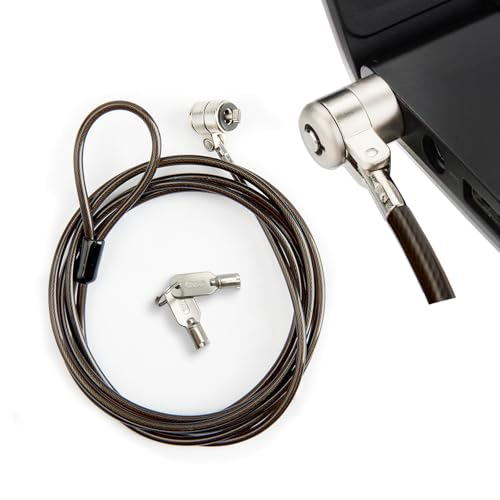
- Fits standard 3×7mm T-slots
- 6.6-foot reinforced steel cable
- Compact design with two keys
Best For: Compatible Lenovo, Asus, Acer, and Samsung devices
Best Standard-Slot Combination Lock – Kensington T-Bar Standard Lock
For travelers whose laptop has a Kensington standard security slot, this combination cable is a straightforward choice among laptop locking cables for travel. Its six-foot carbon steel cable anchors to a desk, table, or other fixed structure, while the resettable four-digit lock avoids carrying a separate key.
Best For: Travelers using HP, Lenovo, Acer, Asus, or other devices with a standard Kensington slot.
Pros:
- Resettable four-wheel combination offers 10,000 possible codes.
- Six-foot cut-resistant carbon steel cable provides flexible anchoring.
- Push-button design supports one-handed engagement.
- Works with laptops, monitors, projectors, docking stations, and other devices with a Kensington slot.
Cons:
- Not compatible with Dell and Alienware devices using Noble lock slots.
- May not fit some 2016-and-newer Dell laptops and tablets.
Choose this model when your device clearly uses the standard Kensington T-bar slot. Check the laptop’s slot type before buying, particularly for newer Dell systems.
Best Adhesive-Anchor Kit – AboveTEK Universal Keyed Cable Lock
This AboveTEK kit is a flexible option for laptop locking cables for travel when a device lacks a built-in security slot. Its adhesive anchor plates attach to many flat surfaces, and the six-foot galvanized steel cable can secure laptops, tablets, phones, and other mobile devices in shared spaces.
Best For: Users securing multiple laptops, tablets, or phones in cafés, libraries, retail spaces, and other public areas.
Pros:
- Includes two adhesive sticker-and-anchor sets for multiple devices.
- Industrial-grade 3M adhesive is designed for strong attachment to flat surfaces.
- Six-foot cut-resistant galvanized steel cable allows movement while secured.
- Keyed operation is simple to install and use.
Cons:
- Adhesive anchors require a suitable flat surface and proper installation.
- Keyed design requires carrying and safeguarding the included keys.
This is a practical choice for devices without compatible built-in lock slots, especially when you want one kit to cover several mobile gadgets. Verify that the intended mounting surface is clean, flat, and appropriate for adhesive attachment.
Best Nano-Slot Travel Lock – Kensington Nano Combination Lock
Designed for thin laptops with Nano-sized security slots, this Kensington model is a compact pick among laptop locking cables for travel. The five-foot carbon steel cable, slim lock head, and resettable four-digit combination suit cafés, shared workspaces, and other places where you need to tether a lightweight laptop.
Best For: Travelers with thin laptops that use a Nano-sized security slot.
Pros:
- Slim lock head helps compatible laptops lie flat and stable.
- Resettable four-wheel combination provides 10,000 possible codes.
- Pivoting head and rotating cable help preserve access to nearby ports.
- Five-foot carbon steel cable resists cutting attempts and anchors to fixed points.
Cons:
- Designed for Nano-sized slots, so it is not a universal laptop lock.
- Five-foot length is shorter than some full-size cable options.
Confirm that your laptop has a Nano security slot before ordering. For compatible thin devices, the slim head and rotating components offer a travel-friendly balance of fit and usability.
Best Portable Laptop Locking Station – AboveTEK Adjustable Locking Station
This AboveTEK station combines a folding laptop mount with a keyed cable lock, making it a more substantial option among laptop locking cables for travel. It fits 12- to 16-inch laptops, includes a 78.7-inch cable, and provides adjustable viewing angles for use in cafés, libraries, and other public areas.
Best For: Travelers who want adjustable laptop support and tethering for MacBook, Surface, Chromebook, and similar 12- to 16-inch devices.
Pros:
- Adjustable arms accommodate laptops from 12 to 16 inches.
- Long 78.7-inch keyed cable supports anchoring to fixed structures.
- Pivot hinge offers viewing angles from 45° to 125°.
- Lightweight 0.94-pound design includes dual lock clips for different laptop thicknesses.
Cons:
- Larger and more involved than a basic cable lock.
- Keyed lock requires carrying the key.
- Compatibility depends on the laptop fitting the stated size and width range.
Consider this station when you need both physical laptop support and theft deterrence. Its adjustable design adds versatility, but check your laptop’s dimensions and thickness before traveling with it.
Slim Standard-Slot Security – Kensington Slim Combination T-Bar Lock
For travelers using a thin-and-light laptop with a standard Kensington slot, this slim combination lock is a practical choice among laptop locking cables for travel. Its flat-lying lock head helps keep ultra-thin and 2-in-1 computers stable while the six-foot cable anchors to a desk, table, or other fixed structure.
Best For: Travelers with compatible HP, Lenovo, Acer, Asus, and other laptops using a standard Kensington slot.
Pros:
- Slim lock head lets compatible laptops lie flat.
- Resettable four-wheel combination provides 10,000 possible codes.
- Six-foot cut-resistant carbon steel cable and one-handed push-button engagement.
- Pivoting cable head supports flexible positioning.
Cons:
- Not compatible with Dell or Alienware models identified for the K68008WW.
- Does not fit Kensington NanoSaver slots; the K60603WW is recommended for those slots.
- Requires a compatible standard Kensington slot and a fixed anchor point.
This is a focused option when your laptop has the right standard slot and you prefer a combination lock over keys. Confirm the slot type before traveling, especially with Dell, Alienware, or ultra-compact devices.
Anchor-Plate Flexibility – Universal Laptop Cable Lock
This hardware security cable is a flexible pick for laptop locking cables for travel because it supports standard laptop slots and devices without them through an adhesive anchor plate. The 6.5-foot coated steel cable can loop around a fixed object, making it useful across a mixed collection of laptops, tablets, and phones.
Best For: Travelers securing standard-slot laptops or tablets and other devices that can use the included adhesive anchor plate.
Pros:
- Works with many standard-slot laptops.
- Anchor plate expands compatibility to devices without a standard security slot.
- Six-and-a-half-foot cut-resistant twisted steel cable offers extra reach.
- Rotating stainless steel lock head supports flexible positioning.
Cons:
- Some models require the I3C adhesive security plate.
- Using the anchor plate requires attaching adhesive to the device’s hard surface.
- Compatibility should be confirmed before relying on it for a specific device.
The included anchor-plate approach makes this lock more adaptable than a slot-only design, but it is important to decide whether adhesive mounting suits your device. It is a practical travel option when one cable needs to cover several device types.
Universal Slot Coverage – Kensington 3-in-1 Combination Lock
For travelers whose laptops use different security-slot designs, this Kensington model is one of the more adaptable laptop locking cables for travel. Its interchangeable tips fit standard, Nano, and wedge-shaped slots, while the six-foot carbon steel cable and resettable combination avoid the need to carry separate keys.
Best For: Households, teams, or travelers securing laptops with standard, Nano, or wedge-shaped security slots.
Pros:
- Three interchangeable tips cover standard, Nano, and wedge-shaped slots.
- Resettable four-number dial offers 10,000 combinations.
- Six-foot carbon steel cable is covered with a protective plastic sheath.
- Tether keeps unused lock tips together, and the five-year warranty adds support.
Cons:
- Interchangeable tips add a setup step compared with a slot-specific lock.
- It still requires a compatible security slot and fixed object for anchoring.
- Combination retrieval depends on using Kensington’s registration program.
This is the strongest fit when slot compatibility is uncertain or changes between devices. Its universal tip system adds versatility for travel, though a dedicated lock may be simpler if you always use one known slot type.
Slot-Free Flexibility – Adhesive-Anchor Laptop Lock
For travelers who need laptop locking cables for travel but cannot rely on a built-in security slot, this 6.7-foot lock offers two installation options. Use the standard lock head with compatible 3×7mm slots, or attach the included adhesive anchor plate to a supported device.
Best For: MacBooks, tablets, slim laptops, and shared workspaces where a security slot may not be available.
Pros:
- Works with devices that have a standard security slot or no slot.
- 6.7-foot braided steel cable provides flexible reach around fixed objects.
- Includes three traceable keys and an adhesive anchor rated for over 100 pounds after curing.
Cons:
- The adhesive anchor requires 24–48 hours to reach maximum strength.
- Adhesive installation may be unsuitable for some device surfaces.
This is the most adaptable option in the group, especially for newer slim devices. Plan the anchor installation before travel so it has time to cure fully.
Dell-Specific Convenience – Kensington N17 Combination Lock
Kensington N17 Dell Laptop Computer Lock, Combination Security Locking Cable (K68008WW) Black
Check Price On AmazonFor Dell owners comparing laptop locking cables for travel, the Kensington N17 is designed for Dell and Alienware laptops with wedge-shaped lock slots. Its combination format avoids carrying a key, while the six-foot carbon steel cable loops around a desk, table, or other fixed structure.
Best For: Dell and Alienware laptops with compatible wedge lock slots, particularly in offices, schools, and shared workspaces.
Pros:
- Purpose-built for Dell and Alienware wedge-type security slots.
- Resettable four-wheel combination provides 10,000 possible codes.
- Push-button design supports one-handed attachment.
- Includes a six-foot cut-resistant carbon steel cable and a five-year warranty.
Cons:
- Compatibility is limited to devices with the specified wedge slot.
- Combination locks require remembering the set code.
This is a straightforward travel choice for compatible Dell hardware. Confirm your laptop has a wedge-type slot before buying, since it is not a universal slot design.
Keyed Travel Value – Standard T-Slot Cable Lock
This compact keyed lock is a practical pick for travelers whose laptop or tablet has a standard 3×7mm T-bar security slot. The 6.6-foot steel cable loops around fixed objects, and its small form fits easily in a laptop bag.
Best For: Lenovo, Asus, Acer, Samsung, and other compatible laptops or tablets with a 3×7mm security hole.
Pros:
- Compatible with standard 3×7mm T-slot openings.
- 6.6-foot reinforced steel cable offers flexible anchoring options.
- Compact design is convenient for travel and daily carrying.
- Includes two keys, providing a spare for storage at home or in the office.
Cons:
- Requires a compatible security slot; it does not include an adhesive anchor.
- A key must be carried or stored for access.
Choose this model when your device already has a standard T-slot and you want a simple, lightweight keyed lock. Verify the slot specification before ordering.
How We Picked the Best Laptop Locking Cables for Travel
We focused on the features that matter when securing a computer away from home: compatibility, cable length, locking method, portability, installation, and everyday usability. The selection includes keyed and combination models, standard T-Bar, Nano and Dell N17-compatible fittings, plus adhesive-anchor systems for devices without a dedicated lock slot.
We also considered whether each design is practical for travel. A useful cable should be long enough to attach to a sturdy fixed object, simple to secure under pressure, and compact enough to pack with a laptop charger and accessories. No cable guarantees theft prevention, so these products are best viewed as deterrents that add a physical layer of protection.
Quick Comparison
| Type | Best for | Main advantage | Potential limitation |
|---|---|---|---|
| Combination lock | Frequent travelers | No key to carry | Code must be remembered |
| Keyed lock | Users who prefer simple operation | Fast, familiar locking | Keys can be misplaced |
| Standard T-Bar | Compatible business laptops | Common fit | Requires a matching security slot |
| Nano or N17 | Newer compatible laptops | Designed for specific slot formats | Not universally compatible |
| Adhesive anchor | MacBooks, tablets, and slot-free devices | Works without a built-in slot | Needs careful surface preparation |
| Locking station | Desks and semi-permanent setups | Added mounting stability | Less compact than a cable alone |
Key Buying Factors for Laptop Locking Cables for Travel
Check the Security-Slot Fit
Start by identifying your laptop’s lock slot. Standard T-Bar, Kensington Nano, and Dell N17 slots are different, and a cable made for one format may not fit another. Check the manufacturer’s specifications before ordering, particularly for thin laptops and newer business models.
Choose Keyed or Combination Access
Combination locks reduce what you need to carry and are convenient at security checkpoints or shared workspaces. Keyed locks can be quicker and avoid forgotten combinations, but keep the spare key somewhere separate from the laptop bag.
Consider Cable Length and Construction
A cable around 6 feet is versatile for desks, tables, and hotel furniture. Look for a steel cable and a lock head that resists casual tampering. A thicker cable may offer greater visual deterrence, while a slimmer model is easier to pack.
Use Anchors Correctly
Adhesive anchors are useful when a laptop or tablet lacks a security slot, but they depend on proper installation. Clean and dry the surface, follow the curing instructions, and attach only to a smooth area that can support the anchor. They may be unsuitable for textured, delicate, or easily damaged finishes.
Who Should Buy Which Laptop Locking Cables for Travel?
- Frequent business travelers: Choose a resettable combination lock that matches your laptop’s slot and eliminates the need for a separate key.
- Owners of MacBooks, tablets, or slot-free laptops: Select an adhesive-anchor kit, provided the device surface is suitable and the anchor can remain attached.
- Users with Dell laptops: Look specifically for an N17-compatible lock rather than assuming a standard T-Bar model will fit.
- People securing several device types: A universal 3-in-1 design offers broader compatibility, but verify the included fittings before relying on it.
- Fixed desk setups: A folding locking station can provide more stability, although it is less convenient for lightweight travel.
- Key-preferring users: A keyed steel cable is straightforward and dependable when you are comfortable carrying and storing the keys.
Before traveling, test the lock on your device, confirm the combination or key works smoothly, and identify a solid, immovable anchor point. For overnight stays, combine the cable with normal privacy and luggage-security practices rather than treating it as a complete anti-theft system.