High-performance laptops can become uncomfortable and throttle under sustained gaming, rendering, or other demanding workloads. A well-designed cooling pad can improve airflow beneath the chassis while also raising the screen and keyboard to a more usable angle.
This roundup focuses on turbo-fan laptop coolers, including models with sealed foam chambers that help direct airflow toward the laptop’s intake vents. We compare fit, control options, noise considerations, adjustability, and practical everyday usability.
Best 10 Laptop Cooling Pad with Sealed Foam Chamber Picks for 2026
Maximum Airflow

- 5.5-inch industrial-grade turbofan
- Magnetic sealed foam and dust filter
- RGB lighting, USB hub, and seven height settings
Best For: Large gaming laptops and performance-focused users
Smart Temperature Control

- Myth.cool software with three smart modes
- 5.5-inch turbo fan and memory-foam seal
- Removable filter, RGB, and USB 3.0 hub
Best For: Large gaming laptops with software-controlled cooling
Compact Sealed Cooling
- 4,000 RPM turbofan with concentrator nozzle
- Flexible sealing ring and replaceable filter
- Five speeds, adjustable stand, and USB hub
Best For: 10- to 17-inch gaming laptops
Adaptive Smart Cooling

- Automatic fan control and custom fan curves
- Airtight chamber with three magnetic frames
- USB hub, remappable buttons, and Chroma RGB
Best For: 14- to 18-inch laptops and Razer ecosystem users
Best Sealed-Chamber Powerhouse
llano V12 Gaming Laptop Cooling Pad

- Airtight foam chamber with 5.5-inch turbo fan
- Fits 15.6- to 19-inch laptops
- Includes dust filter and three-port USB hub
Best For: Large gaming laptops and demanding desk setups
Best Long-Warranty Option
KLIM Everest Turbo-Fan Cooling Pad
- Two 4,300 RPM turbo fans
- Detachable foam seal boosts airflow pressure
- Includes six speeds and five-year assurance
Best For: Ventilated laptops and buyers prioritizing coverage
Best Flexible Mid-Size Fit
llano V10 Gaming Laptop Cooling Pad

- 3,500 RPM turbo fan with copper motor
- Supports 13- to 17.3-inch laptops
- Includes foam inserts, dust filter, and dual USB ports
Best For: Mixed-size laptop setups and hands-on control
High-Airflow Sealed Cooling
Everest Plus Laptop Cooling Pad

- Dual 6300 RPM turbo fans
- Detachable foam seal concentrates airflow
- Five-year manufacturer warranty
Best For: Ventilated 14- to 17.3-inch laptops needing aggressive cooling
Adjustable Turbo Cooling

- 4200 RPM industrial-grade turbofan
- Infinitely variable speed control
- Adaptable sealed foam for 13-17.3-inch laptops
Best For: Gaming users who prioritize adjustable cooling over low noise
Quiet Versatile Stand
DeskLogics Sealed Airflow Cooler

- 800-2600 RPM operation as low as 35 dBA
- Removable seal supports gaming laptops and ultrabooks
- Adjustable stand with RGB lighting and dust filter
Best For: Multi-device users seeking a quieter cooling stand
Maximum Airflow – IETS GT600 V2
If you need a laptop cooling pad with sealed foam chamber for a large gaming laptop, the IETS GT600 V2 emphasizes concentrated airflow and a close seal. Its 5.5-inch turbine fan, magnetic foam, adjustable stand, dust filter, and USB hub make it a feature-rich option for demanding setups.
Best For: Large 14.1- to 19.3-inch gaming laptops and users who prioritize aggressive cooling over quiet operation.
Pros:
- Industrial-grade 5.5-inch turbofan and sealed foam are designed to move hot air out quickly.
- Bottom intake design helps prevent heat backflow on rear-exhaust gaming laptops.
- Includes RGB lighting, a three-port USB hub, seven height settings, and a replaceable dust filter.
Cons:
- Noise can reach 65 dB at maximum speed, making it a poor fit for noise-sensitive users.
- Its large 2.9-pound metal design is less portable than a basic cooling stand.
The GT600 V2 is built as a performance-first cooler. Choose it when sealed airflow, broad laptop compatibility, and extensive controls matter more than low noise or portability.
Smart Temperature Control – llano V12 Ultra
The llano V12 Ultra is a laptop cooling pad with sealed foam chamber designed for large, high-performance laptops. Its 5.5-inch turbo fan works with a memory-foam edge seal, while Myth.cool software can automatically adjust fan speed according to workload.
Best For: 15.6- to 19-inch gaming laptops and users who want software-assisted cooling control.
Pros:
- Three smart cooling modes can automatically adjust fan speed, with manual control also available.
- Memory-foam sealing and a 2,800 RPM turbo fan are designed to pressurize airflow into the laptop intake.
- Includes three adjustable heights, a removable dust filter, RGB lighting, and a three-port USB 3.0 hub.
Cons:
- It is a large, four-pound cooler intended primarily for 15.6- to 19-inch laptops.
- Smart software control requires downloading the latest version from llano’s support site.
With its dedicated 36W adapter and software control, the V12 Ultra suits users who want robust cooling without manually managing the fan constantly. Its size makes it better for a desk than travel.
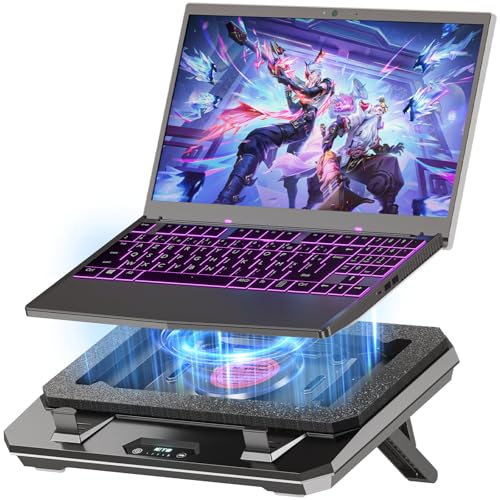
Compact Sealed Cooling – IETS GT300
The IETS GT300 is a laptop cooling pad with sealed foam chamber that combines a 4,000 RPM turbofan, concentrator nozzle, and flexible sealing ring. It is sized for 10- to 17-inch gaming laptops and adds adjustable height, air filtration, speed controls, and expanded USB connectivity.
Best For: Gamers who want concentrated sealed airflow for laptops from 10 to 17 inches without moving to the largest cooler format.
Pros:
- Three-part cooling design combines an industrial-grade turbofan, concentrator nozzle, and sealed foam.
- Five fan-speed settings support stronger cooling during gaming or quieter operation during office work.
- Replaceable filter cotton helps limit dust intake, and the stand height is adjustable.
Cons:
- The filter cotton should be replaced every two to six months for optimal performance.
- Its plastic enclosure may feel less substantial than a metal cooling pad.
The GT300 is a practical middle-ground option for users who want the pressure benefits of a sealed design in a relatively compact package. Its replaceable filtration adds maintenance but can help protect the laptop intake.
Adaptive Smart Cooling – Razer Laptop Cooling Pad
Razer’s cooling pad is a laptop cooling pad with sealed foam chamber that uses magnetic foam frames to match laptops from 14 to 18 inches. Its smart fan control, customizable fan curves, 140 mm brushless fan, USB hub, and Chroma RGB make it a polished choice for users already invested in Razer software.
Best For: 14- to 18-inch laptops, especially Razer Blade owners who want adaptive controls and Synapse integration.
Pros:
- Automatic fan control adjusts cooling from idle to full load based on selected settings.
- Airtight pressure chamber and interchangeable magnetic frames help reduce cool-air leakage.
- Offers preset or custom fan curves, a three-port USB Type-A hub, remappable buttons, and Chroma RGB.
Cons:
- Advanced fan curves and button customization require Razer Synapse.
- The 2.61 kg design is relatively heavy for a laptop accessory.
- Its feature set may be more than needed for users seeking a simple, low-cost cooling stand.
The Razer pad stands out for adaptive controls and ecosystem integration rather than maximum specification alone. It is a strong fit for users who value customization, broad laptop sizing, and a two-year manufacturer warranty.
Best Sealed-Chamber Powerhouse – llano V12 Gaming Laptop Cooling Pad
If you need a laptop cooling pad with sealed foam chamber for a large gaming laptop, the llano V12 combines an airtight pressure chamber with a 5.5-inch turbo fan. It is designed for 15.6- to 19-inch laptops and adds adjustable airflow, dust filtration, RGB lighting, and a three-port USB hub.
Best For: Large gaming laptops, demanding workloads, and users who want strong cooling with peripheral connectivity.
Pros:
- Sealed foam design and 5.5-inch turbo fan support focused airflow.
- Adjustable fan speed, three tilt angles, and a removable dust filter.
- Three USB 2.0 ports provide convenient connections for peripherals.
Cons:
- At 1.8 kg, it is relatively heavy for portable use.
- Designed for larger laptops, so it may be excessive for compact models.
- USB ports are intended for peripherals, not charging devices.
The V12 is a substantial choice when cooling performance and desk-based functionality matter more than portability. Its sealed chamber, filtration, and reinforced chassis make it especially suitable for demanding gaming or rendering setups.
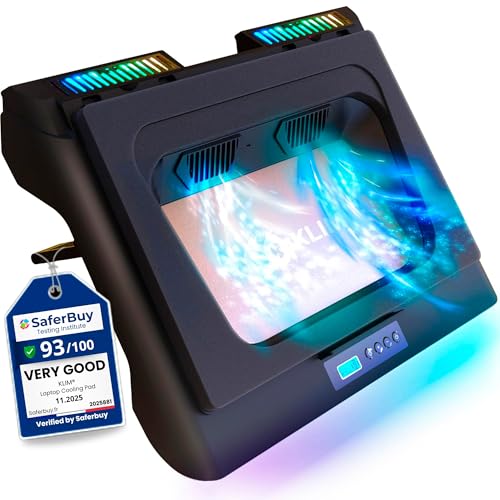
Best Long-Warranty Option – KLIM Everest Turbo-Fan Cooling Pad
The KLIM Everest is a laptop cooling pad with sealed foam chamber that uses two 4,300 RPM turbo fans to push air through compatible laptops. Its detachable foam seal is designed to maximize pressure, while six fan speeds, RGB lighting, and an extra USB port add practical convenience.
Best For: Users seeking high-speed cooling, broad laptop-size compatibility, and extended warranty coverage.
Pros:
- Dual 4,300 RPM fans are built for rapid cooling.
- Detachable foam seal helps create a high-pressure airflow path.
- Six fan speeds, an extra USB port, and a five-year assurance.
Cons:
- Requires ventilation openings underneath the laptop.
- Not suitable for laptops without bottom vents, including the example MacBook models noted by the manufacturer.
- Its foam-sealed design may be less convenient to reposition frequently.
Everest stands out for users who want aggressive fan performance without giving up long-term coverage. Confirm that your laptop has underside ventilation and falls within the supported 11- to 17.3-inch range before buying.
Best Flexible Mid-Size Fit – llano V10 Gaming Laptop Cooling Pad
For shoppers comparing a laptop cooling pad with sealed foam chamber for 13- to 17.3-inch laptops, the llano V10 offers a compact turbo-fan design with extra foam inserts for smaller machines. It also provides physical controls, three stand levels, a dust filter, and USB-A and USB-C connectivity.
Best For: Gamers and power users who need adjustable cooling for several laptop sizes with hands-on controls.
Pros:
- 4.72-inch turbo fan and copper motor deliver up to 3,500 RPM.
- Extra foam inserts help accommodate 13- to 14-inch laptops.
- Physical buttons, three stand levels, dust filtration, and dual USB ports.
Cons:
- It has less stated cooling capacity than the larger V12 model.
- Only one fan is listed.
- Smaller laptops require the included foam inserts for a snug fit.
The V10 is a versatile middle-ground option for users who switch between laptop sizes or prefer tactile controls. Choose the V12 instead if you use a larger 17-inch-plus gaming laptop and want the more substantial sealed-chamber design.
High-Airflow Sealed Cooling – Everest Plus Laptop Cooling Pad
The Everest Plus is a laptop cooling pad with sealed foam chamber designed to concentrate airflow beneath compatible laptops. Its two 6300 RPM fans and detachable foam seal target rapid cooling, while the adjustable two-mode design offers a straightforward setup for performance-focused users.
Best For: Owners of 14- to 17.3-inch laptops with underside ventilation who want high airflow and long warranty coverage.
Pros:
- Dual turbo fans reach up to 6300 RPM and are designed to cool quickly.
- Detachable foam sealing helps retain air pressure beneath the laptop.
- Supports a broad range of listed laptop sizes from 11 to 17.3 inches, with the sealed design highlighted for 14- to 17.3-inch devices.
- Includes a five-year manufacturer warranty and 24/7 specialist support.
Cons:
- Not suitable for laptops without underside ventilation, including the example MacBook models noted by the manufacturer.
- Its 1.1 kg weight and larger footprint may be less convenient for frequent travel.
This is a strong choice when maximum airflow matters more than portability. Confirm that your laptop has bottom ventilation before buying, and use the detachable seal to match the cooling setup to your device.
Adjustable Turbo Cooling – IETS GT500 Laptop Cooling Pad
The IETS GT500 is a laptop cooling pad with sealed foam chamber that combines a 4200 RPM industrial-grade turbofan with adjustable speed control. Its foam seal can be adapted to the laptop’s size, while the bottom intake is designed to avoid heat backflow on rear-exhaust gaming laptops.
Best For: Gaming laptop users who want finely adjustable cooling and broad compatibility from 13 to 17.3 inches.
Pros:
- Infinitely variable fan control ranges from 0 to 4200 RPM.
- Combined sealed foam helps create a concentrated cooling effect around the laptop.
- Designed for 360-degree, undifferentiated cooling regardless of the laptop’s cooling-hole position.
- Bottom air intake is intended to address heat backflow from rear-exhaust laptops.
Cons:
- Noise can reach 55 dB at maximum speed, so it may not suit noise-sensitive users.
- Compatibility is listed for 13- to 17.3-inch laptops rather than smaller devices.
- The supplied warranty description is one year.
The GT500 offers more control than a simple fixed-speed pad, making it useful for switching between quieter everyday operation and stronger gaming cooling. Its maximum-speed noise is the main trade-off to consider.
Quiet Versatile Stand – DeskLogics Sealed Airflow Cooler
This DeskLogics model is a laptop cooling pad with sealed foam chamber that pairs a quieter turbo fan with an adjustable stand. Keep the memory-foam seal installed for gaming laptops with bottom intakes, or remove it to use the pad as an active heat sink with MacBooks and metal ultrabooks.
Best For: Users who want one adjustable cooling stand for 12- to 19-inch laptops, including compatible MacBooks and ultrabooks.
Pros:
- Variable fan speed from 800 to 2600 RPM, with operation as low as 35 dBA.
- Supports two configurations: sealed airflow for gaming laptops or seal-free heat-sink use for MacBooks and metal ultrabooks.
- Adjustable height angles can improve viewing position, typing comfort, and airflow.
- Includes RGB modes, a washable dust filter, anti-slip pads, and USB output ports.
Cons:
- Full turbo power requires a USB 3.0 port or 5V/1A wall charger; the wall adapter is not included.
- Its 3.9-pound weight may be less portable than slimmer cooling pads.
- The warranty period is 12 months.
The DeskLogics cooler is the most flexible option here because its removable seal accommodates both bottom-intake gaming laptops and seal-free ultrabook use. It also adds ergonomic adjustment, but buyers should account for the larger weight and separate wall adapter requirement.
How We Picked the Best Laptop Cooling Pad with Sealed Foam Chamber
We evaluated these 10 cooling pads by looking at the features that most affect real-world performance: fan design and stated speed, how effectively the pad seals or directs air beneath the laptop, size compatibility, speed control, stand adjustability, RGB or software features, power requirements, and ease of use. Models with sealed foam chambers received particular attention because they are designed to reduce air leakage and concentrate airflow at the laptop’s intake area.
Published fan speeds are useful for comparison, but they do not guarantee a specific temperature reduction. Laptop vent placement, room temperature, dust buildup, and the computer’s internal cooling system also influence results.
Quick Comparison
| What to compare | Why it matters |
|---|---|
| Supported laptop size | Ensures the chassis sits securely and the airflow opening aligns properly. |
| Sealed foam chamber | Helps focus air beneath compatible laptops instead of allowing it to escape around the edges. |
| Fan speed control | Lets you balance cooling power, noise, and energy use. |
| Stand adjustment | Improves viewing angle and typing comfort while elevating the laptop. |
| Controls and connectivity | Determines whether adjustment is handled by a dial, buttons, software, USB, or DC power. |
Key Buying Factors for a Laptop Cooling Pad with Sealed Foam Chamber
Fit and Airflow Alignment
Check both the advertised size range and your laptop’s actual dimensions. A chamber that is too large may not seal effectively, while one that is too small may interfere with the chassis or leave vents uncovered. Measure the laptop, including any unusually deep rear section or protruding hinge.
Cooling Power Versus Noise
Turbo-fan models can move substantially more air than basic mesh stands, but higher output often produces more audible fan noise. Look for variable-speed control if you want to use a lower setting for office work and a stronger setting for gaming. A sealed design may improve cooling efficiency without requiring maximum speed continuously.
Ergonomics and Stability
Adjustable height is valuable for long sessions, but the laptop should remain stable at every angle. Check for a firm base, front retaining lips, and enough room for your preferred keyboard or controller setup. RGB lighting is mainly an appearance feature, so treat it as secondary to support and airflow.
Power and Maintenance
Confirm whether the cooler uses USB, a DC adapter, or both, and consider how many ports it occupies. Foam seals and intake grilles can collect dust, so choose a design that is easy to inspect and clean. Keeping the laptop’s own vents clear remains essential.
Who Should Buy Which Laptop Cooling Pad with Sealed Foam Chamber?
Choose an IETS or similar sealed-foam turbo-fan model if your priority is directed airflow for a large gaming laptop or sustained heavy workloads. The GT600 and GT500 are suited to users who want aggressive cooling and broad compatibility, while the GT300 is a more compact option for smaller systems.
Choose a llano V10 or V12 model if you want a gaming-oriented stand with speed control, RGB styling, or software-oriented features. Everest models are worth considering when high stated fan speed or flexible USB/DC power is important. A Razer cooling pad is the better fit for buyers who value a polished ecosystem and adaptive controls.
For casual users, students, or MacBook owners who mainly need elevation and supplemental airflow, a quieter adjustable turbo-fan stand may offer better value than the largest sealed-chamber model. Before buying, prioritize correct fit and vent alignment over peak RPM claims.