The best document holders for typing keep papers at a readable angle beside your keyboard, helping reduce repeated head movement and desk clutter. The right stand can also keep pages open while you reference notes, forms, books, or sheet music.
These 10 picks cover adjustable metal stands, compact plastic holders, weighted bases, foldable designs, and clipboard-style options. Use the guide below to match the holder to your desk space, document size, and daily workflow.
Best 10 Document Holders for Typing Picks for 2026
Best Adjustable Stand
TONOS Stainless Steel Document Holder

- Seven adjustable viewing positions
- Stainless steel and ABS construction
- Folds for convenient storage
Best For: Typing, studying, proofreading, and multi-purpose desk use
Best for Large Documents

- Holds letter and legal documents
- Supports up to 150 sheets
- Includes adjustable clip and line guide
Best For: Typing from larger documents and high-volume reference pages
Best Portable Option
Compact Green Plastic Paper Stand

- Lightweight and easy to transport
- Non-slip base protects desk surfaces
- Clamp holds up to 20 sheets
Best For: Portable typing, A4 papers, and compact workspaces
Best Metal Foldable Holder
KLOUD City Adjustable Book Stand

- Seven adjustable viewing angles
- Metal-and-plastic construction
- Foldable with removable line guide
Best For: Typing, reading, and angle-adjustable document support
Compact Desk Reference
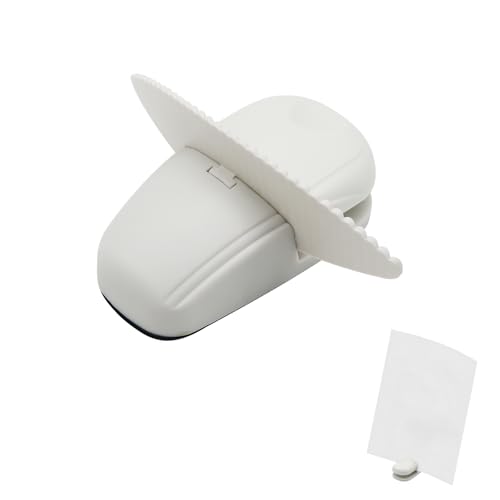
- Weighted base with nonslip pads
- Compact design for small desks
- Clips one page or a few sheets
Best For: Single-page references and compact workspaces
Adjustable Mesh Stand

- Six adjustable viewing angles
- Steel mesh with non-slip base
- Folds flat and includes magnetic buckles
Best For: Adjustable reading and typing at home, school, or work
Tracked-Reading Stand

- Seven adjustable positions
- Line guide helps track text
- Supports books and larger documents
Best For: Typing, transcription, and reading longer or thicker materials
Best Adjustable Desktop Holder
7-Position Document Stand with Side Clip
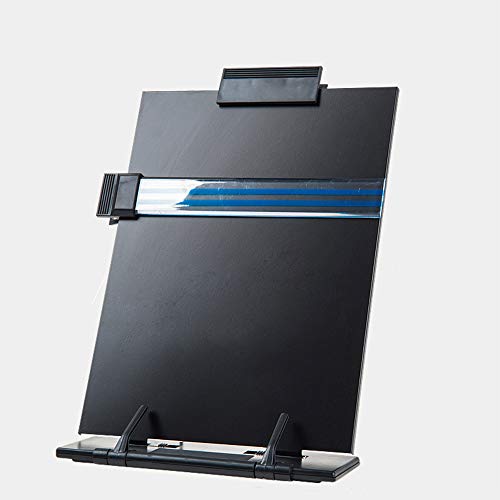
- Offers seven adjustable viewing positions
- Includes a highlighting side clip
- Sturdy metal and acrylic construction
Best For: Flexible desk-based document viewing
Best Compact Paper Clamp
Mini Non-Slip Desktop Typing Holder

- Uses a small 4 x 2.2 x 1.4-inch footprint
- Non-slip pad helps stabilize the holder
- Front notch makes paper insertion easy
Best For: Individual documents on space-limited desks
Best Adjustable Stand – TONOS Stainless Steel Document Holder
The TONOS is a versatile choice among document holders for typing, with seven viewing positions to keep papers, books, recipes, or music sheets upright and easy to follow. Its stainless steel backplate, ABS components, bottom support arms, and wide base make it suitable for everyday desk work.
Best For: Typing, proofreading, transcription, studying, note-taking, and general home-office or classroom use.
Pros:
- Seven adjustable viewing positions accommodate different desk setups.
- Supports papers, books, worksheets, recipes, and music sheets.
- Foldable design stores easily in a drawer, shelf, cabinet, or bag.
- Stainless steel and ABS construction provides a sturdy desktop stand.
Cons:
- Its approximately 9.05-inch width may provide limited room for larger materials.
- The 90-day warranty is relatively brief.
With adjustable positioning and broad document compatibility, the TONOS is a practical pick when you want one stand for typing, reading, and studying without permanently occupying much desk space.
Best for Large Documents – 3M Desktop Document Holder
The 3M Desktop Document Holder keeps reference pages upright in front of your monitor, making it a straightforward option among document holders for typing. Its adjustable clip supports portrait or landscape orientation, while the line guide helps you keep your place.
Best For: Users who type from letter- or legal-sized documents and want a monitor-area stand with substantial sheet capacity.
Pros:
- Holds letter- and legal-sized documents.
- Adjustable clip supports portrait or landscape viewing.
- Line guide helps track text while reading or transcribing.
- Non-skid base and fold-flat design add stability and storage convenience.
Cons:
- Its larger listed dimensions may take more desk space than compact holders.
- The plastic construction may feel less substantial than a metal stand.
Choose this 3M model if document size and page capacity matter more than minimal footprint; it can hold up to 150 sheets and remains adjustable for different workflows.
Best Portable Option – Compact Green Plastic Paper Stand
This compact green holder is designed for people who need portable document holders for typing at home, in an office, or at a bank. Its non-slip base, adjustable viewing angle, and clamp for up to 20 sheets make it a lightweight solution for short reference documents.
Best For: Mobile professionals, compact desks, A4 papers, memos, schedules, recipes, and occasional typing or reading.
Pros:
- Lightweight 0.17-pound design is easy to carry.
- Non-slip rubber pads help prevent movement and desk scratches.
- Clamp holds up to 20 sheets and allows quick paper handling.
- Works with A4 paper, books, and tablets according to the supplied notes.
Cons:
- Its 20-sheet capacity is lower than that of larger document holders.
- The compact footprint may not support large or bulky materials as comfortably.
The small size makes this holder particularly convenient when portability and desk space are priorities. It is best suited to lighter reference materials rather than thick document packets.
Best Metal Foldable Holder – KLOUD City Adjustable Book Stand
The KLOUD City metal stand is a durable, foldable option among document holders for typing. Seven grooves provide adjustable viewing angles, while the removable line guide and movable document clip help keep pages positioned and text easy to track.
Best For: Typing, reading, studying, proofreading, and users who prefer a compact metal holder with multiple angle settings.
Pros:
- Seven grooves offer seven viewing angles.
- Metal and plastic parts provide a sturdy, compact design.
- Removable line guide helps highlight or follow text.
- Adjustable clip can be positioned along the side edges and the stand folds flat.
Cons:
- The listed 14-inch width may require more storage or desk space than smaller holders.
- The supplied notes do not specify a sheet-capacity limit.
This KLOUD City holder is a strong fit for buyers who value metal construction and flexible positioning. Its foldable form also makes it easier to put away when the desk needs to serve another purpose.
Compact Desk Reference – White Paper Holder
If you need document holders for typing but have limited desk space, this compact white stand keeps a page or a small group of sheets upright beside your keyboard. Its weighted base and clip are suited to quick-reference tasks such as data entry, studying, and following printed instructions.
Best For: Small desks, single-page references, forms, notes, recipes, and sewing patterns.
Pros:
- Compact footprint leaves room for a keyboard and other desk items.
- Weighted base and nonslip pads help keep it steady on a flat surface.
- Clip holds loose sheets upright for hands-free reading.
- Easy to reposition between desks, counters, and worktables.
Cons:
- Designed for one page or only a small group of sheets.
- Its compact, sloped design may offer less angle adjustment than larger stands.
This is a practical choice when simplicity and minimal desk usage matter more than holding books or multiple documents. The white plastic stand works well for everyday reference pages without adding bulk.
Adjustable Mesh Stand – Foldable Document Holder
For typing, reading, or copying text, this metal mesh stand provides a larger adjustable platform than a compact paper clip stand. Six viewing angles, a non-slip base, and four magnetic buckles help keep documents positioned while you work.
Best For: Home offices, study areas, and users who want an adjustable holder that folds flat for storage.
Pros:
- Six viewing angles make it easier to find a comfortable reading position.
- Steel mesh construction and non-slip pads help reduce wobbling.
- Four magnetic buckles help secure documents in place.
- Folds completely flat for drawers, bags, or backpacks.
Cons:
- The larger footprint may use more desk space than a compact holder.
- Its listed size and metal construction make it less minimal for quick, single-page setups.
This stand is a strong all-around option among document holders for typing when adjustability and storage convenience are priorities. Its black metal design also suits office, home, and school environments.
Tracked-Reading Stand – Adjustable Metal Copyholder
This adjustable metal copyholder is built for document holders for typing, reading, and transcribing. Seven positions, a page clip, and a highlighting line guide help keep books, papers, and longer passages stable and make it easier to track your place.
Best For: Typing from books, speech transcription, reading textbooks, sheet music, and handling larger documents.
Pros:
- Seven adjustable positions support different reading and typing angles.
- Line guide helps track the text where you left off.
- Page support clip helps keep books and documents open.
- Metal backplate supports papers, books, magazines, recipes, and catalogs.
Cons:
- Its larger 13.9-by-8.3-inch footprint may be too much for a very small desk.
- It is less compact than a basic single-page holder when folded or in use.
Choose this model when document tracking and support for thicker reading material are more important than the smallest possible footprint. The foldable design also makes it practical to move between home, office, library, and outdoor work areas.
Best Ergonomic Clipboard Stand – Foldable 9 x 13-Inch Typing Holder
This foldable clipboard is a practical choice among document holders for typing when you want a paper copy elevated at a more comfortable viewing angle. It converts from a handheld clipboard to a standing document holder and supports A4 and letter-size pages.
Best For: Home, office, college, and school users who want a portable typing reference stand with posture-friendly viewing.
Pros:
- Opens into an ergonomic standing angle for easier reading while typing.
- Works as both a regular clipboard and a freestanding document holder.
- Lightweight, foldable, and sized for A4 or letter paper.
- Water-resistant, scratch-resistant polypropylene construction is easy to wipe clean.
Cons:
- The 0.2-inch fastener capacity may be limiting for thick document stacks.
- It is designed for paper and files rather than larger tablets or laptops.
Choose this model if portability and an adjustable reading position matter most. Its clipboard-to-stand design makes it especially useful for alternating between writing, reading, and computer entry.
Best Adjustable Desktop Holder – 7-Position Document Stand with Side Clip
This adjustable desktop stand is a versatile option among document holders for typing, with seven viewing positions for positioning papers, books, recipes, or sheet music. Its metal base and acrylic holder plate provide a stable freestanding setup for desk use.
Best For: Users who need multiple viewing angles and a compact stand for documents, cookbooks, sheet music, or compatible devices.
Pros:
- Seven adjustable positions accommodate different viewing angles.
- Highlighting side clip bookmarks a page and helps secure the document.
- Metal base and heavy-duty acrylic plate provide a balanced, wear-resistant design.
- Foldable and compact for use in tight spaces.
Cons:
- At 1.1 pounds, it is heavier than a lightweight clipboard-style holder.
- The supplied dimensions may not accommodate every laptop or oversized document.
This is a strong fit when adjustability is more important than minimum weight. The side clip and freestanding design also make it useful beyond typing, including reading and following recipes or music.
Best Compact Paper Clamp – Mini Non-Slip Desktop Typing Holder
This miniature paper clamp is a space-saving choice among document holders for typing. Measuring 4 x 2.2 x 1.4 inches, it grips a sheet at the front of a desk and uses a non-slip bottom pad to help keep the holder in place.
Best For: Small desks, quick typing references, and users who want a portable holder for individual A4 documents.
Pros:
- Compact footprint helps preserve desk space.
- Front notch makes it simple to insert and remove paper.
- Anti-slip pad helps prevent movement on the tabletop.
- Lightweight at 3.52 ounces and easy to carry.
Cons:
- The small format is intended for paper rather than books, tablets, or large files.
- Its single-sheet clamp design offers less page capacity than a full-size stand.
Select this holder when a minimal footprint matters most. It is a straightforward solution for keeping one document visible during typing without adding a full-size stand to the desk.
How We Picked the Best Document Holders for Typing
We compared these Document Holders for Typing by focusing on practical desk performance rather than appearance alone. Key considerations included stability, adjustability, page support, portability, storage, and how easily each stand can position documents beside or behind a keyboard. We also considered useful details such as clips, non-slip feet, foldable frames, weighted bases, and compatibility with common A4 or letter-size pages.
Because workspaces vary, the list includes both simple paper stands and more versatile desktop copyholders. A compact model may suit occasional reference work, while a heavier adjustable holder is generally better for frequent typing, data entry, studying, or transcription.
Quick Comparison
- Best for adjustability: Choose a stand with several angle settings if you switch between typing, reading, and presenting.
- Best for stability: Look for a weighted base, sturdy metal construction, or broad non-slip feet.
- Best for portability: Foldable plastic or metal designs are easier to carry and store.
- Best for loose pages: A built-in clip or side support helps prevent papers from sliding or curling.
- Best for larger reading material: Select a wide platform that can support books, cookbooks, folders, or sheet music.
Key Buying Factors for Document Holders for Typing
Angle and Height Adjustment
An adjustable angle can reduce glare and make text easier to view from your normal seated position. Multiple positions are especially useful when the holder must work with different desk heights, keyboards, or monitor setups. If you type for long periods, prioritize a stand that keeps the page close to eye level without blocking the screen.
Base Stability and Construction
A document holder should stay in place when you turn pages or press against the paper. Metal frames and weighted bases typically provide more resistance to movement, while non-slip pads help lighter plastic models grip the desk. Check the platform width and overall footprint if your workspace is narrow.
Page Retention and Capacity
Clips are useful for single sheets, forms, and pages that do not lie flat. For books or thicker documents, choose a deeper ledge or broader support surface. Confirm the listed dimensions before buying if you regularly use legal-size pages, large notebooks, or oversized music sheets.
Foldability and Storage
Foldable holders are convenient for shared desks, travel, and occasional use. A fixed desktop stand may be preferable when the holder will remain beside your keyboard every day and maximum stability matters more than compact storage.
Who Should Buy Which Document Holders for Typing?
Office workers and data-entry users should look for a sturdy, adjustable holder with a stable base and enough width for frequently referenced documents. Students and remote workers may prefer a foldable model that stores easily when the desk is needed for other tasks. Readers, musicians, and cooks should prioritize a wide platform, secure page support, and multiple viewing angles. Travelers or occasional users can save space with a lightweight portable stand, while anyone handling loose forms should choose a design with a reliable clip.