Finding a dependable laptop on a $500 budget means balancing speed, storage, display quality, operating system, and long-term usability. The options in this roundup cover practical Windows laptops, lightweight Chromebooks, and refurbished business hardware for students, home users, and everyday work.
Before choosing, consider which apps you use, how much multitasking you expect, and whether you need Windows compatibility or can work comfortably in ChromeOS. The guide below highlights the most important differences so you can narrow down the right value quickly.
Best 10 Laptops Under 500 Picks for 2026
Best All-Around Windows Value

- 15.6-inch Full HD matte display
- 8GB RAM and 512GB SSD
- Numeric keypad and Wi-Fi 6
Best For: Everyday productivity, school, and home use
Best Lightweight Student Pick

- 3.24-pound slim design
- Includes one-year Microsoft 365
- Wi-Fi 6 and useful modern ports
Best For: Students, travel, and everyday productivity
Best Full HD Family Laptop

- 15.6-inch Full HD IPS display
- Ryzen 3 processor with 8GB LPDDR5
- 128GB NVMe SSD and Wi-Fi 6
Best For: Family use, schoolwork, and multimedia
Best Chromebook Value

- ChromeOS with Intel N200 processor
- Light 3.2-pound design
- 128GB storage and Wi-Fi 6
Best For: Web apps, schoolwork, and light everyday tasks
Budget Starter

- 14-inch HD display in a 3.2-pound design
- 128GB SATA 3 TLC M.2 SSD
- 4GB RAM for basic everyday tasks
Best For: Browsing, email, streaming, and light personal use
Refurbished Value

- 14-inch anti-glare LED display
- 128GB solid-state drive
- Tested and repackaged refurbished unit
Best For: Students and light productivity on a budget
Business Power Pick

- 11th Gen Core i5 processor with 16GB RAM
- 256GB SSD and 14-inch Full HD display
- Windows 11 Pro with broad connectivity
Best For: Multitasking, office work, and business productivity
Best Windows Option
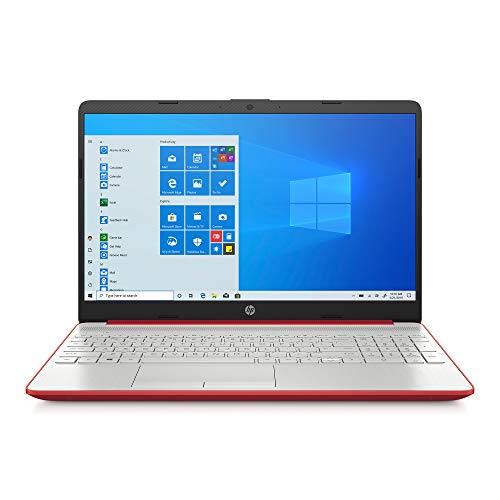
- Windows 10 S operating system
- 128GB SSD storage
- Large 15.6-inch display
Best For: Basic Windows productivity and home use
Best Large-Screen Chromebook

- 15.6-inch Full HD anti-glare screen
- Wi-Fi 6 and Bluetooth 5.2
- USB-C, HDMI, and microSD support
Best For: Cloud-based school and everyday productivity
Best All-Around Windows Value – Dell 15.6-inch FHD Laptop
If you are comparing laptops under 500 for everyday work, school, and entertainment, this Dell offers a practical combination of a 15.6-inch Full HD display, 8GB of RAM, and a 512GB SSD. Its Intel Core 3 processor, numeric keypad, and Windows 11 Home make it a versatile choice for general productivity.
Best For: Students, home users, and office tasks that benefit from a larger screen, roomy keyboard, and generous solid-state storage.
Pros:
- 15.6-inch 1920×1080 matte display with a 120Hz refresh rate
- 512GB SSD and 8GB RAM provide useful everyday capacity
- Numeric keypad, calculator hotkey, Wi-Fi 6, and three USB ports
- Includes one-year onsite service and ComfortView blue-light reduction
Cons:
- Integrated Intel UHD Graphics are intended for everyday use rather than demanding graphics work
- No touchscreen or optical drive
Choose this Dell if you want a mainstream Windows laptop with more storage and a higher-resolution display than many budget alternatives. Its feature set is especially well suited to documents, browsing, streaming, and routine business use.
Best Lightweight Student Pick – HP 14-inch Everyday Laptop
Among laptops under 500, this HP emphasizes portability and everyday convenience. It combines an Intel N150 processor with 4GB of LPDDR5 memory, 128GB of UFS storage, Windows 11 Home, Copilot integration, and a bundled one-year Microsoft 365 Personal subscription.
Best For: Students, travelers, and home users focused on browsing, documents, online classes, video calls, and streaming.
Pros:
- Lightweight 3.24-pound design with a slim 0.71-inch profile
- Wi-Fi 6, Bluetooth 5.4, USB-C, two USB-A ports, HDMI, and an SD card reader
- 720p camera, dual-array microphones, and AI noise reduction for calls
- Includes a one-year Microsoft 365 Personal subscription
Cons:
- 4GB RAM and 128GB storage are modest for heavier multitasking
- 14-inch display is 1366×768 rather than Full HD
This HP is a sensible budget option when low weight, built-in productivity software, and video-call features matter more than high-end performance. Its compact design makes it easy to carry between classes, rooms, or travel destinations.
Best Full HD Family Laptop – Acer Aspire 3 Ryzen 3 Laptop
This Acer Aspire 3 is a strong contender among laptops under 500 for users who want a larger Full HD screen and capable everyday performance. Its Ryzen 3 7320U processor, 8GB LPDDR5 memory, 128GB NVMe SSD, and Radeon Graphics suit schoolwork, browsing, multimedia, and video meetings.
Best For: Families, students, and personal users who want a 15.6-inch Full HD display with a portable design.
Pros:
- 15.6-inch 1920×1080 IPS display with narrow bezels and matte finish
- AMD Ryzen 3 7320U quad-core processor and 8GB LPDDR5 RAM
- NVMe SSD storage, Wi-Fi 6, and a backlit keyboard
- Camera noise reduction and AI-assisted voice filtering for online meetings
Cons:
- 128GB storage may fill quickly with large files and media
- Windows 11 S can limit software installation compared with standard Windows
- Memory is onboard and listed at a maximum of 8GB
The Aspire 3 stands out for its sharper, roomier display and balanced hardware. It is a good fit when screen quality and 8GB of memory are priorities, provided the included Windows 11 S configuration matches your software needs.
Best Chromebook Value – HP 14a Chromebook
For shoppers considering laptops under 500 for web-based work, this renewed HP Chromebook keeps things simple with ChromeOS, an Intel N200 processor, 4GB of RAM, and 128GB of UFS storage. Its 14-inch IPS display, wireless connectivity, and compact 3.2-pound build support everyday browsing and cloud-focused tasks.
Best For: Students and users who primarily need a Chromebook for web apps, email, documents, video calls, and light business tasks.
Pros:
- ChromeOS offers a streamlined environment for web-based computing
- Light 3.2-pound design with a 14-inch IPS display
- Intel N200 processor, 128GB UFS storage, Wi-Fi 6, and Bluetooth 5.3
- 720p camera with dual microphones and USB-C DisplayPort support
Cons:
- 1366×768 display resolution is lower than Full HD
- 4GB RAM is better suited to lighter multitasking
- Renewed product includes a 90-day warranty
This HP is worth considering if your workflow is centered on ChromeOS and browser-based applications. The renewed status and shorter warranty make it important to check condition expectations, but the compact design and 128GB storage add practical value for basic use.
Budget Starter – HP 14s Athlon Laptop
If you need one of the most basic laptops under 500 for everyday personal tasks, the HP 14s-fq0013dx offers a compact 14-inch design, an SSD, and Windows 10 Home in S mode. Its Athlon Silver processor and 4GB of memory are best suited to lighter workloads rather than demanding multitasking.
Best For: Browsing, email, streaming, and basic personal computing.
Pros:
- Compact 3.2-pound design with a 14-inch HD display.
- 128GB SATA 3 TLC M.2 SSD provides solid-state storage.
- Includes USB-C, two USB-A ports, HDMI, Wi-Fi, Bluetooth, and an SD card reader.
Cons:
- 4GB of RAM limits heavier multitasking.
- 1366×768 display resolution is basic.
- Windows 10 Home is configured in S mode.
The HP 14s is a practical entry-level choice when portability and simple daily use matter more than speed. Its limited memory and modest display make it less suitable for intensive apps, large workloads, or demanding games.
Refurbished Value – Lenovo IdeaPad 3 Pentium
Among laptops under 500, this refurbished Lenovo IdeaPad 3 focuses on affordable everyday computing with a dual-core Pentium processor, 4GB of RAM, and a 128GB solid-state drive. Its anti-glare 14-inch display may appeal to students and home users who want a straightforward Windows laptop.
Best For: Students, office basics, web use, and light home computing.
Pros:
- 128GB SSD supports solid-state storage performance.
- 14-inch 1366×768 anti-glare LED display.
- Refurbished unit is tested, cleaned, inspected, and repackaged with relevant accessories.
Cons:
- 4GB of RAM is limited for multitasking.
- Refurbished products may have minor blemishes or light scratches.
- Listed battery life is approximately 6 hours.
The IdeaPad 3 makes sense for buyers prioritizing value and basic productivity. Its refurbished condition and fixed 4GB memory should be weighed against the useful SSD, anti-glare screen, and compatibility with external displays and peripherals.
Business Power Pick – Dell Latitude 5420
For shoppers comparing laptops under 500, the renewed Dell Latitude 5420 stands out with business-class specifications: an 11th Gen Core i5-1145G7 processor, 16GB of RAM, a 256GB SSD, and a 14-inch Full HD display. It is a stronger fit for multitasking and productivity than the entry-level options in this roundup.
Best For: Office work, multitasking, remote meetings, and everyday business use.
Pros:
- 16GB of RAM supports more comfortable multitasking.
- 256GB SSD offers more storage than the other listed models.
- 14-inch matte Full HD display with 1920×1080 resolution.
- Includes Windows 11 Pro, HDMI, Ethernet, USB ports, and Thunderbolt ports.
Cons:
- Renewed product includes a listed 30-day warranty.
- Integrated graphics are intended for general use rather than dedicated graphics workloads.
- The display is non-touch.
The Latitude 5420 is the most capable option here for users who need responsive multitasking and a sharper screen. Because it is renewed, buyers should consider the shorter listed warranty while benefiting from its business-oriented features and stronger hardware.
Best with Extra Features – Lenovo Chromebook S330
If you want one of the more straightforward laptops under 500 for everyday browsing, documents, streaming, and cloud-based work, the Lenovo Chromebook S330 is a practical choice. Its 14-inch Full HD display, lightweight design, and Chrome OS make it easy to carry and simple to set up.
Best For: Students, casual users, and anyone who mainly works in a browser or with Google apps.
Pros:
- Sharp 14-inch 1920 x 1080 display
- Light 3.3-pound design with a thickness under one inch
- Includes USB-C, USB 3.0, microSD, HDMI, Wi-Fi ac, and Bluetooth 4.1
- Chrome OS offers built-in virus protection and cloud integration
Cons:
- 4GB of RAM and 64GB of eMMC storage limit heavier multitasking and local storage
- Chrome OS may not support the Windows software some users need
The S330 is best viewed as a portable cloud-first laptop rather than a high-performance Windows replacement. For everyday computing and multimedia, its Full HD screen and convenient connectivity are appealing at this price point.
Best Windows Option – HP Pavilion 15.6-inch Laptop
Among laptops under 500, this HP Pavilion is a practical Windows option for users who want a large screen, familiar software environment, and quick SSD storage. The quad-core Pentium processor and 4GB of memory are suited to basic productivity, browsing, and media use.
Best For: Home users and students who prefer Windows for documents, web browsing, video calls, and everyday tasks.
Pros:
- Large 15.6-inch HD LED display
- 128GB SSD provides quicker storage access than a traditional hard drive
- Includes three USB ports, HDMI, HD webcam, and DTS Studio Sound
- Listed battery life is up to 10 hours
Cons:
- 4GB RAM is modest for demanding multitasking
- 1366 x 768 resolution is less sharp than a Full HD display
- Windows 10 S may restrict software installation compared with standard Windows
This Pavilion emphasizes a familiar Windows experience and useful storage capacity over premium display resolution or high-end performance. It is a sensible basic laptop, provided your workload stays within everyday productivity limits.
Best Large-Screen Chromebook – Lenovo IdeaPad 3 Chromebook
The Lenovo IdeaPad 3 is a strong fit for shoppers comparing laptops under 500 who want a modern Chromebook with a spacious Full HD screen. Its Chrome OS platform, anti-glare display, and current connectivity make it well suited to browser-based work, school tasks, and cloud apps.
Best For: Students, remote workers, and families wanting a simple Chromebook with a large Full HD display.
Pros:
- 15.6-inch 1920 x 1080 anti-glare display
- Wi-Fi 6 support and Bluetooth 5.2
- USB-A, USB-C, HDMI, and microSD compatibility
- Chrome OS includes cloud backups and built-in protection
Cons:
- 4GB of RAM is fixed and suited mainly to light multitasking
- 64GB of eMMC storage may require cloud storage or external expansion
- TN display is rated at 220 nits, so it may not be ideal for bright environments
The IdeaPad 3 combines a roomy Full HD workspace with the simplicity and security features associated with Chrome OS. It is a good everyday Chromebook, but users needing desktop software or substantial local storage should look elsewhere.
How We Picked the Best Laptops Under 500
We focused on specifications that matter most at this price: processor capability, RAM, storage, screen resolution, operating system, portability, and upgrade value. The selection includes current and older models because budget laptop listings can vary widely in configuration and condition. Refurbished business laptops were considered for their stronger build quality and higher memory, while Chromebooks were included for buyers who mainly use web apps.
Pricing, availability, warranty coverage, and exact configurations can change, so verify the seller’s listing before buying. Pay particular attention to whether a product is new, renewed, or running an older version of Windows.
Quick Comparison
| Type | Best For | Typical Strength | Main Limitation |
|---|---|---|---|
| Windows laptop | Office, school, and familiar desktop software | Broad app compatibility | Budget processors may feel slow with heavy multitasking |
| Chromebook | Web browsing, Google Workspace, and streaming | Simple interface and efficient performance | Limited support for traditional Windows programs |
| Refurbished business laptop | Multitasking and productivity | More RAM, ports, and durable construction | May show cosmetic wear or have an older battery |
Key Buying Factors for Laptops Under $500
Operating System and Software
Choose Windows if you need Microsoft desktop applications, specialized school software, or compatibility with Windows-only tools. ChromeOS is often a better fit for browser-based work, video calls, email, and streaming, but confirm that your required apps work online or through Android and Linux support.
Processor and Memory
Entry-level processors are suitable for browsing and documents but can struggle when many browser tabs or demanding applications are open. Aim for 8GB of RAM when possible. A 16GB refurbished business model can offer notably better multitasking than a new 4GB budget laptop.
Storage and Display
An SSD makes startup and app loading much faster than an older hard drive. Capacity varies significantly, so 128GB is a more flexible starting point than 64GB, especially on Windows. A Full HD display provides sharper text and more workspace than a basic 1366×768 panel.
Condition, Battery, and Connectivity
For renewed models, check the refurbisher’s warranty, return policy, battery expectations, and cosmetic-grade description. Also confirm the ports you need, such as USB-C, HDMI, a headphone jack, and an SD card reader.
Who Should Buy Which Laptops Under 500?
Students and home users: Choose a Windows model with 8GB RAM and an SSD if you need Office, school software, or general flexibility. A Chromebook is a strong alternative for browser-based assignments and streaming.
Remote workers: Prioritize a Full HD screen, webcam, comfortable keyboard, and at least 8GB of memory. A refurbished business laptop may deliver the best productivity value if battery condition is acceptable.
Light users and travelers: A compact Chromebook or 14-inch Windows laptop can be easier to carry and usually handles email, documents, and entertainment efficiently.
Power users on a strict budget: Look for the highest RAM and SSD capacity available, ideally in a business-class refurbished model. None of these budget options are intended for serious gaming, professional video editing, or demanding 3D workloads.