The right document holder keeps pages at a readable angle, reduces desk clutter, and makes copying, typing, and reviewing information more comfortable. The models in this roundup range from compact plastic stands to adjustable metal copyholders with clips and line guides.
Use the guide below to compare stability, adjustability, size, and everyday convenience before choosing the best desktop document holder for your workspace.
Best 10 Desktop Document Holders Picks for 2026
Best Adjustable Mesh Stand
MaxGear Foldable Document Holder

- Six adjustable viewing angles
- Steel mesh frame with non-slip base
- Four magnetic buckles and fold-flat storage
Best For: Adjustable hands-free reading, typing, and copying
Best Compact Clip
Kensington Flex Clip Copyholder
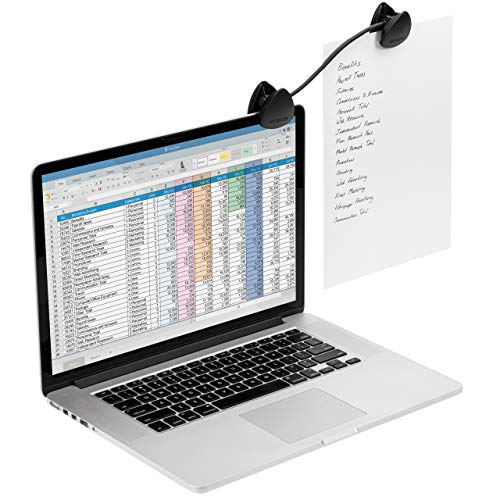
- Clips to laptops and monitors
- Flexible gooseneck positioning
- Lightweight 3.84-ounce design
Best For: Portable, screen-mounted document reference
Best High-Capacity Holder
3M Adjustable Desktop Document Holder

- Holds up to 150 sheets
- Supports letter and legal documents
- Adjustable clip with line guide
Best For: Paperwork-heavy office and typing workflows
Best for Books and Recipes
TONOS Stainless Steel Paper Stand

- Seven adjustable viewing positions
- Stainless steel backplate and wide base
- Foldable support for papers and books
Best For: Students, teachers, cooks, and multi-purpose desk use
Best Adjustable Metal Stand
KLOUD City Desktop Document Holder

- Seven adjustable viewing angles
- Removable line guide and document clip
- Sturdy, compact, foldable design
Best For: Adjustable desk reading and document reference
Best Compact Typing Stand
Red Paper Holder for Desk Work

- Small footprint for crowded desks
- Clamp holds up to 20 sheets
- Non-slip weighted base
Best For: A4 documents beside a computer keyboard
Best Two-Pack for Large Documents
Lawei Adjustable Desktop Document Holder

- Includes two fold-flat holders
- Supports up to 150 sheets each
- Seven angles for letter, legal, and A4 documents
Best For: Shared workspaces and high-volume document reference
Compact Choice
Hanghs Adjustable Desktop Document Holder
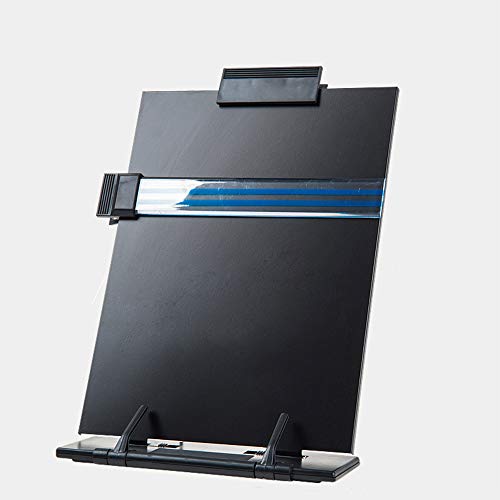
- Seven adjustable viewing positions
- Highlighting side clip bookmarks pages
- Foldable, lightweight design for tight spaces
Best For: Compact desks and portable reading or typing setups
Best Value Pair
OSPNIEEK 2-Pack Desktop Document Holders

- Includes two foldable document stands
- Seven positions adjust height and angle
- Paper clip and line guide aid reading
Best For: Shared workspaces or keeping a spare stand
Single-Stand Pick
OSPNIEEK Adjustable Desktop Document Holder

- Seven adjustable positions for flexible viewing
- Page clip and line guide support reading
- Foldable stand for portable use
Best For: Individual reading, typing, and transcription setups
Best Adjustable Mesh Stand – MaxGear Foldable Document Holder
The MaxGear is one of the more versatile desktop document holders for reading, typing, and copying. Its steel mesh construction, six viewing angles, magnetic buckles, and fold-flat design make it practical for a home office, classroom, or portable workspace.
Best For: Users who want adjustable hands-free document viewing with a stable, foldable stand.
Pros:
- Six adjustable viewing angles help position documents comfortably.
- Non-slip pads and a solid metal mesh frame help reduce wobbling.
- Four magnetic buckles hold documents in place.
- Folds flat for storage in a drawer, bag, or backpack.
Cons:
- The stand is larger and heavier than compact clip-style holders.
- Its listed dimensions may take up noticeable desk space when fully opened.
Choose the MaxGear if adjustability and stability matter more than having the smallest possible footprint. The 12-month after-sales service is an additional convenience.
Best Compact Clip – Kensington Flex Clip Copyholder
The Kensington Flex Clip is a compact option among desktop document holders, attaching directly to a laptop or monitor. Its flexible gooseneck lets you position pages near your screen without adding a full-size stand to your desk.
Best For: Laptop and monitor users who need a lightweight, portable copyholder.
Pros:
- Clips to laptops, CRT monitors, and flat-panel monitors.
- Flexible gooseneck allows customized document positioning.
- Compact, lightweight design is easy to carry.
- High-impact molded plastic construction.
Cons:
- Its clip-on format may not suit users who prefer a freestanding holder.
- The compact design offers less support for books or thick document stacks.
The Flex Clip is best when portability and minimal desk space are priorities. Its monitor-mounted design keeps reference pages close to the screen, though it is less suited to larger reading materials.
Best High-Capacity Holder – 3M Adjustable Desktop Document Holder
The 3M DH340MB is a practical desktop document holder for keeping papers upright beside or in front of your monitor. Its height-adjustable clip supports portrait or landscape pages, while the line guide and capacity of up to 150 sheets make it useful for longer documents.
Best For: Office users handling letter- or legal-sized documents during typing, reading, or data entry.
Pros:
- Height-adjustable clip supports portrait and landscape orientations.
- Holds letter- and legal-sized documents.
- Supports up to 150 sheets.
- Non-skid base and fold-flat storage add practical convenience.
Cons:
- Its larger dimensions may require more desk space than clip-on models.
- Plastic construction may feel less substantial than metal alternatives.
The 3M holder stands out for document capacity and format flexibility. It is a strong choice for paperwork-heavy workflows, especially when a line guide and fold-flat storage are useful.
Best for Books and Recipes – TONOS Stainless Steel Paper Stand
The TONOS paper stand is a sturdy choice among desktop document holders, combining a stainless steel backplate with ABS components and a wide base. Seven viewing positions support reading, typing, studying, recipes, music sheets, and other hands-free tasks.
Best For: Students, teachers, home cooks, and professionals who need a foldable stand for papers, books, or recipes.
Pros:
- Seven adjustable viewing positions accommodate different desk setups.
- Stainless steel backplate and wide base provide a sturdy structure.
- Bottom support arms help hold papers, books, and other materials.
- Foldable design stores easily in a drawer, cabinet, shelf, or bag.
Cons:
- The approximately 9-inch width and 14-inch height may occupy substantial vertical space.
- Its 90-day warranty is shorter than some alternatives listed here.
The TONOS is a versatile pick when a document holder must handle more than loose pages. Its adjustable, foldable design suits study areas, classrooms, offices, and kitchen counters.
Best Adjustable Metal Stand – KLOUD City Desktop Document Holder
For shoppers comparing desktop document holders, the KLOUD City model offers a sturdy, compact metal design with seven viewing positions. Its foldable form, line guide, and adjustable clip make it practical for reading or referencing documents at a desk.
Best For: Users who want adjustable viewing angles in a compact, foldable document stand.
Pros:
- Seven grooves provide seven viewing angles.
- Metal and plastic construction is sturdy while remaining compact.
- Includes a removable line guide and adjustable document clip.
- Folds to approximately 13.9 by 8.2 inches.
Cons:
- Its 1.1-pound weight may be more than needed for users seeking an ultra-light holder.
- The supplied details do not specify a maximum sheet capacity.
This is a sensible desktop document holder for readers who value angle adjustment and helpful accessories without choosing a bulky stand.
Best Compact Typing Stand – Red Paper Holder for Desk Work
This compact desktop document holder is designed to keep A4 papers upright beside a keyboard. Its small footprint, non-slip base, and 20-sheet clamp suit crowded workstations where forms, notes, and instructions need to stay visible while typing.
Best For: Typing, data entry, and other tasks that require a small upright paper stand beside a computer.
Pros:
- Compact footprint fits crowded desks and counters.
- Clamp holds up to 20 sheets.
- Weighted base with rubber pads helps keep the stand in place.
- Lightweight plastic construction weighs about 0.17 pound.
Cons:
- Its compact design is intended for A4 documents rather than larger materials.
- It offers a single stand-alone format rather than adjustable viewing positions.
Choose this red paper holder when desk space is limited and your main priority is keeping a modest stack of pages accessible while typing.
Best Two-Pack for Large Documents – Lawei Adjustable Desktop Document Holder
The Lawei two-pack is a versatile choice among desktop document holders, with adjustable tilt, document clips, and line guides included for each stand. Each holder supports letter, legal, and A4 documents and is designed to hold up to 150 sheets.
Best For: Offices, study areas, or shared workspaces that need two adjustable holders for substantial documents.
Pros:
- Two holders are included in the pack.
- Seven grooves provide seven adjustable viewing angles.
- Each stand can hold up to 150 sheets and supports letter, legal, and A4 sizes.
- Includes a removable document clip and clear line guide.
Cons:
- Its 12.2-inch setup height and 8.3-inch width require more desk space than compact stands.
- The two-pack weighs approximately 1.37 kilograms.
With its two-holder format and high stated sheet capacity, the Lawei is well suited to users who regularly reference larger documents or want a spare stand available.
Compact Choice – Hanghs Adjustable Desktop Document Holder
For shoppers comparing desktop document holders for reading, typing, recipes, or sheet music, the Hanghs stand offers a compact, foldable design with seven viewing positions. Its metal base and heavy-duty acrylic plate are suited to tight workspaces.
Best For: Compact desks, sheet music, cookbooks, documents, and tablet viewing.
Pros:
- Seven adjustable positions help customize the viewing angle.
- Highlighting side clip bookmarks your place and helps hold documents.
- Lightweight, foldable design is easy to carry and store.
- Metal base and acrylic holder plate provide a sturdy setup.
Cons:
- It is a single-document-holder package rather than a multipack.
- The compact 8.2-inch width may be less suitable for especially large materials.
This Hanghs model is a practical pick when portability and a small footprint matter most. The adjustable positions and side clip add useful flexibility for everyday reference tasks.
Best Value Pair – OSPNIEEK 2-Pack Desktop Document Holders
Among desktop document holders, the OSPNIEEK two-pack stands out for shared workspaces or buyers who want a spare. Each foldable stand has seven positions, a paper clip, and a line guide for reading, typing, or transcribing.
Best For: Home offices, classrooms, shared workspaces, and buyers needing two stands.
Pros:
- Two stands provide useful value for personal or shared use.
- Seven adjustable positions support different reading angles and heights.
- Line guide and page clip help track text and keep papers in place.
- Metal and ABS construction has a polished, easy-to-clean finish.
Cons:
- The two-piece package may be more than needed for a single-user setup.
- At 1.33 kg per the supplied details, it is less lightweight than the single OSPNIEEK model.
This set makes sense when flexibility and quantity are priorities. Its clips, line guide, and adjustable backstand support organized reference work across office, study, and reading tasks.
Single-Stand Pick – OSPNIEEK Adjustable Desktop Document Holder
This OSPNIEEK desktop document holder is a straightforward single-stand option for A4 or letter documents, books, music, and tablets. Seven adjustable positions, a page clip, and a highlighting line guide make it useful for hands-free reference work.
Best For: Individual users who need a sturdy, foldable stand for reading, typing, or transcription.
Pros:
- Seven positions allow adjustment of height and viewing angle.
- Page clip helps hold books and documents open.
- Line guide makes it easier to keep track while reading or typing.
- Foldable, compact format is portable for home, office, library, or outdoor use.
Cons:
- This is a one-item package, unlike the matching two-pack option.
- The supplied details do not specify a dedicated warranty length beyond the listed one-year warranty.
Choose this model if you want the OSPNIEEK feature set without buying two stands. It balances adjustability, document retention, and portability in a single desk-ready design.
How We Picked These Desktop Document Holders
We selected products that address common desk-based tasks, including typing from printed pages, reading books or sheet music, reviewing forms, and keeping documents visible beside a monitor. The lineup includes foldable stands, monitor-mounted holders, clip-based designs, adjustable metal bookstands, and multipacks for shared or multi-document workstations.
Our comparison focuses on practical features: page support, angle adjustment, clip strength, footprint, portability, material durability, and compatibility with common paper sizes such as Letter and A4. Since desk setups vary, no single design is ideal for every user.
Quick Comparison
| Best For | Look For | Useful Design Types |
|---|---|---|
| Typing from papers | Elevated viewing angle and a page clip | Adjustable stands, clipboards |
| Small desks | Compact footprint or fold-flat construction | Foldable plastic holders, monitor-mounted models |
| Books and thick documents | Wide support ledge and strong retaining clip | Metal bookstands, multi-position holders |
| Multiple work areas | Low-cost multipack and portable construction | Two-pack document holders |
Key Buying Factors for Desktop Document Holders
Stability and Construction
A holder should stay planted while you type, turn pages, or mark up documents. Metal frames generally provide more rigidity, while plastic models can be lighter and easier to transport. Check for a non-slip base, broad rear support, and a ledge deep enough to prevent pages from sliding.
Adjustability and Viewing Angle
Several positions let you match the holder to your chair height, monitor placement, and document thickness. Adjustable designs are especially useful when one stand must handle papers, books, recipes, or sheet music. A fixed holder may be preferable if you want a simpler, faster setup.
Clips, Line Guides, and Page Control
Retaining clips help with loose sheets and lighter documents, while a line guide can make proofreading or data entry easier. For thick books, verify that the clip opens wide enough and does not obstruct the text. If you frequently turn pages, choose a design that holds paper securely without requiring constant readjustment.
Size, Portability, and Desk Space
Confirm the supported document size before buying, particularly if you use Legal, A4, oversized forms, or bound books. Foldable and compact models suit small desks and travel, while wider metal stands offer better support but occupy more room.
Who Should Buy Which Desktop Document Holders?
Choose a foldable or compact plastic model if you need an affordable holder for occasional typing or a crowded workstation. A monitor-mounted option works well when desk space is limited and your screen setup is compatible. Pick an adjustable metal stand if durability, stability, and support for books or thicker documents matter most.
Users who proofread, enter data, or transcribe regularly should prioritize a clip and line guide. A multipack is practical for separate home and office desks, shared workspaces, or keeping one holder available for different documents. Before ordering, measure your available desk area and compare it with the holder’s footprint and intended page size.