Accurate color starts with dependable measurement. The best colorimeter color calibration tools help photographers, video editors, designers, and other visual professionals create a display they can trust.
This roundup includes monitor colorimeters, camera color targets, and specialized color-matching tools, covering everything from straightforward calibration to demanding HDR and OLED workflows.
Best 10 Colorimeter Color Calibration Tools Picks for 2026
Easy Entry-Level Choice

- Creates an edit-ready profile in about 90 seconds
- Uses a simple three-step setup
- Profiles up to three connected displays
Best For: Beginners and creators seeking quick, uncomplicated calibration
Camera Color Reference

- Offers 48 color targets plus a gray card
- Creates HSL presets from test shots
- Supports consistent color across cameras and lighting
Best For: Photographers calibrating camera color during studio or location shoots
Display Calibration Choice

- Automated display color and brightness calibration
- Supports multiple displays with one sensor
- Includes a quick ReCAL assistant
Best For: Multi-display monitor calibration
Camera Workflow Pick

- Four targets for exposure and white balance
- Creates DNG and ICC camera profiles
- Folding case is portable and positionable
Best For: On-location photo and video color control
Paint Matching Pick
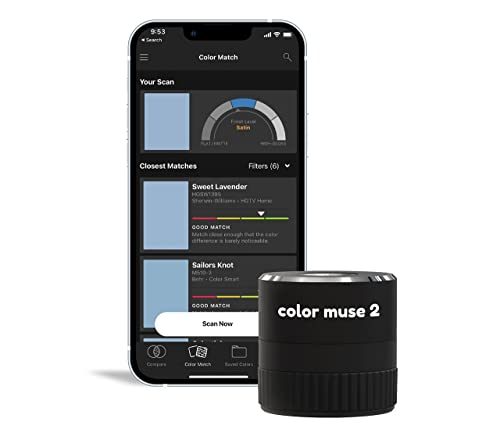
- Reads paint color and sheen levels
- Connects wirelessly to the Color Muse app
- Supports major paint libraries and RAL/Pantone options
Best For: Wall-to-wall paint color matching
Simple Dual-Screen Setup

- Guided Easy 1 2 3 calibration workflow
- Supports up to two displays
- Includes a before-and-after comparison
Best For: Photographers using a compact multi-monitor setup
Advanced Display Control

- Adds deeper grayscale calibration and display analysis
- Supports advanced backlights and up to 12,000-nit brightness
- Includes projector calibration and 3D LUT export
Best For: Professional photo, video, and multi-display workflows
High-Luminance Creative Pick – Calibrite Display Pro HL
The Calibrite Display Pro HL is a versatile choice among colorimeter color calibration tools for photographers and designers using LCD, mini-LED, OLED, Apple XDR, or compatible projector displays. Its sensor measures up to 3,000 nits, while PROFILER software provides both simple and advanced calibration controls.
Best For: Photo and design workflows that need accurate color across modern high-brightness displays and multiple workstations.
Pros:
- Measures displays up to 3,000 nits, including LCD, mini-LED, and OLED panels.
- PROFILER software supports white point, luminance, gamma, contrast, presets, and custom patch sets.
- Includes validation, uniformity, flare-correction, and multi-display profiling tools.
Cons:
- Its 3,000-nit range may be less suitable for extremely bright HDR displays.
- Advanced controls may be more than casual users need.
Choose this model if you want a capable all-around monitor calibrator with strong verification features and flexible control for creative work.
Easy Entry-Level Choice – Datacolor SpyderExpress
Datacolor SpyderExpress is a straightforward option among colorimeter color calibration tools for creators who want a quick path to more dependable screen color. Its software-led setup uses three steps and can produce an edit-ready profile in about 90 seconds.
Best For: Beginners and content creators who want fast, simple calibration for everyday monitors and supported Liquid Retina XDR displays.
Pros:
- Simple download, plug-in, and three-step setup.
- Designed to deliver edit-ready color in about 90 seconds.
- Supports up to three connected displays per workstation and saves profiles.
Cons:
- OLED and advanced mini-LED support requires a software upgrade.
- Features such as ambient-light adjustment and DevicePreview are upgrade options rather than included capabilities.
SpyderExpress makes sense when ease of use and speed matter more than extensive calibration controls, with an upgrade path for more advanced workflows.
Professional HDR Specialist – Calibrite Display Plus HL
The Calibrite Display Plus HL is built for demanding HDR and video workflows. As one of the more capable colorimeter color calibration tools, it measures luminance up to 10,000 nits and supports LCD, mini-LED, OLED, Apple XDR, super-bright displays, and compatible projectors.
Best For: Video editors, colorists, and teams calibrating very bright HDR displays or multiple monitors.
Pros:
- Measures up to 10,000 nits for ultra-bright HDR displays.
- PROFILER software offers advanced controls, custom patch sets, and shared presets.
- Supports Rec.709, BT.1886, Rec.2020 workflows, validation, uniformity checks, and multi-monitor profiling.
Cons:
- Its high-luminance capability may be unnecessary for standard displays.
- Advanced video and profiling features can add complexity for casual users.
This is the strongest fit in the group for professionals who need reliable measurement at extreme brightness levels and standards-aware video calibration controls.
Camera Color Reference – Datacolor Spyder Checkr
Unlike monitor-focused colorimeter color calibration tools, Datacolor Spyder Checkr is designed for camera color consistency. You photograph its target, then use the results to create an HSL preset for supported editing software such as Lightroom Classic, Adobe Camera RAW, or Hasselblad Phocus.
Best For: Photographers who need consistent camera color across different cameras, lighting conditions, and shooting locations.
Pros:
- Provides 48 spectrally engineered color targets, including extra skin-tone, near-white, and black-tone patches.
- Includes a gray chart for in-camera white balance and scene-light information.
- Durable self-casing construction, larger targets, and a tripod mount support studio or location use.
Cons:
- This is a camera-reference target, not a monitor calibration colorimeter.
- The Fade Checkr patch indicates when target cards need replacement, adding a maintenance consideration.
Consider Spyder Checkr when your primary color problem begins at capture rather than at the monitor, especially when matching cameras or controlling varied lighting.
Display Calibration Choice – Spyder4Pro S4P100
The Datacolor Spyder4Pro is a dedicated colorimeter color calibration tool for calibrating computer displays. Its full-spectrum sensor supports automated color and brightness calibration, while the ReCAL assistant makes periodic adjustments faster.
Best For: Photographers, designers, and other users calibrating one or more displays.
Pros:
- Automates color and brightness calibration.
- One sensor can calibrate multiple displays.
- Double-shielded filters are designed for improved accuracy and long-term stability.
- ReCAL helps simplify repeat calibrations.
Cons:
- Designed for display calibration rather than camera or paint-color matching.
- The supplied notes do not specify compatibility details for current operating systems.
Choose this model when your main priority is maintaining consistent monitor color and brightness across multiple displays. Its automated workflow and recalibration assistant are useful for ongoing maintenance.
Camera Workflow Pick – ColorChecker Passport Photo 2
The Calibrite ColorChecker Passport Photo 2 is a portable colorimeter color calibration tool for photography and video workflows. Its four targets address white balance, exposure, camera profiling, and enhancement, with included software supporting DNG and ICC profiles.
Best For: Photographers and video creators who need repeatable color from capture through editing.
Pros:
- Four targets cover exposure, white balance, profiling, and enhancement.
- Supports custom DNG and ICC camera profiles through Calibrite PROFILER.
- Folding case offers multiple positioning options.
- Compact design includes a lanyard for quick access on location.
Cons:
- It is intended for camera and capture workflows, not direct monitor calibration.
- Profile creation requires using the included calibration software.
This is a strong fit for location work and multi-camera projects where consistent white balance and camera rendering matter. The case and lanyard make it practical to carry between shoots.
Paint Matching Pick – COLOR MUSE 2
The COLOR MUSE 2 is a wireless paint colorimeter color calibration tool that reads flat surfaces and connects with the Color Muse app. It identifies nearby paint colors and sheen levels, with access to libraries from brands including Sherwin-Williams, Behr, PPG, and Benjamin Moore.
Best For: Wall-to-wall paint matching and selecting a compatible finish for interior or exterior projects.
Pros:
- Designed for color and sheen matching.
- Wireless connectivity works with the Color Muse app.
- App includes an extensive library of paint colors and premium RAL and Pantone options.
- Compact design is convenient for on-the-go readings.
Cons:
- Spot touch-ups are not recommended.
- Best results require smooth, flat surfaces.
- Phone-screen colors may vary slightly from scanned colors.
Consider the COLOR MUSE 2 when you need a practical paint scanner rather than a display or camera calibration device. Its sheen detection and broad app library can help narrow down wall-color and finish choices.
Easy Color Confidence – Spyder Monitor Calibrator
For photographers, designers, and other creators comparing colorimeter color calibration tools, the datacolor Spyder offers a quick, approachable way to establish a more accurate display baseline. Its software supports modern laptop and desktop screens, including OLED, mini-LED, and Apple Liquid Retina XDR displays.
Best For: Beginners and everyday creators who want fast, guided monitor calibration with room-light awareness.
Pros:
- Completes a standard calibration in about 90 seconds.
- Works with OLED, mini-LED, and Apple Liquid Retina XDR displays.
- DevicePreview Beta simulates how photos may appear on other devices.
- Ambient light sensing can recommend or automate profile changes.
Cons:
- Advanced users may find the preset workflow less flexible than the SpyderPro.
- DevicePreview is identified as a beta feature.
This is a practical entry point for improving color confidence without a complicated setup. Choose it when speed and ease of use matter more than advanced analysis and video-oriented controls.
Simple Dual-Screen Setup – Calibrite Display 123
The Calibrite Display 123 is one of the more straightforward colorimeter color calibration tools for creators who want a guided process rather than a long list of technical settings. Its Easy 1 2 3 software workflow helps correct common monitor shifts and supports calibration for up to two displays.
Best For: Photographers and creators building a simple two-monitor editing workspace.
Pros:
- Guided 1 2 3 workflow makes setup approachable.
- Supports up to two displays for more consistent multi-screen viewing.
- Includes a before-and-after comparison check.
- Offers USB-C connectivity and a selectable brightness target.
Cons:
- Supports fewer displays than the datacolor Spyder models.
- The notes emphasize simplicity rather than advanced calibration controls.
Display 123 is a sensible pick when you want visible before-and-after feedback and consistent color across a compact setup. It is especially appealing if you prefer a guided workflow over extensive customization.
Advanced Display Control – SpyderPro Monitor Calibrator
The datacolor SpyderPro is aimed at professionals who need more than basic calibration. Among colorimeter color calibration tools, it stands out for deeper grayscale measurement, broad backlight support, projector calibration, display analysis, 3D LUT export, and extensive controls for multi-monitor and video workflows.
Best For: Professional photographers, video editors, designers, and multi-display users who need detailed calibration and analysis.
Pros:
- Offers Standard and Deeper Calibration modes, with the latter measuring more grayscale points.
- Supports Wide LED, OLED, QD-OLED, Apple Liquid Retina XDR, and Mini LED displays.
- Can calibrate unlimited displays per computer capability and includes StudioMatch and SpyderTune.
- Supports projector calibration, display analysis, and 3D LUT export for compatible video monitors.
Cons:
- Its extensive controls may be more than casual users need.
- Some advanced features are most relevant to professional video and multi-monitor workflows.
SpyderPro is the strongest fit here for users who need measurement, diagnostics, and customization alongside routine calibration. It costs complexity in exchange for a broader professional toolkit and more control over demanding display setups.
How We Picked These Colorimeter Color Calibration Tools
We focused on the type of measurement each tool performs, supported display or camera workflows, software usability, connection requirements, and the level of color control it offers. The selection includes current Calibrite and Datacolor monitor calibrators, older models that may still appear through remaining stock, camera calibration targets, and a dedicated paint-color matching device.
Because these products are not interchangeable, we considered whether each one is designed for monitor profiling, camera color consistency, white balance and exposure checks, or physical color matching. That distinction matters more than brand alone.
Quick Comparison
| Best For | Look For | Relevant Options |
|---|---|---|
| Everyday monitor calibration | Simple software and USB connectivity | SpyderExpress, Display 123 |
| Photo and design work | Accurate profiling and repeatable results | Display Pro HL, SpyderPro |
| HDR, OLED, and very bright displays | High-luminance measurement capability | Display Pro HL, Display Plus HL |
| Camera color consistency | Multi-color reference targets | Spyder Checkr, ColorChecker Passport Photo 2 |
| Paint color matching | Portable physical-color measurement | COLOR MUSE 2 |
Key Buying Factors for Colorimeter Color Calibration Tools
Choose the Correct Measurement Type
A monitor colorimeter measures the light produced by a screen and creates a display profile. Camera targets instead provide known reference colors for correcting images across cameras and lighting conditions. A paint colorimeter serves a different purpose entirely, so confirm the product category before buying.
Match the Tool to Your Display
Standard LCD monitors may not need the same sensor capabilities as OLED, Mini LED, or HDR displays. If your screen reaches high brightness, choose a model explicitly built for higher luminance rather than assuming an older colorimeter will deliver equally reliable results.
Check Software and Operating-System Support
Calibration quality depends partly on the software. Look for a workflow that supports your operating system, target white point, brightness, gamma, and color space. A simpler interface is often preferable for general users, while advanced controls benefit photographers, editors, and color-managed studios.
Consider Ports, Mounting, and Frequency of Use
Verify whether the device uses USB-C, requires an adapter, or includes a counterweight and suitable screen contact. Regularly recalibrated displays benefit from quick setup and saved profiles. If you calibrate several computers, check licensing and whether the software supports multiple displays.
Who Should Buy Which Colorimeter Color Calibration Tools?
Choose an entry-level monitor calibrator if you want more consistent color for home photo editing, design, or general creative work without a complicated setup. Step up to a professional monitor colorimeter when you need tighter repeatability, multiple display controls, or dependable results for client-facing work.
For HDR, OLED, Mini LED, or exceptionally bright screens, prioritize the Calibrite HL models. Camera users should choose a reference target such as Spyder Checkr or ColorChecker Passport Photo 2 rather than a screen-only colorimeter. If your goal is identifying paint colors from real-world surfaces, choose COLOR MUSE 2. Before ordering, confirm that the tool’s measurement type, software, and display compatibility match your actual workflow.