A monitor stand with wireless charging can raise your screen to a more comfortable height while adding convenient power and storage to your workspace. The models in this roundup range from compact single-monitor risers to feature-rich docking stations for dual-screen setups.
We compared charging capability, port selection, monitor support, storage, construction, and overall desk practicality to help you choose the right stand for your office, gaming area, or home workstation.
Best 10 Monitor Stands with Wireless Charging Picks for 2026
Best Docking Station Stand
Anker 675 12-in-1 Monitor Stand

- 12-in-1 dock with HDMI, Ethernet, USB, and card readers
- 100W USB-C upstream power plus wireless charging
- Under-stand storage helps organize peripherals
Best For: Laptop users needing a monitor stand and docking station
Best Dual-Monitor Organizer
Vaydeer Dual Monitor Stand Riser
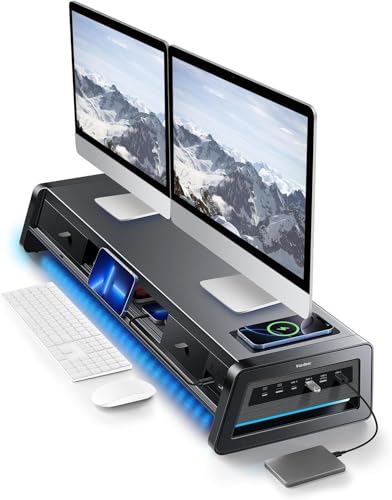
- Supports dual monitors with a 50kg advertised capacity
- Eight USB ports and a 15W wireless charging pad
- Two drawers plus integrated LED workspace lighting
Best For: Large dual-monitor desks needing storage and connectivity
Best Adjustable RGB Stand
Klearlook Dual Monitor Stand Riser

- Two foldable, rotatable sections adjust from 18.11 to 45.91 inches
- 15W wireless and up to 18W wired charging
- Drawer, device holders, and six RGB lighting modes
Best For: Flexible multi-monitor and gaming workspaces
Best Compact Metal Stand

- 21-inch metal riser supports up to 66 pounds
- 15W wireless charging and four USB ports
- Two drawers organize small desk accessories
Best For: Compact single-monitor desks needing storage and charging
Best Docking Hub

- 4K HDMI, USB 3.0, USB-C, and PD100W hub
- Up to 15W wireless charging
- Aluminum riser supports up to 44 pounds
Best For: Creators and laptop users needing integrated connectivity
Best for Everyday Use

- Supports two monitors up to 27 inches
- Two drawers and four USB ports
- 15W charging pad with 66-pound capacity
Best For: Wide dual-monitor workstations needing storage
Best Single-Shelf Value
Vaydeer Wireless Charging Monitor Stand
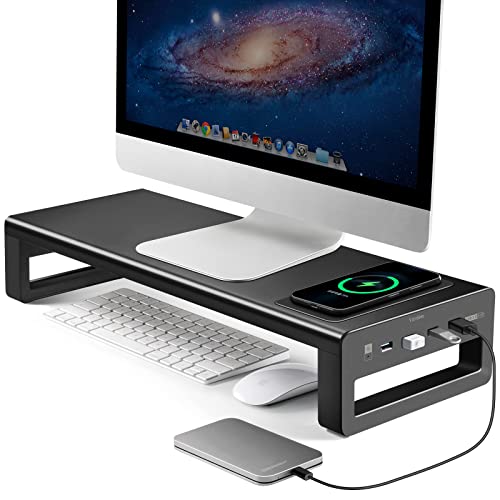
- 15W wireless charging area
- Four USB 3.0 ports
- 66-pound aluminum stand for monitors up to 27 inches
Best For: Single-monitor desks needing simple charging and USB access
Best All-in-One
RGB USB-C Wireless Charging Monitor Stand

- 15W wireless charging with separate power control
- Four-port hub with USB 3.0 and Type-C connectivity
- Foldable design with RGB lighting and under-stand storage
Best For: Single-monitor desks needing charging, connectivity, and lighting
Best for Dual Monitors
Two-Tier Wireless Charging Monitor Stand

- Supports two monitors up to 27 inches
- 88-pound capacity with reinforced metal construction
- Wireless charging, four USB 3.0 ports, and two-tier storage
Best For: Large dual-monitor workstations with substantial desk space
Best Value Dual-Monitor Riser
Vaydeer Wireless Charging Monitor Stand
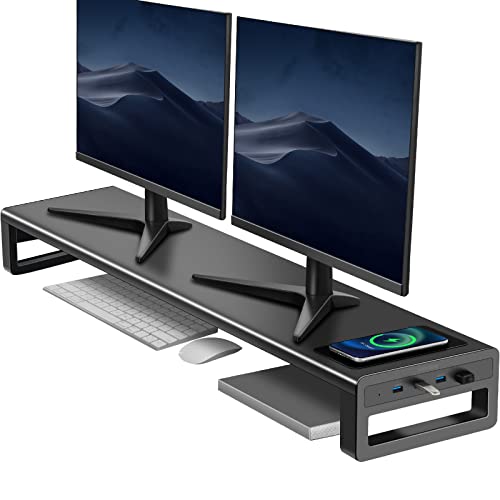
- Supports two 27-inch monitors with a 66-pound capacity
- Wireless phone charging plus four USB 3.0 ports
- Large under-stand storage area with simple leg assembly
Best For: Dual-monitor desks wanting practical charging and storage
Best Docking Station Stand – Anker 675 12-in-1 Monitor Stand
If you want monitor stands with wireless charging that also reduce cable clutter, the Anker 675 combines a monitor riser with a broad selection of workstation ports. It includes HDMI, USB, Ethernet, card readers, and a wireless charging pad, though video output is limited to its HDMI port.
Best For: Laptop users who want a monitor stand and full-featured USB-C docking station in one unit.
Pros:
- 12-in-1 design includes HDMI, Ethernet, USB ports, and SD/microSD readers.
- 100W maximum USB-C upstream power supports laptop charging.
- Wireless charging pad and under-stand storage help keep the desk organized.
- Raises the monitor to encourage a more upright sitting position.
Cons:
- Display output works through HDMI only, not the USB-C ports.
- Its 21.26-inch width and 3.7-pound weight may be more than compact desks need.
The Anker 675 is a strong choice when connectivity matters as much as monitor elevation. Confirm that your laptop and display setup can use its HDMI-only video output before buying.
Best Dual-Monitor Organizer – Vaydeer Dual Monitor Stand Riser
Among monitor stands with wireless charging, the Vaydeer stands out for dual-monitor support and built-in organization. Its metal riser adds an advertised 50kg capacity, two drawers, eight USB ports, a 15W charging pad, and an LED light strip.
Best For: Dual-monitor desks that need substantial storage, charging, and integrated lighting.
Pros:
- Supports two monitors and up to 50kg according to the supplied specifications.
- Eight USB ports provide four fast-charging and four data-transfer connections.
- Two drawers and two-tier storage help contain small office accessories.
- Built-in LED strip adds gentle workspace illumination.
Cons:
- The 39.3-inch-wide design requires considerable desk space.
- Its feature-rich design may be unnecessary for a single-monitor setup.
This Vaydeer riser is best viewed as a complete dual-monitor workstation organizer rather than a simple shelf. Measure your desk carefully and verify that your monitors fit comfortably across its wide surface.
Best Adjustable RGB Stand – Klearlook Dual Monitor Stand Riser
The Klearlook is a flexible option among monitor stands with wireless charging, combining two adjustable riser sections with USB connectivity, charging, storage, and RGB lighting. The sections can be used separately or together, making the setup adaptable to different desk layouts.
Best For: Adjustable multi-monitor, gaming, or study setups that want charging and customizable RGB lighting.
Pros:
- Two stands can work separately or combine for widths from 18.11 to 45.91 inches.
- Includes 15W wireless charging, up to 18W wired charging, and USB ports.
- Foldable, rotatable design supports flexible placement and viewing.
- Drawer and hidden phone/tablet holders improve desktop organization.
Cons:
- Its USB hub has one USB-A and two USB-C ports, fewer than some larger risers.
- RGB lighting and multiple adjustment features may be excessive for a basic office setup.
Choose the Klearlook if flexibility is a priority. Its modular width and rotatable design are useful for changing layouts, while the charging and storage features keep everyday devices close at hand.
Best Compact Metal Stand – Meatanty 3-in-1 Monitor Riser
For shoppers seeking straightforward monitor stands with wireless charging, the Meatanty combines a metal riser, two drawers, and a four-port USB hub in a compact 21-inch format. It supports monitors up to 27 inches and has a stated 66-pound load capacity.
Best For: Compact desks needing basic monitor elevation, wireless charging, and small-item storage.
Pros:
- Metal construction supports up to 66 pounds and monitors up to 27 inches.
- 15W wireless charging module adds convenient phone charging.
- Four USB ports support data transfer and hub functions.
- Two pull-out drawers store pens, drives, clips, and other small accessories.
Cons:
- The 21-inch riser is intended for a more compact setup than wide dual-monitor stands.
- The supplied notes mention troubleshooting may be needed if an iPhone does not begin charging.
The Meatanty keeps the feature set focused and the footprint relatively modest. It is a practical pick for a single-monitor desk where drawers and charging are more useful than extensive docking features.
Best Docking Hub – YICOSUN 6-in-1 Monitor Stand
If you want monitor stands with wireless charging that also expand your workstation, the YICOSUN combines a sturdy aluminum riser with a built-in 6-in-1 hub. It adds screen elevation, device connectivity, cable-management potential, and up to 15W wireless charging in one desk accessory.
Best For: Creators, laptop users, and office setups that need HDMI expansion, USB connectivity, and high-wattage charging.
Pros:
- 6-in-1 docking station includes 4K@60Hz HDMI, USB 3.0, USB-C, and PD100W charging.
- Up to 15W wireless charging supports convenient phone charging.
- Heavy-duty aluminum design supports up to 44 pounds and creates storage space underneath.
- Works as a monitor or laptop riser and supports compatible MacBook, Dell, Lenovo, HP, and full-function USB-C devices.
Cons:
- Its hub-focused design may provide more connectivity than a basic monitor riser requires.
- The listed load capacity is lower than some competing stands in this roundup.
The YICOSUN is the most connectivity-oriented option here. Choose it when a built-in display connection, USB expansion, PD100W power delivery, and wireless charging are more important than maximizing monitor capacity.
Best for Everyday Use – Meatanty Dual Monitor Stand
Among monitor stands with wireless charging, the Meatanty stands out for supporting two screens while adding drawers and USB expansion. Its 38.7-inch metal platform is designed for dual monitors up to 27 inches each and includes a charging pad rated up to 15W.
Best For: Dual-monitor office, study, gaming, and studio desks that need substantial storage and a high load capacity.
Pros:
- Supports up to 66 pounds and two monitors up to 27 inches.
- Includes two pull-out drawers for small office accessories.
- Four USB ports provide hub and data-transfer functionality.
- Up to 15W charging pad enables convenient phone charging.
Cons:
- At 38.78 inches wide, it requires considerable desk space.
- The supplied notes identify a charging pad but do not specify its wireless charging standard or compatibility range.
This is the strongest fit for shoppers who need a wide dual-monitor platform and built-in organization. Its drawers and 66-pound capacity make it especially practical for equipment-heavy workstations.
Best Single-Shelf Value – Vaydeer Wireless Charging Monitor Stand
The Vaydeer is a straightforward choice among monitor stands with wireless charging, pairing a single raised shelf with four USB 3.0 ports and a 15W charging area. Its aluminum construction supports up to 66 pounds while creating room beneath the screen for desk accessories.
Best For: Single-monitor or laptop desks seeking a compact riser with wireless charging and USB access.
Pros:
- Up to 15W wireless charger provides convenient phone charging.
- Four USB 3.0 ports support peripherals and data transfer.
- Aluminum alloy construction supports up to 66 pounds and monitors up to 27 inches.
- Raises the display to help improve viewing posture while adding storage underneath.
Cons:
- Its single-level design is less suited to dual-monitor setups.
- It does not list HDMI or USB-C display connectivity.
Choose the Vaydeer when you want the essential benefits of a monitor riser, USB hub, and wireless charging pad without the larger dual-monitor footprint or more extensive docking features.
Best All-in-One – RGB USB-C Wireless Charging Monitor Stand
This monitor stand with wireless charging combines a riser, 15W charging pad, four-port USB hub, RGB lighting, and storage in one compact setup. It is a practical choice for users who want to reduce desk clutter while adding connectivity and a higher viewing position.
Best For: Home offices, gaming desks, and users who want charging, USB expansion, lighting, and storage in one stand.
Pros:
- Includes a 15W wireless charging pad, three USB 3.0 ports, and one Type-C port.
- Independent power inputs let you control the wireless charger separately from the hub and RGB lighting.
- Foldable legs, under-stand storage, and a stated 25kg load capacity add everyday versatility.
- Raises the screen by approximately 3.5 inches and requires no assembly.
Cons:
- The USB hub and RGB lighting require a PC connection, while wireless charging uses its dedicated cable.
- Its 19.6-inch width is intended for one monitor or smaller equipment rather than a dual-monitor setup.
- The supplied details list a 22-pound load capacity, which is lower than the stated 25kg structural capacity.
This is the most feature-packed option of the three, especially for a single-monitor workstation. Choose it if integrated lighting and flexible connectivity matter as much as wireless charging.
Best for Dual Monitors – Two-Tier Wireless Charging Monitor Stand
This monitor stand with wireless charging is built for a wide, two-monitor workstation. Its metal frame supports two displays up to 27 inches, while the charging pad, USB hub, and two-tier storage help organize a larger desk.
Best For: Dual-monitor office, gaming, school, or studio setups that need substantial storage and a sturdy riser.
Pros:
- Wide 38.78-inch platform is designed to accommodate two 27-inch monitors.
- Built-in charging pad starts charging compatible phones when placed on the designated area.
- Four USB 3.0 ports provide convenient data access for peripherals and storage devices.
- Two-tier storage creates room for a keyboard, mouse, tablet, notebook, or hard drive.
Cons:
- The USB ports do not support charging, according to the supplied product notes.
- The charging pad may require troubleshooting with some iPhones, including rebooting the phone.
- At nearly 39 inches wide, it needs considerable desk space.
With its heavy-duty metal construction and 88-pound stated capacity, this is the strongest fit for a broad dual-monitor arrangement. It prioritizes stability and storage over compactness.
Best Value Dual-Monitor Riser – Vaydeer Wireless Charging Monitor Stand
This monitor stand with wireless charging offers a straightforward dual-monitor setup with a metal riser, wireless phone charger, four USB 3.0 ports, and generous space underneath. It suits users who want a clean workstation without RGB lighting or a more elaborate tiered design.
Best For: Dual-monitor users seeking a sturdy aluminum riser with charging, USB connectivity, and accessible under-desk storage.
Pros:
- Supports two 27-inch monitors and has a stated 66-pound weight capacity.
- Wireless charging works with compatible iPhone and Samsung phones.
- Four USB 3.0 ports support data transmission and can charge connected devices, according to the notes.
- Large 36.6-by-7.87-by-3.14-inch area underneath helps organize accessories.
Cons:
- The supplied notes recommend using a fast-charging adapter rather than the USB ports for wireless charging.
- Assembly is required for the two legs, even though the main aluminum plate arrives assembled.
- Its 38.88-inch width may not suit smaller desks.
This Vaydeer model balances dual-monitor support with useful charging and storage features. It is a sensible pick when you want a clean aluminum riser and do not need the RGB lighting or two-tier layout of the other options.
How We Picked the Best Monitor Stands with Wireless Charging
We focused on stands that combine monitor elevation with useful connectivity or charging features. Our comparison considers wireless charging output, USB port availability, wired connectivity, storage design, size, construction, and compatibility with common desk setups. Models with docking-station features received extra attention because they can reduce cable clutter and replace several small accessories.
Because listed specifications can vary by configuration, check the manufacturer’s weight limits, charging requirements, port standards, and dimensions before ordering. Wireless charging performance also depends on your phone case, device compatibility, and the power adapter used.
Quick Comparison
| Best For | Look For | Typical Features |
|---|---|---|
| Single-monitor home office | Compact footprint and storage | Wireless charging, USB hub, shelf or drawer |
| Dual-monitor workspace | Longer platform and higher weight capacity | Wide riser, multiple USB ports, cable access |
| Connected workstation | Docking-station functionality | HDMI, USB-C, data ports, and power delivery |
| Gaming or RGB setup | Lighting and front-access ports | RGB illumination, charging pad, USB hub |
Key Buying Factors for Monitor Stands with Wireless Charging
Charging Output and Compatibility
Confirm the stand’s maximum wireless charging wattage and whether it supports your phone or earbuds. A 15W pad may charge compatible devices quickly, while lower-output models are better suited to overnight or occasional charging. Look for a stable, clearly marked charging area that is easy to use without moving the monitor.
Ports and Docking Features
A basic USB hub is useful for keyboards, mice, flash drives, and other accessories. If you need to connect displays, storage, or a laptop, prioritize models with USB-C, HDMI, data-transfer support, or power delivery. Remember that a stand’s advertised port speed and video capability may depend on the connected computer and cable.
Size, Weight Capacity, and Stability
Measure your desk and monitor bases before buying. Dual-monitor risers need enough length and depth to support both screens without overhang. Check the rated load, especially when using large displays, speakers, or accessories on the shelf. Metal construction and nonslip feet can improve stability, but a wider stand may occupy valuable desk space.
Storage and Cable Management
Drawers and open compartments help keep notebooks, controllers, and small accessories organized. Choose open storage for quick access or drawers for a cleaner appearance. Also check whether cables can pass through the rear or underneath the riser so the charging and USB connections do not create extra clutter.
Who Should Buy Which Monitor Stands with Wireless Charging?
Choose a compact single-monitor riser if you want basic height adjustment, phone charging, and modest storage. A long dual-monitor stand is better for two screens or a monitor-and-laptop arrangement. If your desk is built around a laptop, webcam, external display, and several USB accessories, a model with USB-C, HDMI, and power-delivery features offers more value than a simple charging riser. RGB models suit gaming or style-focused setups, while drawer-equipped stands are practical for anyone trying to reclaim desk space. Finally, prioritize the strongest construction and clearest compatibility information when supporting expensive or heavy monitors.