A stacked monitor setup can free valuable desk space, improve screen positioning, and create a cleaner workstation—but only if the arm is stable and sized correctly for both displays.
We compared 10 vertical dual-monitor mounts across compatibility, weight capacity, adjustability, desk support, and installation features to help you choose with confidence.
Best 10 Monitor Arm for Stacked Monitors Picks for 2026
Best Value Vertical Mount

- Supports two 17- to 32-inch monitors
- Tilt, swivel, and 360-degree rotation
- Clamp or grommet mounting for desks up to 3.14 inches
Best For: Standard-size dual-monitor productivity setups
Best Heavy-Duty Option
PUTORSEN Vertical Dual Monitor Arm

- Supports screens up to 49 inches and 44 pounds each
- 19.69-inch pole for vertical stacking
- Gas-spring, full-motion adjustment
Best For: Large ultrawide and heavy-monitor workstations
Best Ergonomic Adjustability
HUANUO 17-32 Inch Stacked Mount

- 17-inch extension reaches up to 25.19 inches
- 90-degree tilt, 180-degree swivel, and 360-degree rotation
- Cable management with clamp or grommet mounting
Best For: Eye-level positioning and highly adjustable standard monitors
Best With USB Charging
ARES WING Stacked Dual Monitor Arm

- Supports monitors up to 49 inches and 44 pounds each
- USB-A and USB-C charging ports
- Up to 27.9 inches of height adjustment
Best For: Large stacked displays with convenient desk-side charging
Best Ultrawide Pick
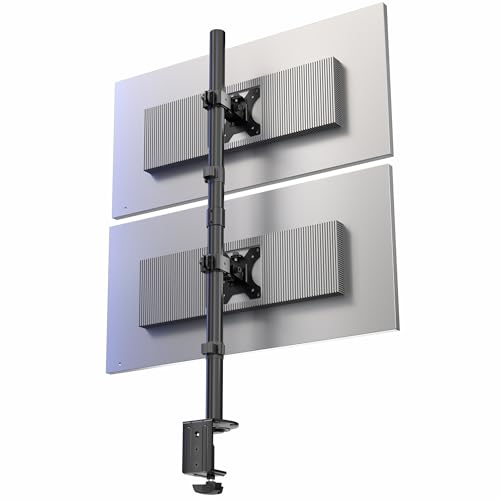
- Supports two ultrawide monitors up to 34 inches
- Holds up to 22 pounds per screen
- C-clamp and optional grommet installation
Best For: Stacking two ultrawide displays vertically
Best for Everyday Use
WALI Vertical Dual Monitor Mount

- Supports screens up to 49 inches
- Handles up to 33 pounds
- Works with C-clamp or grommet mounting
Best For: Large curved and ultrawide stacked monitors
Best Stability Features

- Supports monitors up to 33 inches
- Reinforced C-clamp helps reduce wobble
- Independent adjustment for each monitor
Best For: Standard dual-monitor home-office or gaming setups
Best Balanced Vertical Mount

- Supports two monitors up to 44 pounds each
- Four-level height adjustment and full rotation
- Cable clips and compact vertical design
Best For: Standard dual-monitor workstations needing an organized vertical stack
Best for Ultrawides
VIVO STAND-V257R Vertical Mount

- Supports two ultrawides up to 57 inches
- Up to 59.4-pound capacity per flat screen
- C-clamp or optional grommet mounting
Best For: Large dual-ultrawide monitor arrangements
Best for Tall Users
MOUNT PRO Freelift Dual Monitor Stand

- Raises screens up to 26.6 inches high
- Pneumatic springs support 4.4- to 22-pound monitors
- Clamp and grommet mounting options
Best For: Elevated dual-monitor setups and taller users
Best Value Vertical Mount – HUANUO Dual Monitor Mount
If you need a practical monitor arm for stacked monitors, this HUANUO mount offers a straightforward vertical setup for two 17- to 32-inch displays. Its height adjustment, broad movement range, and choice of clamp or grommet mounting make it suitable for space-conscious workstations.
Best For: Home offices, productivity setups, and users who want two standard-size monitors stacked vertically.
Pros:
- Supports two 17- to 32-inch monitors weighing up to 17.6 pounds each.
- Offers tilt, swivel, and 360-degree rotation for flexible positioning.
- Clamp or grommet base supports desks up to 3.14 inches thick.
- Raises displays to help reduce neck, back, and shoulder strain.
Cons:
- Limited to monitors up to 32 inches and 17.6 pounds per arm.
- Requires compatible 75x75mm or 100x100mm VESA mounting holes.
This is a sensible choice when you want a stable stacked-monitor arrangement without the capacity demands of an ultrawide-focused arm. Confirm your monitor weight, size, and VESA pattern before buying.
Best Heavy-Duty Option – PUTORSEN Vertical Dual Monitor Arm
For a monitor arm for stacked monitors that can handle larger displays, the PUTORSEN heavy-duty arm supports screens from 17 to 49 inches and up to 44 pounds per arm. Its extra-tall pole and gas-spring adjustment are aimed at demanding gaming, creative, and multitasking setups.
Best For: Large ultrawide monitors, heavy displays, video editing, gaming, and professional multitasking.
Pros:
- Supports 17- to 49-inch monitors weighing up to 44 pounds each.
- Its 19.69-inch pole is designed for vertical stacking.
- Gas-spring arms provide adjustable height and weight tuning.
- Offers tilt, swivel, and 360-degree rotation with portrait or landscape positioning.
Cons:
- Non-VESA displays require a separately sold adapter.
- Its heavy-duty construction weighs 8.3 kg, which may be more than basic setups need.
This arm stands out for users pairing large or heavy monitors, especially when a conventional dual stand lacks the necessary capacity. Check the desk, VESA pattern, and monitor weights before installation.
Best Ergonomic Adjustability – HUANUO 17-32 Inch Stacked Mount
This HUANUO monitor arm for stacked monitors adds a 17-inch extension and can elevate screens up to 25.19 inches, making it useful for eye-level positioning. It also provides extensive tilt, swivel, and rotation adjustment for work, gaming, or video calls.
Best For: Users prioritizing extra height, posture-friendly screen placement, and flexible viewing angles.
Pros:
- Supports two monitors up to 32 inches and 19.8 pounds each.
- 17-inch extension raises monitors up to 25.19 inches.
- Provides 90-degree tilt, 180-degree swivel, and 360-degree rotation.
- Includes cable management and clamp or grommet mounting.
Cons:
- Not compatible with monitors larger than 32 inches.
- Monitors must weigh between 4.4 and 19.8 pounds and use 75x75mm or 100x100mm VESA holes.
- Not recommended for glass desks.
Choose this model if vertical reach and precise positioning matter more than support for oversized screens. Its detailed compatibility requirements make measuring your monitors especially important.
Best With USB Charging – ARES WING Stacked Dual Monitor Arm
The ARES WING is a monitor arm for stacked monitors designed for larger displays, including compatible 49-inch ultrawides. Along with gas-spring adjustment and a tall vertical layout, it adds USB-A and USB-C charging ports for convenient access at the desk.
Best For: Large-monitor setups that benefit from integrated USB charging and flexible stacked-screen positioning.
Pros:
- Supports 17- to 49-inch monitors weighing up to 44 pounds per arm.
- Offers up to 27.9 inches of height adjustment and 22.4 inches of arm extension.
- Provides tilt, 90-degree swivel, and 360-degree rotation.
- Includes USB-A and USB-C ports rated at 5V/2A for charging.
Cons:
- Non-VESA monitors require an adapter.
- Desk thickness ranges are narrower than some mounts: 0.5-1.8 inches for the C-clamp and 0.5-2 inches for the grommet mount.
- USB charging functionality adds features that may be unnecessary for simpler setups.
This is a strong fit for users combining heavy or ultrawide displays with a cleaner, more accessible charging setup. Verify the VESA pattern, desk thickness, and available clearance before mounting.
Best Ultrawide Pick – VIVO STAND-V002T
The VIVO STAND-V002T is a practical monitor arm for stacked monitors when you need to mount two ultrawide displays vertically. It supports screens from 13 to 34 inches, with up to 22 pounds per monitor, and uses a sturdy desk-mounted design.
Best For: Users stacking two ultrawide monitors while keeping installation drill-free.
Pros:
- Supports two ultrawide screens up to 34 inches and 22 pounds each.
- Offers tilt, swivel, rotation, and center-pole height adjustment.
- Includes a C-clamp for surfaces up to 3.25 inches thick, plus an optional grommet mount.
- Detachable cable clips and VESA plates simplify setup and cable organization.
Cons:
- Designed for a maximum screen size of 34 inches.
- The stacked configuration may require careful height adjustment for comfortable viewing.
With broad ultrawide compatibility, full positioning adjustments, and a three-year warranty, this VIVO mount is a solid choice for a clean two-screen vertical workstation.
Best for Everyday Use – WALI Vertical Dual Monitor Mount
The WALI vertical dual monitor mount is a monitor arm for stacked monitors built for especially large displays. It supports flat and curved screens from 17 to 49 inches, with a 33-pound capacity, making it suitable for demanding ultrawide setups.
Best For: Large curved or ultrawide monitors that need a high-capacity stacked mount.
Pros:
- Supports monitors from 17 to 49 inches and up to 33 pounds.
- Provides tilt, swivel, rotation, height adjustment, and arm extension.
- Includes both C-clamp and grommet mounting options.
- Uses a quick-release VESA plate and built-in cable management.
Cons:
- Its broad support range may be more than needed for standard-sized screens.
- Large 49-inch monitors can require careful desk and viewing-space planning.
The WALI stands out for its unusually high screen-size and weight ratings, while its adjustable positioning and dual mounting options add flexibility for large stacked displays.
Best Stability Features – ErGear Dual Monitor Stand
The ErGear dual monitor stand is a monitor arm for stacked monitors aimed at standard-sized dual-screen workstations. Its reinforced C-clamp, wider VESA plates, and gap-free arm connections are designed to help reduce wobble while supporting screens up to 33 inches.
Best For: Home-office and gaming setups using two standard-sized monitors.
Pros:
- Supports two monitors from 13 to 33 inches and up to 19.8 pounds per arm.
- Offers independent height, tilt, swivel, and 360-degree rotation adjustments.
- Uses an anti-slip padded C-clamp and wider VESA plates for added stability.
- Includes pre-installed cable-management clips and hand-tightened setup hardware.
Cons:
- Its 19.8-pound-per-arm capacity is lower than the WALI mount’s rating.
- The stated maximum supported screen size is 33 inches.
For users prioritizing a stable, easy-to-adjust stacked arrangement, the ErGear combines useful motion range with practical clamp and cable-management improvements.
Best Balanced Vertical Mount – HEMUDU Dual Monitor Arm
If you need a monitor arm for stacked monitors without taking up much desk space, the HEMUDU HD04B-002 is a practical option for two standard-size displays. It supports 13- to 34-inch monitors up to 44 pounds each and includes multiple adjustment points for arranging screens in portrait or landscape orientation.
Best For: Workstations using two VESA-compatible monitors that need a space-saving vertical setup.
Pros:
- Supports two 13- to 34-inch monitors up to 44 pounds each.
- Offers tilt, swivel, 360-degree rotation, and four center-pole height levels.
- Built-in cable clips help keep power and AV cables organized.
Cons:
- Its listed maximum supported screen size is 32 inches in the product details, despite the bullet specification mentioning up to 34 inches.
- VESA compatibility is limited to 75x75mm and 100x100mm patterns.
This mount is a solid fit for conventional monitors and compact desks. Verify your screen size, weight, and VESA pattern before buying, especially if your displays are near the upper size limit.
Best for Ultrawides – VIVO STAND-V257R Vertical Mount
For a monitor arm for stacked monitors that can handle unusually wide displays, the VIVO STAND-V257R is designed for two ultrawide screens. It supports screens up to 57 inches, uses a heavy-duty C-clamp or optional grommet mount, and provides broad VESA compatibility for larger monitor configurations.
Best For: Dual-ultrawide setups requiring high capacity and flexible desk mounting.
Pros:
- Supports two ultrawide screens up to 57 inches.
- Handles up to 48.4 pounds per curved screen or 59.4 pounds per flat screen.
- Includes detachable VESA plates, cable clips, and extensive tilt, swivel, and rotation adjustments.
Cons:
- Its C-clamp fits surfaces up to 1.45 inches thick, while the optional grommet mount fits up to 1.26 inches.
- The large-screen capacity may be excessive for standard monitor setups.
The STAND-V257R stands out when ordinary vertical mounts cannot accommodate wide or heavy displays. Check both your screen weight and desk thickness, then confirm the monitor’s VESA pattern before installation.
Best for Tall Users – MOUNT PRO Freelift Dual Monitor Stand
The MOUNT PRO Freelift is a monitor arm for stacked monitors designed to raise two screens well above the desktop. Its extended 16.5-inch column reaches up to 26.6 inches from the desktop to the VESA center, while pneumatic springs provide adjustable positioning for compatible monitors up to 32 inches.
Best For: Taller users and space-constrained desks that need a high vertical viewing position.
Pros:
- Raises screens up to 26.6 inches from the desktop to the VESA center.
- Supports two 13- to 32-inch monitors weighing 4.4 to 22 pounds per arm.
- Provides swivel, tilt, 360-degree rotation, and clamp or grommet mounting.
Cons:
- Not compatible with 1000R, 1500R, or 1800R curved screens.
- Each monitor must use a 75x75mm or 100x100mm VESA pattern.
- Monitors larger than 27 inches are not recommended for stacking with this model.
This stand is most compelling when screen height is the priority. Confirm the monitor’s weight, curvature, size, and VESA pattern carefully, since its compatibility requirements are more restrictive than its maximum listed screen size suggests.
How We Picked the Best Monitor Arm for Stacked Monitors
We focused on the specifications that matter most in a vertical setup: supported screen size, weight capacity per arm, VESA compatibility, height range, tilt and swivel adjustment, base stability, and clamp design. We also considered whether each mount suits standard monitors, curved displays, or ultrawide screens.
Because stacked monitors place considerable leverage on the desk mount, capacity was evaluated per screen rather than only by the combined maximum. Models with integrated cable management, USB ports, reinforced clamps, or extra-tall poles received additional consideration when those features improve everyday usability.
Quick Comparison
| Best For | What to Prioritize |
|---|---|
| Two standard 17–32-inch monitors | Simple height adjustment and sufficient per-arm capacity |
| Large or curved screens | Wide size support, strong joints, and a heavy-duty clamp |
| Two ultrawide monitors | Extra-tall construction and high total weight capacity |
| Small or lighter displays | Compact footprint and a lower-profile installation |
| Frequently repositioned screens | Full-motion arms with smooth tilt, swivel, and rotation |
Key Buying Factors for a Monitor Arm for Stacked Monitors
Weight and Screen Size
Check the weight of each monitor without its original stand and compare it with the mount’s per-arm rating. Leave some capacity in reserve, especially for curved or ultrawide panels, which can create more leverage than their weight suggests.
Vertical Range and Pole Height
A tall center pole or extra-tall stand is essential for comfortable spacing between screens. Confirm that the lower display can sit low enough for your desk and that the upper display can reach an ergonomic viewing height.
VESA Compatibility and Adjustability
Most mounts use common VESA patterns such as 75 × 75 mm or 100 × 100 mm, but verify before buying. Tilt, swivel, rotation, and independent height adjustment make it easier to align bezels and reduce neck strain.
Desk and Clamp Stability
Measure your desk thickness and inspect the available mounting space. A reinforced C-clamp is usually preferable for heavy stacked screens, while a grommet mount can provide additional stability when your desk supports it. Avoid mounting to fragile, hollow, or damaged surfaces.
Cable Management and Installation
Built-in cable channels can keep two sets of display and power cables organized. Before installation, confirm that the mount will clear wall edges, shelves, desk lips, and other accessories as the arms move.
Who Should Buy Which Monitor Arm for Stacked Monitors?
Choose a standard dual vertical mount if you use two conventional 17- to 32-inch monitors and want an affordable space-saving arrangement. Select a heavy-duty model for large, curved, or ultrawide displays, particularly when the combined load approaches the mount’s limit. An extra-tall design is best when you need generous separation or plan to stack two ultrawides.
For lighter monitors or a smaller workstation, prioritize a compact mount with a stable clamp rather than unnecessary articulation. If you frequently switch between portrait and landscape orientation, choose full-motion arms with independent rotation. Users who value a cleaner, more connected desk may prefer a model with integrated USB ports and built-in cable routing.